
An office move is not complete because the equipment reached the new address. Internet service, networks, servers, workstations, phones, meeting rooms, and access systems all need to be ready in the right order so employees can work on the first morning. NYC IT Tech provides IT relocation services for NYC businesses moving one office, several floors, or a complete technology environment. The work combines destination preparation, secure equipment handling, a managed cutover, testing, documentation, and day-one support.
What Office IT Relocation Services Include in NYC
Office IT relocation moves business technology from the current location to a prepared destination and brings it back online under a documented plan. It begins with an audit, continues through staging and move weekend, and ends after acceptance testing and closeout.
Most projects include
- An inventory of equipment, applications, owners, and dependencies
- Destination preparation for circuits, cabling, racks, power, and networks
- Disconnect, labeling, transport, reconnect, and configuration
- Workstations, servers, phones, meeting rooms, cameras, and door and floor access at the new office
- Cutover testing, day-one floor support, and final documentation
A general mover handles furniture and boxes. A technology relocation team handles the systems the business depends on and verifies that they work after the move.

The Phases of an NYC Office IT Relocation
Most corporate moves follow five phases. Each has a decision point and evidence that the project is ready to continue.
Phase | Main Decisions | Required Evidence | Exit Condition |
Assessment and inventory | Move, replace, retire, or migrate | Asset list, floor plans, owners, applications, and target date | Scope and responsibilities approved |
Destination readiness | Circuits, cabling, racks, power, network, rooms, phones, and access | Readiness checklist and open-items log | Critical dependencies have owners and dates |
Staging and pilot | Configuration, temporary connectivity, pilot users, and rollback | Staging results and pilot test | Cutover plan is technically viable |
Move weekend | Disconnect, transport, reconnect, configuration, and communication | Runbook, chain-of-custody log, and decision record | Acceptance tests pass or rollback begins |
Day one and closeout | User support, unresolved items, records, and decommissioning | Support queue, sign-off, and final inventory | Operations and ownership are handed over |

How Far in Advance Should an NYC Office IT Move Be Planned?
Start planning as soon as the lease and floor plan are firm, commonly three to six months before move-in. New fiber service in an NYC building can take 60 to 120 days, so carrier delivery often sets the critical path.
The schedule should work backward from the move date through
- Carrier orders and access to the building demarcation point
- Cabling, racks, power, network hardware, and long-lead equipment
- Building approvals, insurance documents, and reserved move windows
- Staging, pilot users, acceptance tests, and rollback planning
- Time for construction delays and incomplete dependencies
Building the IT schedule around circuits and construction prevents a fixed move date from outrunning the new office.
What Should Be Audited at the Existing Office?
The origin audit records what exists, who owns it, what depends on it, and what should move. That inventory becomes the office IT relocation checklist used for labeling, transport, reconnection, testing, and final reconciliation.
The audit records
- Asset, serial number, owner, location, warranty, and support status
- Network, server, application, and carrier dependencies
- Configurations, licenses, and administrator access
- Backups and a tested recovery path
- Cabling records, rack layouts, and current contracts
- Equipment to move, replace, wipe, recycle, or retire
Moving is a useful point to remove unsupported hardware instead of paying to transport equipment already near end of life.

Is the New Office Ready for Internet, Cabling, Networks, WiFi, AV, and Access?
Destination readiness means every critical system has an owner, a due date, and a passing test before move weekend. Missing circuits, unfinished cabling, or an unpowered rack can turn a controlled cutover into a Monday outage.
A new office IT setup should have
- Active carrier service and access to the demarcation point
- Tested riser, backbone, and horizontal cabling
- Rack space, power, cooling, and battery backup
- Configured switching, firewall, addressing, VLANs, and WiFi
- Ready phones, meeting rooms, cameras, and access control
- Approved building access, furniture placement, and move sequence
If construction is still underway, coordinating technology with the complete fit-out places the rooms, pathways, power, and equipment requirements into the project schedule. Testing cabling before devices arrive gives the network and workstations a verified physical connection at move-in.
How to Plan a Weekend IT Cutover With Less Downtime
A weekend cutover leaves move day for disconnecting, transporting, reconnecting, and validating because configuration and testing happen earlier. The runbook names the person with go or no-go authority and defines the conditions that trigger rollback.
The sequence usually includes
- Pre-stage and configure equipment at the destination
- Test critical services with pilot users
- Freeze changes and verify current backups
- Disconnect, label, log, and transport equipment
- Reconnect and validate each service in priority order
- Hold technical support through the first business day
Much of the advance work involves building and testing the destination network before the old office is disconnected. A zero-downtime office IT move is not realistic for every environment, so the approved plan states the expected interruption and rollback point instead of making a blanket promise.
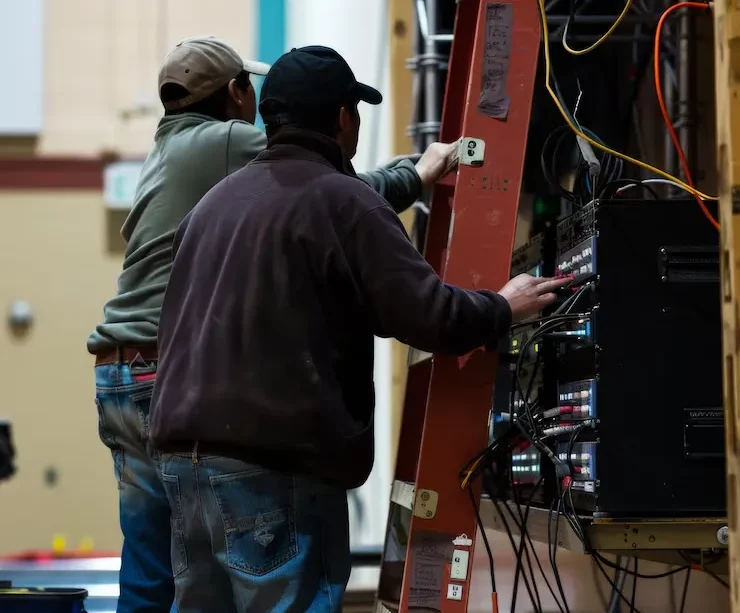
Systems and Equipment We Move and Reconnect
A relocation can cover the technology around the office while electrical, fire-alarm, door-hardware, furniture, and carrier work remain coordinated scopes.
Systems may include
- Servers, storage, racks, UPS units, and server-room equipment
- Switches, routers, firewalls, access points, and controllers
- VoIP phones, call handling, and shared communication devices
- Conference-room displays, cameras, microphones, and controls
- Workstations, laptops, docks, monitors, printers, and peripherals
- Cameras, access-control readers, and door controllers
The equipment schedule identifies each platform, model, configuration owner, support status, and responsibility. Manufacturer or technician credentials are included only if they apply to the approved project and can be documented.
Move, Replace, Virtualize, or Retire Existing Equipment?
Every asset receives a disposition based on age, support status, business role, licensing, transport risk, and replacement cost. The goal is to move what still serves the business and retire what adds risk.
Server-room relocation needs this decision early because physical servers and storage have the least tolerance for interruption. Options may include replication to the new site, temporary cloud services, a dual-run period, or a short maintenance window. Retired devices follow an approved data-wiping and e-waste process with the disposition recorded.
Secure Disconnect, Transport, Reconnect, and Chain of Custody
Each asset should be labeled, photographed, and logged before leaving the old office, then checked at every handoff and reconciled at the destination. Workstation tags keep each computer, dock, monitor, and peripheral together, while port and cable labels support a faster reconnect.
Devices holding sensitive data receive a documented chain of custody with named custodians and recorded exceptions. NYC IT Tech provides project-specific insurance documentation before work begins, while the relocation proposal defines the approved transport method, handling controls, and responsibility at each stage.


What Gets Tested Before Employees Arrive?
Acceptance testing follows the order in which the business needs services restored. Results are recorded during the cutover so issues appear before employees return.
Testing includes
- Primary internet service and any backup connection
- DNS, VPN, cloud services, and critical applications
- Wired network, WiFi, phones, printers, and shared devices
- User logins, file access, and identity services
- Cameras, access control, monitoring, and backups
- A punch list with a documented go or no-go decision
Meeting rooms receive their own sign-off because audio, video, calendars, sharing, and guest meetings can fail even after the network is live. Those checks follow the same practical commissioning used for testing a completed conference room.
NYC Building, Freight-Elevator, Loading, and After-Hours Requirements
NYC buildings may require certificates of insurance, approved vendor lists, freight-elevator reservations, loading times, protective materials, and after-hours work. Both buildings should provide their move rules early enough to place those requirements into the schedule.
Coordinating the building logistics around the IT move also involves named property contacts and access for carrier, cabling, and technical crews. Life-safety and egress work remains with the qualified electrical, fire-alarm, door-hardware, and building teams for the approved scope. This is planning guidance, not legal advice.
Sequencing a Multi-Floor Move
Multi-floor projects are planned and accepted floor by floor. Elevator access, risers, equipment rooms, user groups, and the cutover order all affect which areas come online first. Coordinating infrastructure across several floors keeps the backbone, closets, workstations, rooms, and support teams in the same sequence.
How Much Does IT Office Relocation Cost in NYC?
Office IT relocation pricing depends on the number of users, devices, servers, floors, and locations, plus the work needed at the destination. A workstation move carries a different scope from a complete server, network, phone, AV, and access-control cutover.
The main cost drivers include
- Inventory size and the number of origin and destination locations
- New cabling, racks, circuits, network equipment, and room systems
- Server replication, dual-run connectivity, staging, and pilot work
- Secure handling, after-hours labor, and building requirements
- Testing, documentation, day-one support, and return visits
- Data wiping, recycling, and disposal records
A useful proposal separates destination preparation, equipment handling, cutover labor, new hardware, third-party charges, and post-move support. This gives the client clear inclusions and exclusions without publishing a generic number that may not fit the move.

An NYC Office IT Move in Practice
A representative move may involve an occupied Manhattan office relocating to a new floor with a fixed opening date, delayed carrier work, aging switches, several meeting rooms, and a server that cannot be unavailable during business hours.
The team can prepare temporary connectivity, stage the destination network, replicate server data, label every workstation, and move equipment in a defined weekend sequence. Testing follows the business-priority list, with unresolved items tracked through day one. This example illustrates the process and does not claim a client result or downtime figure.
Office IT Relocation FAQs
In many cases, yes. The phone provider should confirm which local, toll-free, and fax numbers can transfer or route to the new office before the old service is canceled.
A new internet circuit often comes with a different public IP range. VPN tunnels, cloud allowlists, firewall rules, DNS records, and security policies tied to the old address may need updating.
Often, yes, if cloud applications, VPN access, MFA, and softphones are tested beforehand. Laptops needed for remote work should be separated from the equipment being transported.
Yes. The new office still depends on internet service, firewalls, WiFi, phones, printers, meeting rooms, access systems, and location-based security settings.
Yes. The phone provider should receive the new address and applicable floor, suite, or room so emergency calls carry the correct dispatchable location.
Plan the Office IT Cutover in NYC
NYC IT Tech plans office technology moves across Manhattan, Brooklyn, Queens, and the wider New York City service area, with New Jersey projects available by scope. The readiness review maps the destination, dependencies, cutover sequence, testing, and first-day support before move weekend.
Schedule a relocation planning call to review your offices, target date, and downtime limits.