
Home Security Systems

Ring vs. Nest vs. SimpliSafe: Which Security System is Best for NYC Renters?

Most security guides focus on suburban homeowners, not your Brooklyn walkup or Manhattan studio where drilling isn’t allowed.

New York City renters face challenges suburban guides ignore. Co-op boards demand documentation. Package thieves patrol shared lobbies. Your lease forbids permanent fixtures. You might move in six months.

This guide answers one question: which DIY security system works best for NYC apartment living?

So, What Each System Does Best?

Ring Works Best for Package Protection

180-day video storage and multiple doorbell options make Ring the strongest choice for package theft. Works exclusively with Alexa devices for smart home integration.

Google Nest Uses AI to Learn Your Routines

AI-powered face recognition and routine learning. Best if you’re already using Google devices and want intelligent automation.

SimpliSafe Offers Month-to-Month Monitoring

Month-to-month monitoring with no long-term commitment. Perfect for renters facing uncertain housing situations or wanting set-it-and-forget-it security.

What Each System Costs and Offers?

Here’s everything that matters for an apartment living in one place.

FeatureRing AlarmGoogle Nest SecureSimpliSafe
Best ForPackage watchers, Alexa usersGoogle Home enthusiastsFlexibility-focused renters
Monthly Monitoring$20 (includes video)$29$23 basic / $33 with video
ContractNoneNoneNone
Smart HomeAlexa onlyGoogle HomeAlexa and Google (basic)
Battery Backup24 hours12 hours24 hours
Video Storage180 days30 days30 days
Siren Volume113 decibels104 decibels95 decibels
Setup Time30-45 minutes30-45 minutes20-30 minutes

Ring vs Nest vs SimpliSafe for NYC Apartment Living

Ring

Ring stores video for 180 days, six times longer than competitors. That matters when you notice a missing package weeks later. The Neighbors app connects you with other Ring users in your building for community alerts. The 113-decibel siren is loud enough to wake neighbors through walls.

  • Pros: Multiple doorbell models for different door types, 24-hour battery backup, self-monitoring option
  • Cons: Alexa-only integration, limited co-op board guidance

Google Nest

Face recognition is what sets Nest apart in busy buildings. The system learns who belongs and who doesn’t—your roommate at midnight doesn’t trigger alerts, but a stranger in the hallway does. The AI learns your schedule and adapts automatically.

  • Pros: Pros: Face recognition cuts false alarms, learning algorithms, works seamlessly with Google Home
  • Cons: 12-hour battery backup (half the competition), $29 monthly cost

SimpliSafe

SimpliSafe stores video for 30 days with the Core plan ($33/month). The monitoring company calls 44 seconds after alarms trigger. The base station talks you through installation. Water leak sensors catch pipe bursts in older NYC buildings.

  • Pros: No contracts, voice-guided setup, temperature monitoring
  • Cons: Bulkier sensors, 30-day video storage

When people ask which DIY security system is best for renters, it often comes down to how long you plan to stay.

Getting Past NYC Landlords  and Co-op Board Rules

All three systems use adhesive mounting without drilling. However, co-op boards scrutinize more than just installation methods.

Ring’s visible cameras might violate rules about recording common areas. Check your lease before mounting doorbell cameras facing hallways.

Nest’s smaller equipment draws less attention during inspections, though boards may require proof the system doesn’t interfere with building security.

SimpliSafe’s simple design satisfies conservative boards. Its local alarm functions work without the internet, addressing connectivity concerns.

All three companies provide spec sheets for board submissions. Get pre-approval by matching these specs to your board’s camera placement rules, or consult a security installer familiar with NYC co-op requirements.

Which System Is The Best Match For You?

Choose Ring if:

Package theft is your main worry and you need long-term video evidence. You use Alexa. Your building allows hallway cameras. Ring wins the renter friendly video doorbell comparison with the most models and mounting options.

Choose Google Nest if:

You’re invested in Google products. Face recognition matters because your building has constant delivery traffic. The higher monthly cost fits your budget.

Choose SimpliSafe if:

You’re not sure how long you’ll stay. Month-to-month flexibility matters more than features. Your building has older infrastructure where water leaks and temperature monitoring matter.

How Much You’ll Spend Each Year

  • Ring: $200-250 equipment + $20 monthly = $440-490 first year
  • Nest: $400-500 equipment + $29 monthly = $748-848 first year
  • SimpliSafe: $200-250 equipment + $23-33 monthly = $476-646 first year

All three skip contracts. Return windows: Ring (30 days), Nest (30 days), SimpliSafe (60 days).

How NYC Building Types Affect Installation

Pre-war buildings have plaster walls and thick concrete construction. Adhesive strips can work, but it’s worth testing them first to make sure they’ll hold. Wireless sensors tend to handle plaster better than concrete, which can interfere with signal strength. Installing equipment in pre-war NYC buildings requires planning for connectivity issues.

Modern high-rises typically offer better wireless penetration, but you’ll likely deal with more interference from neighboring networks since there are so many units in close proximity. This makes sensor placement more important than in other building types.

Brownstones present their own challenge when it comes to sensor range, especially if you need coverage across multiple floors. Companies like Ring and SimpliSafe offer range extenders specifically to help with this issue. Adding smart tech to century-old brownstones involves similar range planning.

Walkups are generally easier for installation since you have more straightforward access throughout the building. However, removal can become challenging if you’re moving furniture up several flights of stairs when it’s time to relocate.

Finding Your Best Fit Among the Three

There’s no universal best security system for NYC renters. Your building type, main concerns, and smart home setup point toward different choices.

Ring dominates package theft monitoring with unmatched video storage. Nest delivers the smartest automation for Google users. SimpliSafe provides maximum flexibility for renters facing unpredictable housing.

When comparing, focus on solving your problem and consider what matters most: long video storage, smart learning, or month-to-month flexibility.

Can You Install a Security System in a NYC Rental? A Renter’s Complete Guide

Package theft is up 30% in NYC apartment buildings since 2023. Break-ins target ground-floor units in Manhattan and Queens at twice the rate of upper floors. If you’re renting, you want protection, but can you install a security system in a rental without losing your deposit or violating your lease?

Yes. The options available to New York City renters have changed in the past few years. You don’t need permission for most of them, and you won’t damage anything.

Start With Your Lease Agreement

Your lease spells out what counts as an “alteration” in your building. Standard NYC rental agreements typically prohibit permanent modifications but define “permanent” differently.

Look for sections on alterations, installations, or drilling. Some leases in doorman buildings allow removable devices. Others in older walk-ups prohibit anything attached to walls.

The Green Light Zone: What You Can Install Without Asking

These devices require no landlord permission in most NYC rentals. They leave no damage and come with you on moving day.

Wireless Indoor Cameras

Cameras sitting on shelves or tables need no approval. You’re monitoring your own space. Models like the Wyze Cam v3 or Ring Indoor Cam cost $30-60 and connect to your phone via WiFi.

For mounted cameras, 3M Command strips hold up to 5 pounds without damaging paint. Renter friendly security cameras NYC tenants use most often include the Blink Mini and TP-Link Tapo. Both offer motion alerts and work without subscriptions.

Contact Sensors for Doors and Windows

Small sensors attach with 3M adhesive backing. One piece goes on the door frame, another on the door itself. They alert your phone anytime someone opens that entry point.

Ground-floor apartments in Queens and Brooklyn benefit most from window sensors. Fire escape access points need monitoring too. The SimpliSafe Entry Sensor and Ring Alarm Contact Sensor both peel off without residue.

Motion Detectors

Battery-powered motion sensors mount in corners using adhesive strips. They detect movement and send phone alerts. The Ring Motion Detector runs 3 years on one battery and installs in under 2 minutes.

All-in-One Starter Kits

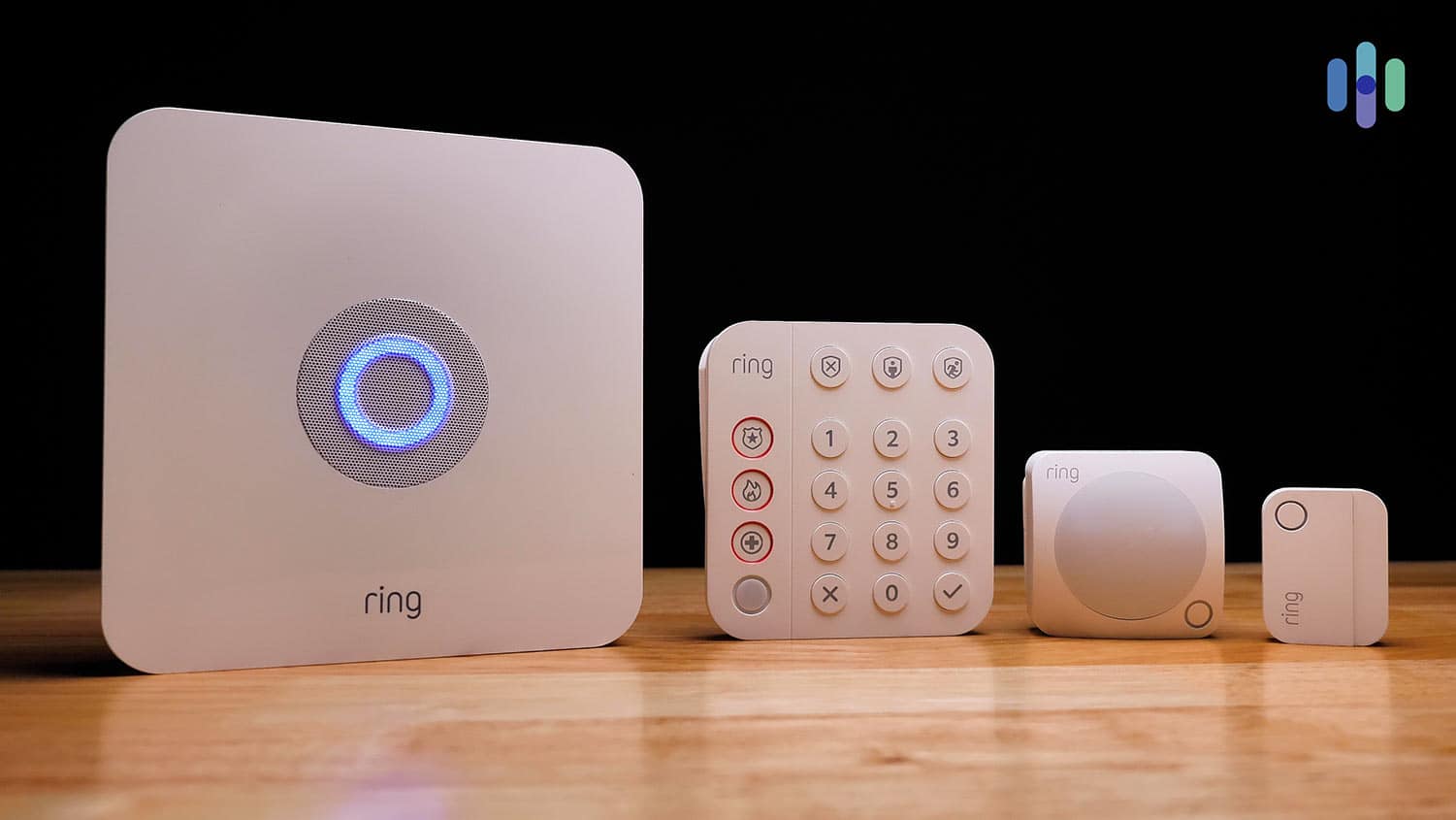
SimpliSafe and Ring Alarm sell complete kits designed for renters. A basic Ring Alarm 5-Piece Kit ($200) includes a base station, keypad, contact sensor, motion detector, and range extender. Everything uses removable mounting or sits on flat surfaces.

These systems integrate all your devices into one app instead of managing multiple apps for different cameras and sensors.

System TypeInstallation TimeMonthly CostLease Approval Needed?
Wireless cameras5-10 minutes$0-10No
Contact sensors2-5 minutes$0-5No
All-in-one kits30-60 minutes$0-20No
Video doorbells10-20 minutes$0-10Usually yes
Smart locks15-30 minutes$0Yes

The Yellow Light Zone: Devices That Need Landlord Approval

Some devices fall into gray areas. Ask before installing these, even if they seem removable.

Video Doorbells

The question “do I need landlord permission for ring doorbell” has a complicated answer in NYC. If your apartment door opens to a shared hallway, you’re recording common space. That affects your neighbors’ privacy.

The Ring Video Doorbell and Nest Hello both offer no-drill mounts. However, hallway recording still requires landlord approval in most buildings. Co-op boards in Manhattan and Brooklyn often have strict policies about hallway cameras.

Smart Locks

Replacing your lock violates most NYC leases. Landlords must have access for emergencies and maintenance.

Some smart locks work differently. The Level Lock and August Smart Lock fit over your existing deadbolt without replacing it. You keep the original key system while adding smartphone control. These retrofit models still need approval.

The Red Light Zone: Completely Off-Limits in Rentals

These require formal alteration agreements and almost never get approved in rentals.

Hardwired security systems need wires run through walls. Installers drill into studs, fish cables behind drywall, and mount panels permanently. You’d be liable for repairing all damage.

Cameras in common areas are off-limits. You cannot install personal surveillance in hallways, lobbies, stairwells, or laundry rooms. These spaces belong to the building. Installing cameras there creates liability issues and privacy complaints. Looking for home security services that understand NYC rental restrictions helps you avoid these mistakes.

Different NYC Buildings Have Different Rules

Building type changes what works. A high-rise in Midtown Manhattan has different challenges than a brownstone walk-up in Park Slope.

  • Doorman buildings: Management often restricts hallway cameras completely. However, interior apartment security faces fewer obstacles. WiFi connectivity is usually strong.
  • Older walk-ups: Thick plaster walls can block WiFi signals. Battery-powered sensors work better than WiFi cameras in back bedrooms. Landlords in these buildings are often more flexible about removable devices.

Your Legal Rights to Safe Housing in NYC

New York City law requires landlords to provide secure entrance doors and functioning locks. You can request lock rekeying if previous tenants had keys.

The NYC Tenant Protection Unit outlines your right to a safe living environment. Building owners must maintain security doors, intercoms, and lobby access systems. Adding your own security supplements these requirements.

Handling the Gray Areas in Your Lease

Some leases stay vague about security devices. They might prohibit “alterations” without defining what that means.

Send your landlord a brief email. List the specific devices you plan to install and how (Command strips, shelf placement, etc.). Mention that everything removes without damage. Keep that email thread. Written approval protects your security deposit during moveout inspection.

Building Security Based on Your Apartment Layout

  • Studio apartment: One camera covering the entry door, contact sensors on windows if ground floor. Budget: $100-150.
  • One-bedroom: Camera at entry, window sensors, one motion detector in the living area. Consider a SimpliSafe 5-piece kit. Budget: $200-300.
  • Ground-floor unit: Prioritize window sensors and glass break detectors. Add a camera facing the fire escape if you have one. Budget: $250-400.
  • Upper floors: Focus on door security and package monitoring. A video doorbell (with permission) covers most concerns. Budget: $100-200.

How to secure a rental apartment depends on your vulnerabilities. Assess your building’s layout and spot weak points first. Consider getting help from an alarm system installer who can identify risks specific to your building.

Audio Recording Laws for Your Security Cameras

New York is a one-party consent state for audio recording. You can legally record conversations you’re part of. However, cameras facing your front door might capture delivery drivers and guests without their knowledge.

Many NYC renters disable audio on doorbell cameras to avoid complications. You still get video of package deliveries and visitors. Ring and Nest cameras let you turn off microphones in settings.

When to Install It Yourself vs Hiring Help

Most wireless systems take 30-60 minutes to set up yourself. Ring and SimpliSafe apps walk you through each step. You need basic smartphone skills and maybe a stepladder.

Professional installation makes sense for older buildings with WiFi dead zones, complex layouts with multiple rooms, or integrating security with existing smart home devices. Make sure any professional you hire knows they’re working in a rental and will use only removable mounting methods.

Make Sure You Cover These Bases Before You Start

Before installing anything:

  • Search your lease for “alterations,” “installations,” “drilling,” and “fixtures”
  • Choose devices with removable mounting (Command strips, shelf placement)
  • Confirm cameras don’t point into neighboring units or common areas
  • Get written landlord approval for video doorbells and smart locks
  • Avoid personal surveillance in shared spaces (hallways, lobbies)
  • Consider disabling audio recording on cameras facing your door
  • Save all communication with your landlord about installations
  • Test WiFi signal strength before buying wireless devices

Getting Started With Your Rental Security System

Installing a security system in a rental is simple once you understand your lease and choose the right devices. NYC renters have access to the same technology as homeowners, just in removable formats.

Focus on wireless, battery-powered devices that mount with removable strips or sit on surfaces. Communicate with your landlord about anything questionable.

The best security for apartments combines multiple layers: contact sensors on entry points, cameras in key locations, and motion detection in vulnerable areas. This no-drill security system for apartments approach gives you real protection without jeopardizing your lease.

Professional home security services can help you design a system that maximizes protection while respecting your rental agreement.

Home Security Systems in New Jersey, NY | NYC IT Tech Guide

Home security is more important than ever. Burglaries happen every 25 seconds in America. Your family deserves protection. Your property needs safeguarding.

Installing a home security system might seem overwhelming. There are many options to consider. Costs vary widely. Technology changes quickly. But with the right information, you can make a smart choice.

This guide will help you understand home security basics. You’ll learn what to look for in a system. We’ll also show you why NYC IT Tech stands out in New Jersey.

Why Home Security Matters in New Jersey?

New Jersey sees thousands of break-ins each year. Criminals often target homes that look unprotected. They avoid houses with visible security systems.

A good security system does more than stop burglars. It protects against fires. It can detect carbon monoxide. Some systems even monitor for floods.

Peace of mind is priceless. Knowing your family is safe helps you sleep better. You can travel without worry. Your home stays protected 24/7.

Types of Home Security Systems

Home security systems come in various types, including monitored systems, unmonitored systems, and smart systems. Each offers unique features like alarms, remote monitoring, and automation to fit different needs and budgets.

Monitored Systems
These systems connect to a monitoring center. Trained professionals watch your home around the clock. They call the police or the fire departments when needed. This service costs extra but provides the best protection.

Self-Monitored Systems
You get alerts on your phone when something happens. You decide whether to call for help. These systems cost less. But they require you to be available and responsive.

Wireless vs. Wired
Wireless systems are easier to install. They work well in most homes. Wired systems are more reliable. They’re harder for criminals to disable. NYC IT Tech can help you choose what works best.

Key Features to Consider

When choosing a security system, consider features like smartphone integration, camera quality, and emergency response times. These elements ensure your system is both effective and convenient to use.

Motion Detectors

These sensors spot movement inside your home. They’re perfect for catching intruders. Modern detectors can tell the difference between pets and people.

Door and Window Sensors

These small devices alert you when someone opens doors or windows. They’re the foundation of most security systems.

Security Cameras

Cameras let you see what’s happening at home. You can check footage from anywhere. Some cameras work in complete darkness.

Smart Home Integration

Many systems work with Alexa or Google Home. You can control lights, locks, and alarms with your voice.

Mobile Apps

Good security apps are easy to use. They send instant alerts. You should be able to arm or disarm your system remotely.

What Makes NYC IT Tech Different?

NYC IT Tech specializes in New Jersey home security systems. They understand local crime patterns. Their team knows New Jersey neighborhoods well.

Local Expertise
Being local matters in home security. We responds quickly to service calls. They know which systems work best in New Jersey weather.

Professional Installation
DIY installation can lead to problems. NYC IT Tech’s trained technicians do it right the first time. They test every sensor and camera before leaving.

Ongoing Support
Your security needs may change over time. We provides updates and upgrades. Their customer service team is always ready to help.

Competitive Pricing
You don’t need to break the bank for good security. We offers flexible payment plans. They work with different budgets.

Questions to Ask Before Installation

How much will monthly monitoring cost? What happens if your internet goes down? Can you expand the system later? How long is the contract?

Ask about response times. Find out what triggers alerts. Make sure you understand all fees upfront.

Common Mistakes to Avoid

Don’t choose based on price alone. The cheapest option often lacks important features. Avoid companies with long-term contracts you can’t escape.

Make sure your system covers all entry points. Don’t forget about basement windows or garage doors.

Test your system regularly. Dead batteries in sensors can leave gaps in protection.

Getting Started with Home Security

Start by assessing your home’s weak spots. Walk around your property at night. Look for dark areas or hidden entry points.

Consider your family’s routine. Do you travel often? Do kids come home to an empty house? Your lifestyle affects which features matter most.

Get quotes from several companies. Compare features, not just prices. Make sure you understand what’s included.

Your Next Steps

Home Security Services in New Jersey, NY have never been more accessible. The best home security system NJ offers depends on your specific needs.

NYC IT Tech makes the process simple. They provide free consultations. Their experts will assess your home and recommend the right system.

Don’t wait until something bad happens. Your family’s safety is worth the investment. Contact NYC IT Tech today to discuss your New Jersey Home Security System options.

A secure home is a happy home. Take the first step toward better protection now.

Your Guide to Home Security Systems: Protecting Your Safe Haven

Home security systems protect our safe havens, and our homes. These systems provide detailed insights into serious security matters, and this article will help you make the right choices for your home’s security.

Why Home Security Matters

  • Protecting Family and Valuables

Friends and family, along with prized belongings, need to be protected at all costs which is why a security system is not only a luxury but also a necessity. Home security systems have the function of a preventative measure against potential intruders as well as the capability to respond to these intruders immediately.

  • Peace of Mind and Insurance Benefits

Apart from protection, a security system provides relief to the pockets. It can also help its owners to decrease their insurance rates because after all insurance agencies provide more favorable rates for homes that have functional security measures.

Components of a Home Security System

A home security system compromises various vital parts that have specific functions for the security of a home.

  • Alarm Systems

The first and foremost precaution is an alarm system. It sounds an alarm if there is an intrusion, which drives the intruders away, and its alarms notify you that there has been any intrusion.

  • Surveillance Cameras

They record intruders as well as keep a watchful eye on your property in your absence. They can be fixed both in and out of doors and can usually be controlled through your mobile phone.

  • Motion Detectors

These sensors notice abnormal motion inside a particular zone and inform you when an unauthorized person has crossed your territory.

  • Door and Window Sensors

Door and window sensors tell you when a door or window has been opened. When installed correctly, they serve as great alarms and if connected to mobile devices, will notify you immediately.

Types of Home Security Systems

Selecting an appropriate security system requires knowledge of the existing types and their advantages and disadvantages.

  • Wired Security Systems

Wired systems mount each of the security components through physical wiring, which makes them secure though they tend to be expensive and also require complicated wiring.

  • Wireless Security Systems

These systems use Wi-Fi or radio frequencies to connect these devices. It often has concerns on signal reception but they are quite easy to install and are mobile in layout.

  • Monitored vs. Unmonitored Systems

A monitored system contacts a monitoring station while unmonitored systems use loud alarms to discourage intruders. Depending on your level of security both have their merits.

Advanced Home Security Features

Home security has moved up a level and the new feature integrates basic home security systems into smart technology homes.

  • Smart Locks and Automation

Smart locks let you control who is coming into your home, and home automation facilitates the easy syncing of light, temperature, security, and alarms within your home.

  • Video Doorbells

As for the video doorbells, you can see and communicate with individuals, who are at your doorstep, using a smartphone or tablet. They also record videos where one may be in a position to notice anyone who may seem to be a threat.

  • Mobile App Integration

The majority of contemporary systems need hereby the existence of applications for controlling and overseeing the state of security in a house or an apartment, increasing comfort.

DIY vs. Professional Installation

The choice between DIY and hiring a professional depends on considerations such as cost, skills when it comes to security, and how complicated the security system required will be.

  • Pros and Cons of DIY Installation

Do-it-yourself installation can be performed easily at low costs and without rigid structure constraints but the systems are not as robust as professionally installed systems.

When to Choose Professional Installation

Professional installation is desirable for complicated systems that need an expert to do the installation. It is an assurance that one’s system is well configured.

Choosing the Right Home Security Provider

It is never easy to decide which provider to go with given the availability of many of them. It is therefore good to base your choice on the reputation of the provider, the kind of help its developers offer and the other features in place.

  • Key Factors to Consider

In deciding who to select as your provider, consider the locations, the extent to which the provider will allow customization, the contractual agreements, and the type of technology that the provider provides.

  • Popular Home Security Providers

Users can choose from a wide range of packages and products provided by the most popular security systems.

Cost of Home Security Systems

Understanding of cost structure enables you to reduce your possible extra expenses. Like any other security offering, home security systems are expensive, with first-time installation costs and recurrent charges for maintenance or incorporation of additional components.

  • Initial and Installation Costs

Some of the one-time costs are on equipment and setup costs regardless if they were professionally done or otherwise.

  • Subscription and Maintenance Costs

Some of the available memberships offer the service of system monitoring while servicing keeps your system up and running.

The Future of Home Security

As technology is improving, so is home security. It is already today that artificial intelligence is influencing the industry today.

  • AI and Machine Learning

Machine-based security can identify friendly faces and movements and disagree with new movements making security stronger with less delay.

  • Cybersecurity for Smart Homes

Smart homes require dedicated cyber-security measures to prevent hackers from gaining control of your devices, your data, and even your personal space.

Tips for Maximizing Your Home Security

Meanwhile, below are some tips that one can embrace once they have the security system in place.

  • Regular Maintenance and Updates

Ensure your security system is up to date and look out for any problems which should be worked out regularly.

  • Setting Up a Security Routine

It is recommended to get into a security habit, such as turning the system on every evening and also before leaving the house.

Security systems are assurance of safety in a world where insecurity has become the order of the day. With these choices at hand and the knowledge of what is available, you are one step closer to that smarter and safer home.

Home Security Systems: A Comprehensive Guide to Protecting Your Space

In today’s world, ensuring the safety and security of your home has never been more critical. With increasing concerns about crime rates, property theft, and personal safety, home security systems have emerged as an essential aspect of modern living. This article delves into various home security systems, including business security systems and specific solutions like CPI security systems and office security systems, to help you make informed decisions about safeguarding your property.

The Importance of Home Security Systems

Home security systems serve as a vital line of defense against intrusions and threats. They provide homeowners with peace of mind by deterring potential criminals and alerting occupants to suspicious activities. In addition to protecting your belongings, these systems can also enhance personal safety for you and your family.

Key Benefits of Home Security Systems

  1. Deterrence of Crime: The presence of security cameras and alarms can discourage potential burglars from targeting your home.
  2. 24/7 Monitoring: Many systems offer round-the-clock monitoring, allowing for immediate response in case of emergencies.
  3. Remote Access: Modern security systems often come with mobile apps that enable homeowners to monitor their property from anywhere, providing real-time updates.
  4. Insurance Benefits: Installing a home security system can lead to lower insurance premiums, as insurers view these systems as a way to mitigate risk.
  5. Increased Property Value: A well-secured home can increase property value and appeal to potential buyers.

Types of Home Security Systems

Home security systems come in various forms, each tailored to meet different needs and preferences. Here are some common types:

1. Monitored Security Systems

These systems involve a professional monitoring service that oversees your security system 24/7. If an alarm is triggered, the monitoring center will contact you and the authorities if necessary. This type of system is ideal for those who prefer peace of mind and quick response times.

2. Unmonitored Security Systems

Unmonitored systems rely on audible alarms to alert homeowners and neighbors of potential intrusions. While they are generally less expensive, they may not provide the same level of security as monitored systems.

3. Wireless Security Systems

Wireless systems use Wi-Fi or cellular connections to communicate with monitoring services and mobile apps. They are easier to install and can be relocated without much hassle.

4. Smart Home Security Systems

Integrating with smart home technology, these systems allow homeowners to control various aspects of their security through mobile devices. Features may include smart locks, video doorbells, and motion detectors, all of which can be monitored remotely.

5. CCTV Systems

Closed-circuit television (CCTV) systems use cameras to monitor and record activity around your home. These systems can be invaluable for both deterrence and evidence collection in case of incidents.

Business Security Systems

For businesses, the need for security is just as paramount, if not more so. Business security systems are designed to protect commercial properties from theft, vandalism, and other threats. These systems often include surveillance cameras, access control systems, and alarms tailored to meet the unique needs of a business environment.

Key Features of Business Security Systems

  1. Access Control: Control who enters your business with keycard systems or biometric scanners.
  2. Surveillance Cameras: High-definition cameras monitor activity in and around your business, providing vital evidence in case of incidents.
  3. Alarm Systems: Integrated alarms notify you and the authorities of any unauthorized access.
  4. Remote Monitoring: Business owners can monitor their premises in real-time via mobile apps.
  5. Integration with Other Systems: Business security systems can often be integrated with fire alarms, environmental sensors, and even smart lighting.

CPI Security Systems

CPI Security is a well-known provider of home and business security systems, offering a range of services designed to protect both residential and commercial properties. Their systems incorporate advanced technology, including smart home integration and 24/7 monitoring.

Features of CPI Security Systems

  1. Smart Home Compatibility: CPI systems work seamlessly with smart devices, allowing for centralized control of your security, lights, and thermostat.
  2. Professional Monitoring: With professional monitoring services, CPI provides a rapid response to alarms and alerts.
  3. Video Surveillance: CPI offers high-definition cameras with live streaming capabilities and motion-activated alerts.
  4. Mobile Access: Users can monitor their security systems remotely via a user-friendly mobile app.
  5. Custom Solutions: CPI tailors its security systems to meet the specific needs of homeowners and businesses, ensuring comprehensive protection.

Office Security Systems

Office security systems are vital for protecting sensitive information, assets, and personnel. These systems can range from basic alarm systems to sophisticated surveillance setups that monitor the entire office environment.

Essential Components of Office Security Systems

  1. Alarm Systems: Alarms can deter unauthorized entry and alert authorities to potential threats.
  2. Surveillance Cameras: Installing cameras throughout the office can provide visual monitoring and act as a deterrent against theft and vandalism.
  3. Access Control Systems: Secure areas of your office with keycard access or biometric scanners to limit entry to authorized personnel only.
  4. Environmental Monitoring: Many office security systems include environmental sensors to detect fire, smoke, and water leaks.
  5. Employee Training: Training employees on security protocols can help create a culture of safety and awareness within the workplace.

Choosing the Right Security System

Selecting the right security system for your home or business involves careful consideration of your specific needs and budget. Here are some steps to guide your decision:

1. Assess Your Needs

Evaluate the level of security you require based on the size of your property, location, and potential vulnerabilities.

2. Research Options

Explore various security providers and their offerings. Look for companies with positive reviews and a track record of reliability.

3. Consider Technology

Choose systems that incorporate the latest technology, such as smart home features, remote access, and energy efficiency.

4. Compare Costs

Obtain quotes from multiple providers to compare pricing structures and understand what’s included in each package.

5. Read the Fine Print

Before signing a contract, thoroughly review the terms and conditions, including any fees for installation, monitoring, or equipment.

Conclusion

In an age where safety concerns are increasingly paramount, investing in reliable home security systems is essential. Whether you are a homeowner looking to protect your family and belongings or a business owner safeguarding your assets, understanding the various options available, including CPI security systems and office security systems, is crucial. By prioritizing security and leveraging advanced technology, you can ensure that your space remains safe, secure, and resilient against potential threats. Embrace the peace of mind that comes with a well-designed security system, and take proactive steps to protect what matters most.

Scroll to top