News

Get the Latest News and Press Releases

Can You Install a Security System in a NYC Rental? A Renter’s Complete Guide

Package theft is up 30% in NYC apartment buildings since 2023. Break-ins target ground-floor units in Manhattan and Queens at twice the rate of upper floors. If you’re renting, you want protection, but can you install a security system in a rental without losing your deposit or violating your lease?

Yes. The options available to New York City renters have changed in the past few years. You don’t need permission for most of them, and you won’t damage anything.

Start With Your Lease Agreement

Your lease spells out what counts as an “alteration” in your building. Standard NYC rental agreements typically prohibit permanent modifications but define “permanent” differently.

Look for sections on alterations, installations, or drilling. Some leases in doorman buildings allow removable devices. Others in older walk-ups prohibit anything attached to walls.

The Green Light Zone: What You Can Install Without Asking

These devices require no landlord permission in most NYC rentals. They leave no damage and come with you on moving day.

Wireless Indoor Cameras

Cameras sitting on shelves or tables need no approval. You’re monitoring your own space. Models like the Wyze Cam v3 or Ring Indoor Cam cost $30-60 and connect to your phone via WiFi.

For mounted cameras, 3M Command strips hold up to 5 pounds without damaging paint. Renter friendly security cameras NYC tenants use most often include the Blink Mini and TP-Link Tapo. Both offer motion alerts and work without subscriptions.

Contact Sensors for Doors and Windows

Small sensors attach with 3M adhesive backing. One piece goes on the door frame, another on the door itself. They alert your phone anytime someone opens that entry point.

Ground-floor apartments in Queens and Brooklyn benefit most from window sensors. Fire escape access points need monitoring too. The SimpliSafe Entry Sensor and Ring Alarm Contact Sensor both peel off without residue.

Motion Detectors

Battery-powered motion sensors mount in corners using adhesive strips. They detect movement and send phone alerts. The Ring Motion Detector runs 3 years on one battery and installs in under 2 minutes.

All-in-One Starter Kits

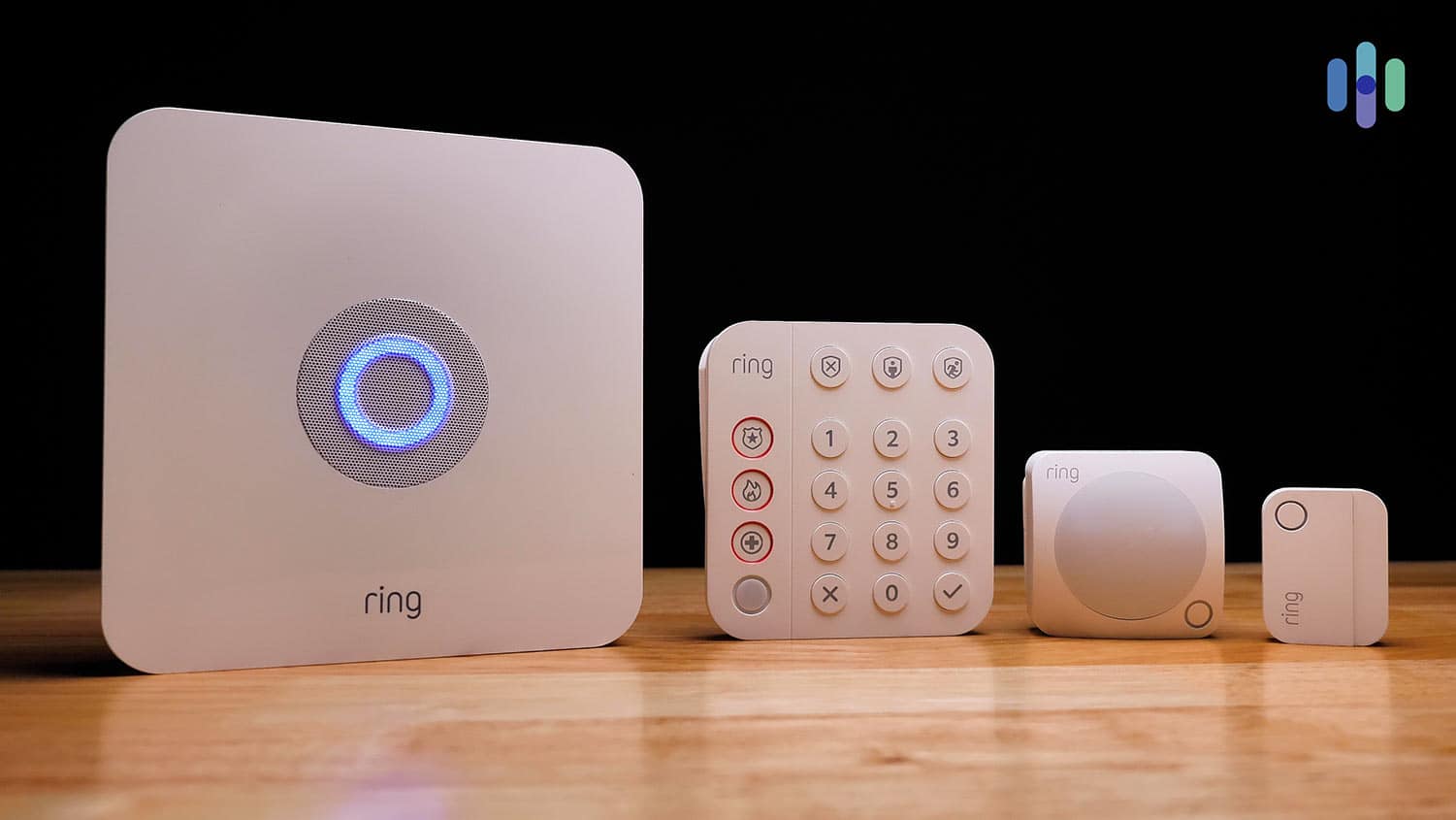
SimpliSafe and Ring Alarm sell complete kits designed for renters. A basic Ring Alarm 5-Piece Kit ($200) includes a base station, keypad, contact sensor, motion detector, and range extender. Everything uses removable mounting or sits on flat surfaces.

These systems integrate all your devices into one app instead of managing multiple apps for different cameras and sensors.

System TypeInstallation TimeMonthly CostLease Approval Needed?
Wireless cameras5-10 minutes$0-10No
Contact sensors2-5 minutes$0-5No
All-in-one kits30-60 minutes$0-20No
Video doorbells10-20 minutes$0-10Usually yes
Smart locks15-30 minutes$0Yes

The Yellow Light Zone: Devices That Need Landlord Approval

Some devices fall into gray areas. Ask before installing these, even if they seem removable.

Video Doorbells

The question “do I need landlord permission for ring doorbell” has a complicated answer in NYC. If your apartment door opens to a shared hallway, you’re recording common space. That affects your neighbors’ privacy.

The Ring Video Doorbell and Nest Hello both offer no-drill mounts. However, hallway recording still requires landlord approval in most buildings. Co-op boards in Manhattan and Brooklyn often have strict policies about hallway cameras.

Smart Locks

Replacing your lock violates most NYC leases. Landlords must have access for emergencies and maintenance.

Some smart locks work differently. The Level Lock and August Smart Lock fit over your existing deadbolt without replacing it. You keep the original key system while adding smartphone control. These retrofit models still need approval.

The Red Light Zone: Completely Off-Limits in Rentals

These require formal alteration agreements and almost never get approved in rentals.

Hardwired security systems need wires run through walls. Installers drill into studs, fish cables behind drywall, and mount panels permanently. You’d be liable for repairing all damage.

Cameras in common areas are off-limits. You cannot install personal surveillance in hallways, lobbies, stairwells, or laundry rooms. These spaces belong to the building. Installing cameras there creates liability issues and privacy complaints. Looking for home security services that understand NYC rental restrictions helps you avoid these mistakes.

Different NYC Buildings Have Different Rules

Building type changes what works. A high-rise in Midtown Manhattan has different challenges than a brownstone walk-up in Park Slope.

  • Doorman buildings: Management often restricts hallway cameras completely. However, interior apartment security faces fewer obstacles. WiFi connectivity is usually strong.
  • Older walk-ups: Thick plaster walls can block WiFi signals. Battery-powered sensors work better than WiFi cameras in back bedrooms. Landlords in these buildings are often more flexible about removable devices.

Your Legal Rights to Safe Housing in NYC

New York City law requires landlords to provide secure entrance doors and functioning locks. You can request lock rekeying if previous tenants had keys.

The NYC Tenant Protection Unit outlines your right to a safe living environment. Building owners must maintain security doors, intercoms, and lobby access systems. Adding your own security supplements these requirements.

Handling the Gray Areas in Your Lease

Some leases stay vague about security devices. They might prohibit “alterations” without defining what that means.

Send your landlord a brief email. List the specific devices you plan to install and how (Command strips, shelf placement, etc.). Mention that everything removes without damage. Keep that email thread. Written approval protects your security deposit during moveout inspection.

Building Security Based on Your Apartment Layout

  • Studio apartment: One camera covering the entry door, contact sensors on windows if ground floor. Budget: $100-150.
  • One-bedroom: Camera at entry, window sensors, one motion detector in the living area. Consider a SimpliSafe 5-piece kit. Budget: $200-300.
  • Ground-floor unit: Prioritize window sensors and glass break detectors. Add a camera facing the fire escape if you have one. Budget: $250-400.
  • Upper floors: Focus on door security and package monitoring. A video doorbell (with permission) covers most concerns. Budget: $100-200.

How to secure a rental apartment depends on your vulnerabilities. Assess your building’s layout and spot weak points first. Consider getting help from an alarm system installer who can identify risks specific to your building.

Audio Recording Laws for Your Security Cameras

New York is a one-party consent state for audio recording. You can legally record conversations you’re part of. However, cameras facing your front door might capture delivery drivers and guests without their knowledge.

Many NYC renters disable audio on doorbell cameras to avoid complications. You still get video of package deliveries and visitors. Ring and Nest cameras let you turn off microphones in settings.

When to Install It Yourself vs Hiring Help

Most wireless systems take 30-60 minutes to set up yourself. Ring and SimpliSafe apps walk you through each step. You need basic smartphone skills and maybe a stepladder.

Professional installation makes sense for older buildings with WiFi dead zones, complex layouts with multiple rooms, or integrating security with existing smart home devices. Make sure any professional you hire knows they’re working in a rental and will use only removable mounting methods.

Make Sure You Cover These Bases Before You Start

Before installing anything:

  • Search your lease for “alterations,” “installations,” “drilling,” and “fixtures”
  • Choose devices with removable mounting (Command strips, shelf placement)
  • Confirm cameras don’t point into neighboring units or common areas
  • Get written landlord approval for video doorbells and smart locks
  • Avoid personal surveillance in shared spaces (hallways, lobbies)
  • Consider disabling audio recording on cameras facing your door
  • Save all communication with your landlord about installations
  • Test WiFi signal strength before buying wireless devices

Getting Started With Your Rental Security System

Installing a security system in a rental is simple once you understand your lease and choose the right devices. NYC renters have access to the same technology as homeowners, just in removable formats.

Focus on wireless, battery-powered devices that mount with removable strips or sit on surfaces. Communicate with your landlord about anything questionable.

The best security for apartments combines multiple layers: contact sensors on entry points, cameras in key locations, and motion detection in vulnerable areas. This no-drill security system for apartments approach gives you real protection without jeopardizing your lease.

Professional home security services can help you design a system that maximizes protection while respecting your rental agreement.

Is Your Conference Room Ready for Hybrid Work?

Monday morning, 9 AM. Your team gathers in the conference room for the weekly standup. Three colleagues dial in from Brooklyn, two from Jersey City, one from home in Queens. The camera cuts off half the table. Someone asks a question from the back, but it sounds like underwater static to everyone on the call. Five minutes disappear while you troubleshoot screen sharing.

This scene repeats itself thousands of times each day across Manhattan office buildings. 83% of employees now prefer hybrid work arrangements, but most conference rooms remain stuck in 2019. The result is wasted time, frustrated employees, and meetings where remote participants feel invisible.

For NYC businesses paying premium rates for office space, every square foot needs to justify its cost. Your conference room has gone from just another meeting space to the hub that keeps distributed teams connected. If it fails at that job, you’re burning money.

The New Reality for NYC Office Spaces

Office spaces across Manhattan tell the same story. Individual desks sit empty most of the week. Conference rooms? Booked solid from 9 to 5.

40% of office meetings now include remote participants, changing what your meeting space needs to accomplish. The room has to work equally well for people in chairs around the table and people joining from a laptop 10 miles away.

Manhattan office rent doesn’t get cheaper. Buildings in SoHo, the Financial District, and Midtown command premium prices. A conference room that creates friction during meetings represents both a technical failure and a business liability.

What Your Conference Room Needs for Hybrid Work?

Displays That Work for Hybrid Teams

That 55-inch TV mounted on the wall worked fine five years ago. Today, it creates more problems than it solves. Modern hybrid conference rooms use dual-display configurations. One screen shows remote participants at life-size scale, the other handles presentations and documents.

Some businesses go with 4K commercial displays or ultra-wide screens. The investment pays off during client pitches and strategy sessions. Your team in Chicago can read every line of the spreadsheet. Your partner in LA sees the whiteboard clearly.

Cameras That Track Whoever’s Speaking

The worst hybrid meetings happen with a single wide-angle camera treating everyone as distant figures. AI-powered cameras with auto-framing and speaker tracking changed this dynamic.

These systems identify individual faces and create separate video feeds for each person in the room. Some models track whoever is speaking and adjust the frame automatically. The technology bridges the gap between physical and virtual presence.

Microphones That Don’t Kill Your Meetings

Someone three chairs away asks a question. People in the room hear it fine. Remote participants hear mumbled noise. The meeting stops while someone repeats everything.

Ceiling microphone arrays or beamforming table mics solve this problem. They pick up voices from every corner with equal clarity. The speakers distribute sound so everyone in the physical space can hear remote colleagues without clustering around the monitor.

Walk In, Tap the Screen, and Your Meeting Starts

Traditional conference setups had a dozen failure points. Laptops freeze. HDMI cables vanish. Nobody can find the right adapter.

Both Zoom Rooms and Microsoft Teams Rooms eliminate the friction. Walk into the room, tap the screen, and the meeting starts. Camera activates, microphones turn on, and your calendar pulls up the right meeting automatically.

The main difference comes down to which platform your company already uses. Teams Rooms integrates with Microsoft 365. Zoom Rooms works best if Zoom is your primary video platform. Both include AI-powered features like automatic transcription, speaker tracking, and noise cancellation.

SystemBest ForKey FeaturesIntegration
Zoom RoomsZoom-first companiesSmart Gallery, one-touch join, AI CompanionWorks with most platforms
Microsoft Teams RoomsMicrosoft 365 usersIntelliFrame, Front Row layout, Copilot integrationNative Microsoft stack
SetupBothSingle-touch startCalendar sync
PricingBothPer-room licensingCloud-based management

Your Conference Room Setup Affects Employee Retention

Meeting equity sounds like corporate speak until you sit through a few broken hybrid meetings. The concept is simple: remote participants should have the same ability to see, hear, and contribute as people in the room.

Remote workers face disadvantages in traditional conference room setups. They miss side conversations, can’t read body language, and struggle to interject in fast-moving discussions. Over time, this creates a culture gap. Top talent leaves for companies that take hybrid work seriously.

Companies that figure out how to set up a hybrid conference room see better employee engagement. When your video system shows remote faces at the same scale as in-room participants, when microphones pick up every voice, and when presentations display clearly on both ends, geography stops mattering.

What You Get Back From the Investment

Conference room AV solutions in NYC cost money. Nobody pretends otherwise. The question is what you get back.

Client Impressions

A client joins your pitch meeting remotely. The video is crystal-clear. The audio never cuts out. They form conclusions about your business based on how well your tools work. A conference room becomes your first impression.

Productivity Gains

Add up the hours your team wastes repeating information because someone couldn’t hear, rescheduling meetings that fell apart, or troubleshooting connections. Small improvements to meeting quality return hours to your team.

Employee Satisfaction

Frustrating technology creates frustrating workdays. The best video conferencing setup for a small business isn’t just about hardware. It’s about showing your team you take their experience seriously.

Advanced Features That Push Past the Basics

The core components get you functional. Additional features take things further.

  • Intelligent Director: Uses multiple cameras and AI to give everyone in the room equal screen time with remote participants.
  • Smart Gallery: AI breaks up a single wide-angle view into individual video streams, creating separate tiles for each person.
  • Interactive Whiteboards: Digital displays that function like traditional whiteboards but save everything to the cloud and allow remote participants to annotate in real time.
  • Wireless Presentation: Anyone walks in, clicks one button, and shares their screen. No cables, no adapters.
  • Room Analytics: Track usage patterns, identify which spaces get overbooked, and optimize your office layout based on real data.

What It Takes to Get Your Setup Working Better

Start with an honest assessment. Record your next hybrid meeting. Watch it like you’re a remote participant. Can you see everyone clearly? Does the audio capture all voices? The gaps become obvious.

NYC buildings throw curveballs at AV installations. Concrete walls in pre-war buildings interfere with WiFi. Co-op boards have strict rules about drilling. Street noise bleeds through windows. Odd room dimensions create audio dead zones.

Working with teams experienced in conference room design in commercial spaces accounts for these building variables. Microphone placement, camera angles, and display height all matter. Get one element wrong and the whole system underperforms.

Conference rooms only deliver value if they work reliably. Things break. Software needs updates. That’s why many NYC businesses work with providers who offer ongoing IT support for meeting technology.

Why This Matters for Your Business

Hybrid work isn’t a temporary adjustment. 24% of new job postings now offer hybrid arrangements, up from 15% just two years ago. Your conference room either supports this reality or fights against it.

You don’t need the most expensive equipment. You need a setup that lets people focus on the meeting instead of the technology. Improving meeting equity for remote employees isn’t about being nice. It’s about keeping good people and running effective meetings.

The companies that figure this out first have an advantage. The ones that don’t lose talent to competitors who did.

Dropped Calls & Slow Wi-Fi? Why Your NYC Home Office Needs Structured Cabling

Your screen freezes mid-sentence during a pitch to your biggest client. You watch the spinning wheel, see your face pixelate, then the dreaded “reconnecting” message. You apologize, restart your router, and hope the rest of the call holds. This isn’t a one-time glitch. It’s Tuesday.

For thousands of NYC professionals, the home office has become the primary office. Your Upper West Side one-bedroom or Financial District studio now handles the same workload that used to require enterprise-grade infrastructure. Yet most people are still running everything over consumer Wi-Fi that was fine for streaming Netflix in 2019.

Unreliable internet isn’t just frustrating. It’s a professional liability. Clients notice when you drop off calls. Deadlines slip because file uploads time out. The cost of bad connectivity adds up in ways your monthly internet bill never shows.

Structured cabling offers a way out. It’s about treating your internet connection like the utility your career depends on.

What Structured Cabling Means?

Most people hear “structured cabling” and imagine a tangle of wires turning their apartment into a server room. The reality is simpler. Structured cabling is a planned network of Ethernet cables inside your walls that creates pathways between your modem and your workspace.

Think of it this way. Wi-Fi is like a city street during rush hour. Your data competes for space with everyone else’s. Neighboring networks clog the same channels. Physical obstacles slow things down.

Structured cabling builds you a private highway. Your data gets its own lanes running directly from point A to point B. No competing traffic. No obstacles. The same reliable path every time.

The system uses Cat6 or Cat6a Ethernet cables running from a central patch panel to wall outlets throughout your space. You plug your computer into a port on the wall, just like an electrical outlet. The cables stay hidden. You get reliable connectivity at your desk.

What Structured Cabling Does for Your Workspace?

Consistent Speed When You Need It Most

Wi-Fi signals fight through walls, dodge interference from microwaves, and compete with dozens of neighboring networks. A physical cable doesn’t care about any of that. You get the full bandwidth your plan provides, delivered consistently.

The difference between wifi vs ethernet for video conferencing isn’t subtle. Wired connections maintain stable speeds during screen sharing. They don’t drop packets when someone starts streaming in the next room. File uploads finish in predictable timeframes.

For remote workers handling video calls and large file transfers, setting up your workspace with reliable internet ready for hybrid work means that difference compounds throughout the workday.

Everything Looks More Professional

Structured cabling consolidates all your network wiring into a central hub, then delivers it to clean wall ports where you need it. No power strips snaking across your floor. No router cables creating trip hazards. No tangles behind your desk.

This organization simplifies maintenance. Technicians can diagnose problems from a labeled patch panel instead of tracing random cables. Problems get fixed faster with less disruption.

Built to Handle Future Bandwidth Needs

Today you need bandwidth for Zoom and cloud storage. Next year your company might roll out 8K video collaboration or AR/VR tools. Installing professional network cabling now means you’re ready for whatever comes next.

The TIA-570-C residential cabling standards that guide modern installations handle bandwidth demands that don’t even exist yet.

But My Wi-Fi Seems Fine. Do I Still Need It?

Not everyone needs structured cabling. If your work involves mostly email, light document editing, and occasional video calls, Wi-Fi probably handles it fine. Whether structured cabling is necessary for home setups depends on what you do and how much your income relies on connectivity.

Here’s a simple checklist:

  • Do you host video conferences daily or multiple times per week?
  • Does your work involve transferring large files (design projects, video footage, databases)?
  • Does your connection slow down when others in your household are online?
  • Does your work require handling confidential client data or proprietary business information?
  • Have you experienced disconnections during critical meetings or presentations?
  • Do you work in finance, tech, creative fields, or other industries where connectivity impacts your reputation?
  • Is your home office your primary workspace, not just an occasional backup?

If you checked three or more boxes, the benefits of hardwiring home office infrastructure probably outweigh the investment. Your connection isn’t just supporting your work. It is your work infrastructure.

How Much Does This Cost in NYC?

Installing structured cabling requires upfront spending. The cost of structured cabling NYC installations varies based on apartment square footage, wall construction type, number of rooms needing connections, and how complex the cable runs are.

Think about it as ROI, not expense. Calculate how many hours you’ve spent troubleshooting Wi-Fi issues this year. Multiply your hourly rate by that number. Add the value of client relationships damaged by unreliable connectivity.

A wired network also increases your property value. Buyers and renters in NYC increasingly look for apartments with strong connectivity infrastructure.

The system reduces ongoing costs by minimizing the need for frequent help desk support tickets. Less time lost to connectivity issues. No need to upgrade every time bandwidth requirements increase. The infrastructure you install today keeps working as technology evolves.

Old Building Construction vs Modern Connectivity Demands

Pre-war apartments in the Upper East Side have thick plaster walls that block Wi-Fi signals. A layout of a 100-Year-Old Brownstones in Brooklyn puts your router three rooms from your desk. Co-op boards require permits before you drill into anything.

You can buy the most expensive router and still struggle to get a signal from your living room to your bedroom office.

Structured cabling works with these constraints. Installers route cables through existing pathways, behind baseboards, or through walls with minimal disruption. They handle co-op board paperwork and building codes.

In a typical Manhattan building, your Wi-Fi competes with 30+ neighboring networks using the same channels. Improving internet reliability for remote work in these conditions often means leaving the crowded wireless spectrum. A wired connection removes you from that competition.

Security Benefits That Matter for Remote Work

Wireless signals pass through walls. Anyone within range can attempt to intercept them. With Ethernet, someone needs physical access to your cables. For professionals handling client financial data, medical records, legal documents, or proprietary business information, that difference matters.

Wired connections eliminate an entire category of security vulnerabilities. You’re not broadcasting your data through the air where tools can capture it. You’re sending it through physical cables that require direct access to compromise.

This physical security works alongside advanced network security protocols and firewalls to create defense in depth. For industries with compliance requirements or client confidentiality obligations, this layered approach isn’t optional.

Is Structured Cabling Right for Your Home Office?

Your home office needs to support the same level of performance clients expect from any professional. If they’re counting on you to deliver work on time and show up reliably for meetings, your internet connection can’t be the weak link.

Structured cabling removes connectivity as a variable. You stop wondering if your connection will hold during presentations. The infrastructure just works.

The installation requires planning and professional work, but the payoff is permanent. For NYC professionals treating their home office like their primary workspace, this is about building infrastructure that matches your professional standards.

Consider how much smoother your workday could be without connectivity problems. That’s a quality of life improvement that pays dividends every day.

Your First Smart Home: 5 Simple Automation Tips for NYC Renters

Smart homes aren’t just for wealthy homeowners with sprawling houses in the suburbs. Your studio in Hell’s Kitchen or one-bedroom in Astoria can benefit from the same technology without calling an electrician or asking permission from your landlord.

The biggest challenge isn’t cost or complexity. It’s feeling overwhelmed by the sheer number of products and platforms. Walk into any electronics store and you’ll find hundreds of “smart” devices, each claiming to revolutionize your life. This beginner’s guide to home automation cuts through that noise.

Here’s what you’ll learn. Five simple, affordable, and renter-friendly automation ideas you can implement this weekend. No drilling. No rewiring. No losing your security deposit. Just practical upgrades that make your daily routine in NYC smoother. If you can plug in a lamp and download an app, you’re qualified.

Before You Start: Choosing Your “Brain” (Alexa, Google, or Apple)

Every smart home needs a central voice assistant to act as the brain of your setup. The good news? You probably already own one.

PlatformWhat You NeedCostBest For
Amazon AlexaEcho Dot or Echo$30-50Most device compatibility
Google AssistantNest Mini or Android phone$30 or freeIntegration with Google services
Apple HomeKitiPhone or iPadFreePrivacy and security focus

Most smart plugs, bulbs, and sensors work across all three platforms. Picking Google doesn’t lock you out of using Amazon-compatible devices later. Start with what you already have or pick up an affordable smart speaker.

You Can Start for Under $100

The best smart home devices for small apartments share three traits. They’re wireless, they’re removable, and they solve real daily frustrations. You can start getting started with smart home on a budget with less than $100 total investment.

Here’s what that starter kit looks like:

  • 3-4 smart plugs ($60-80)
  • 2-3 smart bulbs ($30-45)
  • 1 door/window sensor ($20-30)
  • Total ($110-155)

You don’t need to buy everything at once. Start with one automation from this guide, get comfortable with it, then add another next month.

Automation #1: The “Good Morning” Routine

  • Benefit: Wake up gently without fumbling for light switches in the dark.
  • Recipe: One smart plug on a bedside lamp + your voice assistant.

How it works:

Program your smart plug to turn on your lamp gradually at 6:45 AM. Light starts at 10% brightness and increases over 15 minutes. Your voice assistant can simultaneously play your news podcast, weather forecast, or playlist.

This simple home automation idea for apartments works with your natural circadian rhythm. Gradual light helps you wake up less groggy. In NYC apartments with limited natural light, it compensates for rooms without morning sun.

Setup takes 5 minutes. Create a “Good Morning” routine in your voice assistant’s app. No permanent installation or rewiring.

Why This Works in NYC Apartments

Many pre-war buildings have lamps with switches in inconvenient locations. Put that hard-to-reach floor lamp on a smart plug and control it from bed. This renter friendly smart home setup moves with you to your next apartment.

Automation #2: The “I’m Leaving” Routine

  • Benefit: Save money on electricity and stop worrying about what you left on.
  • Recipe: Smart plugs on non-essential electronics throughout your apartment.

How it works

Rushing to catch the 1 train and can’t remember if you unplugged the hair straightener? Program an “I’m Leaving” routine that shuts down everything non-essential with one voice command.

Connect these devices to smart plugs:

  • Coffee maker
  • Phone chargers
  • TV and entertainment system
  • Hair styling tools
  • Desk fan or portable heater
  • “Vampire” devices that draw power when not in use

Say “Alexa, I’m leaving” as you walk out. Everything turns off automatically. Check from the subway to confirm everything is shut down.

The NYC Energy Savings

Phantom power from standby devices can add $10-20 to your monthly electric bill. This automation pays for itself within a few months.

Fast-paced NYC lifestyles mean you’re always rushing. This routine eliminates the mental burden of remembering what you left on.

Automation #3: The “Movie Night” Scene

  • Benefit: Create instant ambiance for entertaining, date nights, or binge-watching.
  • Recipe: 2-3 smart bulbs in your main living area lamps.

How it works

Smart bulbs screw into any standard lamp socket. Most connect directly to your WiFi without a separate hub. They cost $10-15 per bulb and display millions of colors plus different white temperatures.

Create a scene called “Movie Night” that sets all your living room lamps to 20% brightness and warm amber color (around 2200K). Optional setting turns off overhead lights if you have smart switches.

Say “Hey Google, movie night” and your apartment transforms. The same bulbs can create bright white light (5000K+) for cleaning or cool blue tones for late-night reading.

Perfect for Small Spaces

Smart home automation maximizes convenience in compact living spaces. Your entire studio or one-bedroom can transform with just 2-3 bulbs. That’s the advantage of small NYC apartments.

If you’re interested in more integrated lighting control throughout your space, professional systems can sync with your entertainment setup, but simple bulbs get you started for under $50.

Automation #4: The “Welcome Home” Security Light

  • Benefit: Never walk into a dark apartment after sunset. Add security that makes it look like someone’s home.
  • Recipe: One door/window sensor + one smart plug on your entryway lamp.

How it works

Stick a small sensor to your apartment door frame using the included adhesive. Pair it with a smart plug controlling your entryway lamp. Configure the automation so the sensor triggers the lamp to turn on automatically after 7:00 PM.

ComponentCostInstallation TimeRemoval
Door sensor$20-302 minutes (peel & stick)Leaves no marks
Smart plug$15-2030 secondsUnplugs normally
Total setup$35-50Under 5 minutesCompletely reversible

You open your door after work, and light floods the entryway before you reach for the switch. A small convenience that makes a big difference during dark NYC winters.

Security Benefits for NYC Renters

This setup works as a deterrent. If you’re away for a long weekend, the light still turns on at sunset, making it appear as if it’s someone’s home. For renters who can’t install hardwired security systems, this simple automation provides peace of mind for $50.

Automation #5: The Smart Coffee Maker

  • Benefit: Wake up to fresh coffee without doing anything except rolling out of bed.
  • Recipe: Your existing drip coffee maker + one smart plug.

How it works

What is the easiest smart home system to use? This one. You don’t need a $300 “smart” coffee maker. Your basic $30 drip machine works perfectly.

Here’s the setup:

  1. Before bed, fill your coffee maker with water and grounds
  2. Flip the physical power switch to “ON”
  3. Unplug the machine from the wall
  4. Plug it into a smart outlet
  5. Program the smart outlet to turn on at 6:55 AM

The outlet provides power, the switch is already on, and the coffee starts brewing. You wake up at 7:00 AM to fresh coffee ready to pour. This trick works with any appliance that has a physical on/off switch.

NYC Morning Rush Solution

NYC mornings mean rushing to catch your train and spending $4-5 daily on bodega coffee. This automation saves time and money. Over a month, that’s $80-100 in coffee shop savings just by having coffee ready at home.

Setup takes 60 seconds. Return on investment happens within two weeks.

Smart Home Devices That Work Best in NYC Apartments

Once you’ve tried a few of these automations, you’ll start to see what actually works in a smaller space. Here’s what to keep in mind when you’re choosing smart home setups for your apartment.

Must-Have Features

  • Wireless connectivity – No drilling or running cables through walls
  • Adhesive mounting – Sensors and cameras that stick on rather than screw in
  • Portable – You can take them to your next apartment
  • Budget-friendly – Under $30 per device keeps costs manageable
  • Cross-platform compatible – Works with Alexa, Google, and Apple

Recommended Brands for Reliability

Stick with established names that get regular firmware updates:

  • Smart Plugs: TP-Link Kasa, Wyze, Amazon Smart Plug
  • Smart Bulbs: Philips Hue, LIFX, Wyze Bulbs
  • Sensors: Wyze Sense, Aqara, Ring Contact Sensors

The beauty of starting small is that you’re not locked into anything. Try a smart plug or a couple of bulbs first, see what makes your life easier, then build from there. No need to outfit your entire apartment in one go.

Adding Sensors Makes Everything More Automatic

Voice control and schedules get you pretty far, but sensors are where it gets really hands-off. They notice what’s happening and trigger actions without any input from you.

Types of Sensors for Apartments

Sensor TypeWhat It DoesExample UseCost
Motion sensorDetects movementBathroom light turns on at night$15-25
Light sensorMeasures brightnessBulbs adjust based on natural light$20-30
Temperature sensorTracks heat/coldAlerts if apartment gets too cold$15-25
Water leak sensorDetects moistureAlerts for leaks under sink$20-30

These all mount with adhesive backing or just sit where you place them. No permanent changes, nothing that’ll make your landlord raise an eyebrow.

Bathrooms are perfect for motion sensors. Set yours to activate the light at a low 30% brightness when it picks up movement late at night. No more fumbling for switches or getting blinded by full brightness at 2 AM.

Light sensors are great for living rooms. They monitor how much daylight is coming through your windows and tell your lamps to brighten as the sun goes down. You get seamless lighting without ever touching a switch.

Don’t Buy Everything at Once, Build Your System Over Time

Don’t rush out and buy ten devices this weekend. You’ll spend hours setting up and get frustrated. Here’s a better approach.

  • Week 1: Start with the coffee maker automation. One smart plug for $15-20. Setup takes 5 minutes.
  • Week 3-4: Add the “I’m Leaving” routine. Buy 2-3 more smart plugs for $45-60. Setup takes 15 minutes.
  • Month 2: Install the “Good Morning” routine. Repurpose an existing smart plug for your bedside lamp. Setup takes 10 minutes.
  • Month 3: Try smart bulbs. Buy 2-3 bulbs for $30-45. Create your movie night scene. Setup takes 20 minutes.
  • Month 4: Add the welcome home security light. Buy a door sensor for $20-30. Setup takes 10 minutes.

Total investment over 4 months: $110-155
Total setup time: About 60 minutes

This approach lets you learn each feature before adding complexity.

NYC Apartment Challenges and How to Handle Them

Living in NYC apartments means dealing with unique obstacles that suburban smart home guides don’t address. Here’s how to handle them.

Thick Walls Block WiFi Signals

Pre-war buildings in the Upper West Side or Park Slope have plaster and lathe walls that block wireless signals better than modern drywall. Your router in the living room might not reach your bedroom.

Solution: WiFi extenders cost $25-40 and solve most coverage issues. Place one halfway between your router and dead zones.

Older Electrical Systems

Buildings from the 1920s-1940s sometimes have quirky wiring. Switches might control unexpected outlets.

Solution: Test one smart plug in different outlets before buying multiples. Most apartments have enough working outlets to support 5-10 smart plugs without issues.

Limited Outlets in Pre-War Units

Your 1930s apartment in the East Village might only have two outlets per room. Installing smart plugs fills up available space fast.

Solution: Use power strips with surge protection, then plug smart devices into the strip. Just avoid overloading circuits with high-draw appliances.

Co-op and Condo Board Restrictions

Some NYC buildings have strict rules about modifications. Even removable smart doorbells might require board approval.

Solution: Everything in this guide happens inside your apartment. Door sensors stick to your interior door frame. Smart plugs are just plugs. No board approval needed. If you’re considering external cameras or smart locks, check your building’s rules first.

High Ceilings Make Bulb Changes Difficult

Converted lofts in Tribeca or Williamsburg might have 12-15 foot ceilings. Changing a burned-out bulb requires a ladder.

Solution: Smart LED bulbs last 15-25 years. Install them once and forget about them. You’ll probably move to your next apartment before these bulbs burn out.

What Advanced Automation Looks Like

You’ve mastered the five simple automations. You’re comfortable with voice commands and app controls. What’s next?

Advanced Automation with IFTTT

IFTTT (If This Then That) connects different platforms and services in ways their native apps can’t. For example:

  • If your phone’s GPS detects you left home, turn off all smart plugs
  • If tomorrow’s weather forecast shows rain, flash your bedroom light as a morning reminder
  • If you receive an email from your landlord, flash the lights to alert you

IFTTT is free for basic use and opens up hundreds of automation possibilities beyond what Alexa or Google routines offer.

Professional Integration Systems

After living with basic automations for 6-12 months, some renters want more sophisticated control. Professional home automation installers can create systems that integrate climate control, security, entertainment, and lighting into one unified interface.

Systems like Savant offer enterprise-level automation with elegant control panels and work in rental apartments with no permanent modifications.

The difference between DIY and professional systems is integration depth. Your smart plugs and bulbs work independently. Professional systems make everything work together as one ecosystem where lights, music, temperature, and security respond to single commands.

Adding Smart Locks and Video Doorbells

Got a private entrance? Maybe you’re renting in a brownstone or you’ve got a ground-floor apartment with its own door. Smart locks eliminate keys and video doorbells let you see who’s there without getting up. Both require landlord approval since they replace existing hardware, but they’re often allowed if you reinstall the original equipment before moving out.

Voice Control Everything

As you add more devices, voice control becomes increasingly powerful. “Alexa, goodnight” can turn off all lights, lock smart locks, lower temperature, arm security sensors, set your coffee maker for tomorrow, and play white noise for sleeping.

Creating these complex routines takes practice, but once configured, they transform your apartment into a responsive environment.

Start This Weekend and Build Your Smart Apartment

You’ve got a complete roadmap for transforming your NYC apartment into a smart home. These are simple, affordable automations that solve real daily frustrations for people living in small rental spaces.

Pick one automation from this guide and implement it this weekend. The coffee maker automation takes 5 minutes and costs $15-20. Get comfortable with the app.

Next month, add the “I’m Leaving” routine. Month after that, try smart bulbs. Build gradually. That’s how most people approach getting started with a smart home on a budget. One device. One automation. One improvement at a time.

Living in a renter friendly smart home setup means choosing solutions that work within apartment living constraints. No drilling. No rewiring. No losing your security deposit. Just smart devices that move with you as you navigate NYC.

Pick your first automation. Set it up this weekend.

Can You DIY a Home Theater Installation in a Pre-War NYC Building?

Picture your ideal Saturday. Coffee in hand, a new 75-inch TV waiting in the box, and a vision of a cozy home theater. You’ve watched the YouTube tutorials, you’ve got your drill ready, and this feels like a manageable weekend project.

Then you start drilling into your Upper West Side apartment wall. This isn’t drywall. It’s three inches of horsehair plaster over wooden lath with brick behind it. Your drill bit just broke. There’s dust everywhere. And you have no idea if you just hit something important.

The biggest DIY disasters happen when enthusiasm meets 1920s construction methods. Pre-war NYC buildings have character and history, but their building techniques turn straightforward projects into complex challenges.

This guide will help you figure out if your home theater is DIY territory or if you need professional help.

The Soundbar Setup That Works in Pre-War Buildings

Meet James from Midtown Manhattan. He wanted better sound for movie nights but knew his 1935 building had limitations. His solution was simple: a 65-inch 4K smart TV, a quality soundbar with wireless subwoofer, and a streaming device.

Total installation time? Three hours. He mounted the TV to studs he located with a stud finder, plugged the soundbar into an existing outlet, and paired the wireless subwoofer. No fishing wires through walls. No opening ceilings. No calling the building super.

This works because James stayed on the surface. His soundbar sits on his media console. The subwoofer sits in the corner. The TV mounts to studs with lag bolts rated for plaster walls. He used existing outlets and didn’t touch the building’s wiring. For a smaller NYC apartment, this setup delivers impressive sound without fighting 1920s construction.

DIY Tips for This Setup:

  • Use a quality stud finder rated for plaster walls (they’re denser than drywall)
  • Mount to studs, never just plaster anchors for heavy TVs
  • Position your wireless subwoofer away from shared walls to avoid neighbor complaints
  • Test your room’s acoustics before buying – hardwood floors and high ceilings can create echo issues

When You Need Professional Help (Surround Sound Edition)

Now meet Sarah from the Upper East Side. She wanted a true home cinema with 5.1 surround sound, in-ceiling speakers, a ceiling-mounted projector, and a hidden AV receiver. Everything wired and integrated.

Her 1928 building has 10-foot ceilings, horsehair plaster walls, knob-and-tube wiring in some rooms, and no crawl space access. Buildings like hers require opening walls, fishing wires through impossible spaces, and mounting equipment to joists hidden behind three layers of different materials.

Sarah called professionals. They spent two days on the installation, brought specialized tools for working with plaster, coordinated with her co-op board for alteration approval, and hired a licensed electrician to add dedicated circuits.

The result? A home theater that works flawlessly and didn’t damage her apartment’s historic details.

The 4 Big Challenges of Pre-War AV Installation

1. Your Walls Are Not What They Seem

Pre-war walls use horsehair plaster over wooden lath strips. This creates a hard, brittle surface that cracks easily and makes running wires difficult.

Behind that plaster? Brick, concrete, or terra cotta tile. Buildings in Downtown Manhattan and the Lower East Side often have solid masonry party walls. You can’t fish wire through brick or drill through concrete without masonry bits and serious effort.

Finding studs is tricky. They might be 16 inches on center, 24 inches, or some irregular spacing from decades of modifications. Hit a water pipe or old electrical conduit, and you’re looking at thousands in repairs.

2. The Electrical Situation Gets Complicated

Knob-and-tube wiring was common in buildings before 1950. This old system can’t handle modern home theater loads. Add a receiver, powered speakers, subwoofer, and streaming devices on one circuit, and you’re risking an overload.

Many pre-war buildings have 15-amp circuits. Modern home theaters need 20-amp dedicated circuits. Any electrical modifications require a licensed electrician. Your co-op board will demand documentation, and your insurance won’t cover unpermitted work.

3. Your Building Has a Say in This

Co-op and condo boards in NYC require board approval, insurance certificates, specific work hours (typically 9 AM to 5 PM weekdays), damage deposits, and licensed contractors for electrical work.

That weekend project? Your board might need three weeks to approve it. Buildings in historic districts face additional scrutiny from the NYC Landmarks Preservation Commission. Some pre-war buildings prohibit in-wall modifications entirely.

4. Sound Behaves Differently in These Spaces

Pre-war apartments have high ceilings, hardwood floors, and plaster walls. All hard, reflective surfaces. Bass sounds boomy. Dialog echoes.

Room acoustics require careful speaker placement and sometimes acoustic treatment. Professional installers measure your room’s properties and adjust for how your ceilings, floors, and walls interact with sound.

Breaking Down the Costs of DIY vs. Hiring a Pro

AspectDIY ApproachProfessional Installation
Upfront Cost$2,000-3,500 (equipment only)$4,500-8,000+ (labor + equipment)
Time Investment2-4 weekends (or longer with problems)1-2 days
Risk of MistakesHigh (wall damage, wrong equipment, electrical issues)Low (experienced with pre-war construction)
Wall RepairsYour cost ($500-2,000 for cracked plaster)Covered by installer’s insurance
WarrantyManufacturer only (1 year)Labor warranty (1-2 years) + manufacturer
Building ApprovalNavigate co-op board yourselfOften handled by contractor
Final ResultDepends on your skills and luckProfessionally calibrated and guaranteed

Home theater installation in NYC runs higher than other cities because of building complexity and labor rates. But consider what mistakes cost. Cracked plaster medallions require specialized restoration. Damaged AV equipment doesn’t get refunded. Time troubleshooting has value.

Professional installation might add $2,000-3,000 in labor for a complex setup, but you get someone who knows horsehair plaster, has co-op board relationships, carries liability insurance, and gets it done right the first time.

Which Projects You Can Handle Yourself

Simple setups work as DIY projects, even in pre-war buildings.

Good DIY Projects:

  • Soundbar and TV on a media console (no wall mounting)
  • TV mounted to confirmed studs in plaster walls
  • Wireless subwoofer placement
  • Streaming device setup
  • Basic cable management with surface-mounted raceways

Leave to Professionals:

  • In-wall or in-ceiling speaker installation
  • Projector mounting to plaster ceilings
  • Running wires through walls or ceilings
  • Any electrical work beyond plugging into existing outlets
  • Installations requiring building board approval
  • Media room designs with integrated components

The line is clear. Surface-level work is manageable. Anything requiring you to open your building’s structure or modify electrical crosses into professional territory.

Why Complex Installations Get Complicated Fast

In-ceiling speakers need access above your ceiling. Many pre-war buildings have no crawl space. Getting wires from your AV receiver to ceiling speakers means opening walls, fishing cable through tight spaces, and patching everything afterward.

Projector mounts need solid attachment to joists. Finding those joists through thick plaster takes experience. Mount to just plaster and your $2,000 projector eventually falls.

The challenges multiply with each component. Each speaker needs wire. Each wire needs a path through your walls. Each hole needs restoration that matches your original plaster. In landmarked buildings, even patching requires specific techniques.

DIY vs Professional AV Installation: Which Makes Sense?

Ask yourself these questions:

About Your Project:

  • Does it require opening walls or ceilings?
  • Does it need electrical work beyond using existing outlets?
  • Will it require building board approval?
  • Does it involve mounting heavy equipment to plaster?

About Your Building:

  • Built before 1950? (Higher difficulty)
  • Plaster walls? (Much harder than drywall)
  • Landmarked or in a historic district? (Additional restrictions)
  • Strict co-op board? (Requires professional documentation)

About Your Situation:

  • Comfortable with the risk of cracking plaster?
  • Have time for a project that might take weeks?
  • Own or rent? (Renters have less flexibility to modify)
  • Concerned about liability if something goes wrong?

If you answered yes to multiple questions in each category, you’re looking at a professional installation. The complexity of your system combined with your building’s construction determines the right path forward.

Making the Smart Choice for Your Situation

Your dream of an immersive home theater in your pre-war NYC apartment is achievable. The question is how. Simple setups work as DIY projects. Complex integrated systems need someone who understands these buildings.

YouTube tutorials film in newer buildings with drywall and standard construction. Your pre-war apartment with horsehair plaster and no ceiling access is different. The materials, techniques, and risks are all different.

For ambitious projects, consulting with experienced installers is the smart first step. They can assess your apartment, explain what’s realistic, and provide accurate costs. Many offer consultations before you commit.

The goal is getting the home theater you want without creating problems that cost more to fix than professional installation would have in the first place.

Home Security Systems in New Jersey, NY | NYC IT Tech Guide

Home security is more important than ever. Burglaries happen every 25 seconds in America. Your family deserves protection. Your property needs safeguarding.

Installing a home security system might seem overwhelming. There are many options to consider. Costs vary widely. Technology changes quickly. But with the right information, you can make a smart choice.

This guide will help you understand home security basics. You’ll learn what to look for in a system. We’ll also show you why NYC IT Tech stands out in New Jersey.

Why Home Security Matters in New Jersey?

New Jersey sees thousands of break-ins each year. Criminals often target homes that look unprotected. They avoid houses with visible security systems.

A good security system does more than stop burglars. It protects against fires. It can detect carbon monoxide. Some systems even monitor for floods.

Peace of mind is priceless. Knowing your family is safe helps you sleep better. You can travel without worry. Your home stays protected 24/7.

Types of Home Security Systems

Home security systems come in various types, including monitored systems, unmonitored systems, and smart systems. Each offers unique features like alarms, remote monitoring, and automation to fit different needs and budgets.

Monitored Systems
These systems connect to a monitoring center. Trained professionals watch your home around the clock. They call the police or the fire departments when needed. This service costs extra but provides the best protection.

Self-Monitored Systems
You get alerts on your phone when something happens. You decide whether to call for help. These systems cost less. But they require you to be available and responsive.

Wireless vs. Wired
Wireless systems are easier to install. They work well in most homes. Wired systems are more reliable. They’re harder for criminals to disable. NYC IT Tech can help you choose what works best.

Key Features to Consider

When choosing a security system, consider features like smartphone integration, camera quality, and emergency response times. These elements ensure your system is both effective and convenient to use.

Motion Detectors

These sensors spot movement inside your home. They’re perfect for catching intruders. Modern detectors can tell the difference between pets and people.

Door and Window Sensors

These small devices alert you when someone opens doors or windows. They’re the foundation of most security systems.

Security Cameras

Cameras let you see what’s happening at home. You can check footage from anywhere. Some cameras work in complete darkness.

Smart Home Integration

Many systems work with Alexa or Google Home. You can control lights, locks, and alarms with your voice.

Mobile Apps

Good security apps are easy to use. They send instant alerts. You should be able to arm or disarm your system remotely.

What Makes NYC IT Tech Different?

NYC IT Tech specializes in New Jersey home security systems. They understand local crime patterns. Their team knows New Jersey neighborhoods well.

Local Expertise
Being local matters in home security. We responds quickly to service calls. They know which systems work best in New Jersey weather.

Professional Installation
DIY installation can lead to problems. NYC IT Tech’s trained technicians do it right the first time. They test every sensor and camera before leaving.

Ongoing Support
Your security needs may change over time. We provides updates and upgrades. Their customer service team is always ready to help.

Competitive Pricing
You don’t need to break the bank for good security. We offers flexible payment plans. They work with different budgets.

Questions to Ask Before Installation

How much will monthly monitoring cost? What happens if your internet goes down? Can you expand the system later? How long is the contract?

Ask about response times. Find out what triggers alerts. Make sure you understand all fees upfront.

Common Mistakes to Avoid

Don’t choose based on price alone. The cheapest option often lacks important features. Avoid companies with long-term contracts you can’t escape.

Make sure your system covers all entry points. Don’t forget about basement windows or garage doors.

Test your system regularly. Dead batteries in sensors can leave gaps in protection.

Getting Started with Home Security

Start by assessing your home’s weak spots. Walk around your property at night. Look for dark areas or hidden entry points.

Consider your family’s routine. Do you travel often? Do kids come home to an empty house? Your lifestyle affects which features matter most.

Get quotes from several companies. Compare features, not just prices. Make sure you understand what’s included.

Your Next Steps

Home Security Services in New Jersey, NY have never been more accessible. The best home security system NJ offers depends on your specific needs.

NYC IT Tech makes the process simple. They provide free consultations. Their experts will assess your home and recommend the right system.

Don’t wait until something bad happens. Your family’s safety is worth the investment. Contact NYC IT Tech today to discuss your New Jersey Home Security System options.

A secure home is a happy home. Take the first step toward better protection now.

Best Network Security Services in NYC for Businesses and Homes

The internet is part of our daily lives. We use it for school, work, shopping, and fun. But just like a busy city street, the internet can be dangerous if you are not careful. Hackers, viruses, and data thieves are always looking for ways to sneak into networks. Once inside, they can steal money, private information, or even shut down a business.

This is why keeping your network secure matters more than ever. At NYC IT Tech, we make sure people and businesses in New York City, Queens, Brooklyn, Manhattan, and New Jersey can use the internet safely. Our team provides modern, reliable, and affordable security solutions that protect against all kinds of threats.

Why Network Security Matters

Think about your home. Before going to bed, you lock the doors and windows. This keeps strangers out. Now imagine leaving your doors wide open. Anyone could walk in and take what they want. That’s exactly what happens when a network is not secure.

  • Viruses and malware can infect computers and slow them down.
  • Hackers can steal bank details, customer information, or private files.
  • Data leaks can cause businesses to lose money and trust.
  • Weak passwords or poor online habits can invite trouble.

In today’s world, threats are not just random—they are targeted and smart. Businesses especially need strong systems to stay safe and follow security laws. Without protection, companies may face fines, angry customers, or big financial losses.

Our Simple 3-Step Process

We believe security doesn’t have to be confusing. That’s why NYC IT Tech uses a simple 3-step approach:

  1. Assess – First, we carefully check your network for weak points. We look at internet use, devices, and current security settings.
  2. Propose – Next, we share clear solutions that fit your needs, budget, and schedule. You get options, not just one plan.
  3. Execute – Finally, we put the right tools in place quickly and effectively. You can relax knowing your network is safe.

This process makes sure every client gets protection that is custom-built and easy to manage.

Core Security Services

1. Firewall Protection

A firewall is like a security guard standing at the front gate of your network. It chooses who is allowed in and who is kept out.

  • Blocks spam, viruses, and spyware before they enter your system.
  • Helps businesses control employee internet use during work hours.
  • Supports VPNs so different office locations can connect safely.
  • Balances internet traffic so everyone gets fast, smooth connections.

At NYC IT Tech, our experts are certified in SonicWall Security, a trusted name in firewalls. This means you get professional, proven protection.

2. Software Threat Cleaning

Even the strongest walls sometimes get tested. If something sneaks past the firewall, we use powerful yet lightweight software to remove it.

  • Cleans out malware, spyware, and other harmful programs.
  • Works fast without slowing down computers.
  • Protects data while restoring normal computer use.
  • Stops 99.9% of threats effectively.

We also train staff on safe internet habits, like not clicking unknown links and using strong passwords. Teaching people how to stay safe is just as important as installing software.

3. IT Security Consulting

Sometimes businesses don’t know what kind of security they need. That’s where our consulting service comes in.

  • We help companies match security plans with business goals.
  • We scan networks for risks before hackers can find them.
  • We guide clients to follow government rules and compliance laws.
  • We protect every device, from desktops to laptops to smartphones.
  • We also provide incident response—quick help when something goes wrong.

With our advice, clients make smart choices and avoid costly mistakes.

4. Emergency Support

Cyber-attacks and network failures don’t wait for the right time. That’s why we offer emergency network security services in NYC.

If a virus spreads, a system shuts down, or sensitive data is at risk, our team responds right away. Fast action can save a business from heavy damage.

Who do We Serve?

NYC IT Tech works with a wide range of clients:

  • Small businesses need strong but affordable protection.
  • Large companies that handle large amounts of data every day.
  • Homes and residents who want peace of mind while browsing, streaming, or working from home.

We also help with related services like wiring, AV setup, cabling, and IT help desk support. Whether it’s one computer or a full office, we are ready.

Why Choose NYC IT Tech?

There are many IT companies in New York, but here’s why we stand out:

  • Certified Experts: Our technicians are trained and certified, including SonicWall specialists.
  • Complete Protection: From firewalls to emergency support, we cover every area of network security.
  • Local Focus: We understand the unique needs of businesses and homes in New York City and the Tri-State area.
  • Client-Centered: Our simple process—Assess, Propose, Execute—ensures that each solution is customized and cost-friendly.

NYC Audio Video Installation Cost Guide – Transparent Pricing for Manhattan AV Projects

Understanding the true cost of audio video installation in Manhattan requires more than simple equipment pricing—it involves comprehensive evaluation of project complexity, space characteristics, integration requirements, and ongoing support needs that affect both initial investment and long-term value. Professional AV installation pricing reflects the expertise, quality, and reliability necessary to deliver systems that perform optimally in Manhattan’s demanding environment while providing years of trouble-free operation.

Transparent pricing enables informed decision-making that balances performance requirements with budget constraints while ensuring that your investment delivers maximum value. The difference between amateur installation and professional AV services becomes apparent not just in initial pricing, but in long-term reliability, performance optimization, and ongoing support that protects your investment while ensuring continued satisfaction.

Manhattan’s unique challenges—from space constraints and building restrictions to acoustic considerations and neighbor relations—require specialized expertise that affects project costs while ensuring optimal results. When evaluating AV installation costs, it’s essential to consider the total value proposition including design expertise, quality installation, ongoing support, and the peace of mind that comes with professional service and warranty coverage.

Commercial Audio Video Installation Pricing

Conference Room AV Systems

Small Conference Rooms (8-12 People)

Basic conference room AV installation for small meeting spaces typically ranges from $15,000 to $25,000, including a 65-75 inch display, wireless presentation system, basic audio conferencing capabilities, and simple control interface. This pricing includes professional installation, basic programming, and standard warranty coverage.

Enhanced systems with advanced video conferencing capabilities, intelligent camera tracking, and sophisticated audio processing range from $25,000 to $40,000. These systems include premium displays, professional-grade cameras, advanced microphone arrays, and custom programming that provides seamless operation for hybrid meetings.

Premium installations with multiple displays, advanced automation, and integration with building systems range from $40,000 to $65,000. These comprehensive systems include redundant equipment, sophisticated control systems, and extensive customization that supports critical business activities and executive-level presentations.

Medium Conference Rooms (12-20 People)

Standard medium conference room installations range from $30,000 to $50,000, including larger displays or projection systems, enhanced audio capabilities, and more sophisticated control systems. These systems provide reliable performance for regular business meetings while supporting both in-person and remote participants effectively.

Advanced systems with multiple displays, sophisticated video conferencing, and comprehensive automation range from $50,000 to $80,000. These installations include premium equipment, custom programming, and integration capabilities that support complex presentations and high-stakes business activities.

Executive-level installations with premium equipment, redundant systems, and extensive customization range from $80,000 to $120,000. These comprehensive systems include the highest quality components, sophisticated automation, and extensive support services that ensure flawless performance for critical business activities.

Large Conference Rooms and Boardrooms (20+ People)

Large conference room installations typically start at $75,000 and can range up to $150,000 for standard business applications. These systems include large-format displays or projection systems, sophisticated audio systems, and comprehensive control capabilities that support complex presentations and large group meetings.

Premium boardroom installations range from $150,000 to $300,000, including state-of-the-art displays, immersive audio systems, advanced lighting control, and sophisticated automation. These systems provide exceptional performance and reliability for executive-level meetings and critical business activities.

Ultra-premium installations for flagship boardrooms and executive facilities can exceed $300,000, including custom millwork integration, redundant systems, and comprehensive building integration. These installations represent the highest level of performance and sophistication available for corporate environments.

Open Office and Collaboration Spaces

Huddle Rooms and Small Collaboration Spaces

Basic huddle room installations range from $8,000 to $15,000, including small displays, simple video conferencing capabilities, and wireless presentation systems. These cost-effective solutions provide essential collaboration capabilities for informal meetings and quick team discussions.

Enhanced huddle rooms with advanced features range from $15,000 to $25,000, including larger displays, improved audio quality, and more sophisticated control systems. These systems provide better performance for regular use while maintaining cost-effectiveness for multiple installations.

Premium huddle rooms with high-end equipment and custom integration range from $25,000 to $40,000. These installations include the best available technology in compact formats while providing seamless integration with corporate systems and comprehensive support services.

Training Rooms and Multi-Purpose Spaces

Training room installations typically range from $25,000 to $50,000, including projection or large display systems, comprehensive audio capabilities, and flexible control systems that support diverse training activities and presentation formats.

Advanced training facilities with interactive capabilities range from $50,000 to $100,000, including interactive displays, sophisticated audio systems, and comprehensive automation that supports diverse educational and training activities.

Premium training centers with state-of-the-art equipment range from $100,000 to $200,000, including multiple displays, immersive audio systems, and extensive customization that provides exceptional learning environments and maximum flexibility.

Reception Areas and Public Spaces

Basic digital signage installations range from $5,000 to $15,000 per display, including commercial-grade displays, media players, and content management systems. These installations provide effective communication capabilities while maintaining professional appearance and reliable operation.

Advanced digital signage systems with interactive capabilities range from $15,000 to $30,000 per installation, including touch displays, advanced content management, and integration with building systems. These systems provide enhanced functionality while supporting diverse communication and wayfinding requirements.

Premium installations with video walls and sophisticated content management range from $30,000 to $100,000 or more, depending on size and complexity. These impressive installations provide maximum visual impact while supporting comprehensive communication and branding objectives.

Specialized Commercial Applications

Restaurant and Hospitality Audio Systems

Basic restaurant audio systems range from $10,000 to $25,000, including background music capabilities, basic zoning, and simple control systems. These systems provide essential audio functionality while maintaining appropriate atmosphere and volume control.

Advanced restaurant systems with comprehensive zoning and automation range from $25,000 to $50,000, including sophisticated audio processing, automated volume control, and integration with restaurant management systems. These systems provide enhanced functionality while supporting operational efficiency.

Premium hospitality installations with immersive audio and comprehensive integration range from $50,000 to $150,000 or more. These sophisticated systems include high-end audio equipment, extensive customization, and comprehensive support services that create exceptional guest experiences.

Retail Audio and Digital Signage

Basic retail audio systems range from $8,000 to $20,000, including background music capabilities, basic announcement systems, and simple control interfaces. These cost-effective solutions provide essential audio functionality while supporting retail operations and customer experience.

Advanced retail systems with digital signage integration range from $20,000 to $50,000, including dynamic content display, sophisticated audio zoning, and integration with retail management systems. These systems provide enhanced marketing capabilities while supporting operational efficiency.

Premium retail installations with comprehensive audio-visual integration range from $50,000 to $150,000 or more. These sophisticated systems include high-end equipment, extensive customization, and comprehensive support services that create exceptional shopping experiences and support brand objectives.

Residential Audio Video Installation Pricing

Home Theater Systems

Basic Home Theater Installations

Entry-level home theater systems range from $25,000 to $50,000, including a quality projector or large display, 5.1 surround sound system, basic automation, and professional installation. These systems provide excellent performance for casual viewing while maintaining cost-effectiveness for budget-conscious homeowners.

Standard home theater installations range from $50,000 to $100,000, including premium displays or projection systems, advanced audio systems, sophisticated automation, and custom integration. These systems provide exceptional performance and convenience while supporting serious home entertainment activities.

Premium home theater systems range from $100,000 to $250,000, including state-of-the-art projection systems, immersive audio, extensive automation, and custom millwork integration. These installations provide the ultimate home entertainment experience with performance that rivals commercial theaters.

Ultra-Premium Home Theaters

Luxury home theater installations can range from $250,000 to $500,000 or more, including custom seating, advanced acoustic treatment, premium equipment, and extensive automation. These installations represent the highest level of home entertainment technology and craftsmanship available.

Flagship home theaters for luxury residences can exceed $500,000, including custom architecture, state-of-the-art equipment, and comprehensive integration with home automation systems. These installations provide unparalleled entertainment experiences while serving as showcase spaces for luxury homes. Commercial-grade home installations with professional equipment and extensive customization can exceed $1,000,000 for the most sophisticated residential entertainment environments. These installations include the highest quality equipment and most extensive customization available.

Multi-Room Audio and Video Systems

Whole-Home Audio Systems

Basic whole-home audio installations range from $15,000 to $30,000, including speakers in 6-8 rooms, basic control systems, and streaming capabilities. These systems provide convenient music access throughout the home while maintaining cost-effectiveness for budget-conscious installations.

Advanced multi-room systems range from $30,000 to $75,000, including high-quality speakers throughout the home, sophisticated control systems, and comprehensive streaming integration. These systems provide exceptional audio quality and convenience while supporting diverse musical preferences and activities.

Premium whole-home audio systems range from $75,000 to $150,000, including audiophile-grade equipment, extensive customization, and comprehensive automation integration. These systems provide the ultimate in home audio quality and convenience while supporting the most demanding musical requirements.

Video Distribution Systems

Basic video distribution systems range from $10,000 to $25,000, including distribution to 4-6 rooms, basic control systems, and standard definition capabilities. These cost-effective systems provide convenient video access while maintaining reasonable investment levels.

Advanced video distribution with high-definition capabilities ranges from $25,000 to $50,000, including 4K distribution, sophisticated control systems, and comprehensive source integration. These systems provide exceptional video quality and convenience while supporting diverse viewing preferences. Premium video distribution systems range from $50,000 to $100,000 or more, including 4K/8K capabilities, extensive customization, and comprehensive automation integration. These systems provide the ultimate in home video distribution while supporting the most demanding viewing requirements.

Smart Home Integration

Basic Smart Home AV Integration

Entry-level smart home integration ranges from $20,000 to $40,000, including basic automation, simple control interfaces, and integration with popular smart home platforms. These systems provide convenient control and automation while maintaining cost-effectiveness for budget-conscious homeowners.

Standard smart home AV systems range from $40,000 to $80,000, including comprehensive automation, sophisticated control systems, and extensive device integration. These systems provide exceptional convenience and functionality while supporting diverse lifestyle requirements and preferences.

Premium smart home installations range from $80,000 to $150,000, including advanced automation, custom programming, and comprehensive integration with all home systems. These systems provide the ultimate in home automation and control while supporting the most sophisticated lifestyle requirements.

Comprehensive Home Automation

Advanced home automation systems range from $100,000 to $200,000, including comprehensive control of all home systems, sophisticated programming, and extensive customization. These systems provide exceptional convenience and functionality while supporting luxury lifestyle requirements.

Ultra-premium automation installations can range from $200,000 to $500,000 or more, including state-of-the-art equipment, extensive customization, and comprehensive integration with all home systems. These installations provide the ultimate in home automation and luxury living.

Flagship smart home installations for luxury residences can exceed $500,000, including custom programming, premium equipment, and comprehensive integration that creates truly intelligent living environments. These installations represent the highest level of home automation technology available.

Factors Affecting Installation Costs

Project Complexity and Scope

Space Characteristics and Challenges

Room size and configuration significantly affect installation costs, with larger spaces requiring more equipment and more complex installations. Irregular room shapes, high ceilings, and architectural features can increase installation complexity and costs while requiring specialized mounting solutions and custom integration approaches.

Acoustic challenges including noise control, reverberation management, and sound isolation can add 15-30% to project costs while requiring specialized equipment and installation techniques. Professional acoustic treatment and sound isolation are essential for optimal performance in Manhattan’s dense urban environment.

Existing infrastructure including electrical capacity, network capabilities, and HVAC systems affects installation costs and may require upgrades that add to project expenses. Older Manhattan buildings often require infrastructure improvements that can significantly impact total project costs.

Integration Requirements

Integration with existing systems including networks, security, and building automation can add complexity and cost while requiring specialized expertise and additional equipment. Complex integration projects may require 20-40% additional investment beyond basic installation costs.

Custom programming and user interface development for sophisticated control systems can add significant costs while providing enhanced functionality and user experience. Custom programming typically ranges from $5,000 to $25,000 depending on complexity and requirements. Multi-vendor coordination for complex projects involving multiple technology systems can increase project management costs while ensuring optimal integration and performance. Professional project management is essential for complex installations and typically adds 10-15% to total project costs.

Equipment Selection and Quality

Performance and Feature Requirements

Basic equipment provides essential functionality at lower cost points while premium equipment offers enhanced performance, reliability, and features at higher price points. Equipment costs typically represent 40-60% of total project investment, with installation and programming comprising the remainder.

Commercial-grade equipment provides enhanced reliability and performance compared to consumer products while commanding premium pricing. Commercial equipment typically costs 50-100% more than consumer alternatives while providing significantly better performance and reliability.

Custom and specialty equipment for unique requirements can significantly increase costs while providing capabilities not available in standard products. Custom solutions may require 25-50% premium over standard equipment while providing optimal performance for specific applications.

Brand and Manufacturer Selection

Premium brands including Crestron, Control4, and other industry leaders command higher prices while providing superior performance, reliability, and support. Premium equipment typically costs 30-50% more than mid-range alternatives while providing significantly better long-term value.

Professional-grade equipment from established manufacturers provides better warranty coverage, technical support, and upgrade paths compared to consumer products. Professional equipment investment provides better long-term value despite higher initial costs.

Emerging technology and cutting-edge equipment can command premium pricing while providing advanced capabilities and future-proofing benefits. Early adoption of new technology typically requires 25-50% premium while providing competitive advantages and enhanced capabilities.

Installation and Support Services

Professional Installation Requirements

Certified installation teams ensure optimal performance and warranty coverage while commanding premium pricing compared to amateur installation services. Professional installation typically costs 30-50% more than amateur services while providing significantly better results and long-term value.

Complex installations requiring specialized skills and equipment can increase labor costs while ensuring optimal results and system reliability. Specialized installation techniques may require 25-40% premium while providing superior performance and longevity.

Project management and coordination services ensure smooth project execution while adding to total costs. Professional project management typically adds 10-15% to total project costs while preventing delays and ensuring optimal results.

Ongoing Support and Maintenance

Comprehensive warranty coverage including both equipment and installation provides peace of mind while adding to initial costs. Extended warranty programs typically cost 10-20% of initial investment while providing significant protection and value.

Preventive maintenance programs ensure optimal performance and equipment longevity while requiring ongoing investment. Annual maintenance contracts typically cost 8-15% of initial system value while providing significant protection and performance benefits.

Technical support and emergency service capabilities provide rapid problem resolution while requiring ongoing investment. Comprehensive support programs typically cost 5-10% of system value annually while providing significant peace of mind and protection.

Return on Investment and Value Analysis

Business Benefits and ROI

Productivity and Efficiency Improvements

Professional AV systems typically reduce meeting time by 25-30% while improving decision-making effectiveness and collaboration quality. These productivity improvements can provide ROI of 200-400% annually for businesses that conduct regular meetings and presentations.

Enhanced communication capabilities enable more effective remote collaboration while reducing travel costs and time requirements. Video conferencing and collaboration systems typically provide ROI of 300-500% annually through reduced travel and improved productivity.

Improved customer experiences and professional image enhancement support business development and competitive advantage while providing measurable returns through increased sales and customer satisfaction. Professional AV systems can provide ROI of 150-300% annually through enhanced business development capabilities.

Operational Cost Savings

Energy-efficient systems and intelligent automation can reduce operational costs while providing environmental benefits. Smart systems typically reduce energy consumption by 20-40% while providing enhanced functionality and convenience.

Reduced maintenance and support costs through professional installation and quality equipment provide ongoing savings that improve total cost of ownership. Professional systems typically require 60-70% fewer support calls while providing better performance and reliability.

Scalable systems that accommodate business growth without complete replacement provide better long-term value while protecting initial investments. Professional systems typically provide 50-100% better upgrade value compared to amateur installations.

Residential Value Enhancement

Property Value Improvement

Professional AV installations typically add 50-75% of their cost to property values while providing ongoing enjoyment and convenience benefits. High-quality installations become selling points that differentiate properties in Manhattan’s competitive real estate market.

Smart home integration and automation capabilities are increasingly important to luxury home buyers while commanding premium pricing in resale markets. Smart home systems typically add 60-80% of their cost to property values while providing significant lifestyle benefits.

Architectural integration and aesthetic design preservation maintain property character while adding modern functionality. Professional installations that respect architectural integrity provide better long-term value compared to amateur installations that may detract from property appeal.

Lifestyle and Convenience Benefits

Enhanced entertainment experiences and family enjoyment provide intangible benefits that justify investment costs while improving quality of life. Professional home entertainment systems provide years of enjoyment while supporting family activities and social entertainment.

Convenience and automation benefits reduce daily stress while providing time savings and enhanced comfort. Smart home systems provide ongoing convenience benefits that improve quality of life while supporting busy Manhattan lifestyles.

Future-proofing and technology evolution support provide protection against obsolescence while enabling adoption of new capabilities as they become available. Professional systems provide better upgrade paths and longer useful life compared to amateur installations.

Total Cost of Ownership

Initial Investment vs. Long-Term Value

Professional installation provides better long-term value despite higher initial costs through superior performance, reliability, and support. Professional systems typically provide 50-100% better total value over their useful life compared to amateur installations.

Quality equipment and professional installation reduce ongoing maintenance and support costs while providing better performance and reliability. Professional systems typically cost 30-50% less to maintain annually while providing superior performance.

Warranty coverage and professional support provide protection against unexpected costs while ensuring optimal performance throughout system life. Comprehensive warranty and support programs provide significant value and peace of mind for system owners.

Upgrade and Enhancement Planning

Modular system architecture enables cost-effective upgrades and enhancements while protecting initial investments. Professional systems typically provide 50-100% better upgrade value compared to systems that require complete replacement.

Technology evolution and future-proofing capabilities enable adoption of new technologies while maintaining existing investments. Professional systems provide better compatibility with emerging technologies while supporting gradual enhancement over time. Strategic planning and professional consultation support informed decision-making about upgrades and enhancements while maximizing value from technology investments. Professional guidance typically provides 25-50% better upgrade value through strategic planning and timing.

Call to Action

Get transparent, accurate pricing for your Manhattan AV project with professional consultation that considers all factors affecting cost and value. Our detailed estimates include all project components while providing clear understanding of investment requirements and expected returns.

Contact NYC IT Tech today for comprehensive cost analysis and transparent pricing that enables informed decision-making for your Manhattan audio video installation project.

📞 Call (212) 671-3330 for detailed cost consultation 📧 Email us for comprehensive project estimates 🌐 Schedule online for convenient pricing discussion

How to setup Smart Home Audio Visual NYC – Intelligent Entertainment Systems for Manhattan Homes

Manhattan’s luxury residential market is embracing smart home audio visual setup that seamlessly integrates entertainment technology with comprehensive home automation, creating living environments that respond intelligently to your preferences while providing unprecedented convenience and control. Smart home AV systems represent the convergence of entertainment, automation, and artificial intelligence, transforming how you interact with your living space while enhancing comfort, security, and energy efficiency.

Professional smart home audio visual setup goes far beyond simply connecting devices to your network. It involves creating integrated ecosystems where entertainment systems, lighting, climate control, security, and other home systems work together harmoniously while learning from your habits and preferences to provide increasingly personalized experiences. The result is a home that anticipates your needs while providing effortless control over all aspects of your living environment.

The complexity of Manhattan living—from space optimization and noise considerations to building restrictions and neighbor relations—requires smart home solutions that are specifically designed for urban residential environments. When you invest in professional smart home audio visual setup, you’re creating a technology foundation that enhances your lifestyle while adding significant value to your property and providing the flexibility to adapt to evolving technology and changing needs.

Integrated Smart Home Entertainment Systems

Whole-Home Audio and Video Distribution

Multi-Zone Entertainment Control

Professional smart home audio visual setup enables synchronized entertainment throughout your Manhattan residence or independent zone control that allows different areas to have unique content and volume levels. Intelligent zone management automatically adjusts audio levels based on time of day, occupancy, and ambient noise while respecting neighbor considerations and building noise regulations.

Advanced audio distribution systems provide high-resolution streaming to every room while maintaining consistent quality and seamless control from any device. Smart systems learn your listening preferences and automatically suggest content while providing voice control that enables natural language commands for all entertainment functions.

Video distribution capabilities provide access to all entertainment sources from any room while enabling different family members to watch different content simultaneously. Smart systems include automatic content recommendation based on viewing history and preferences while providing parental controls and content filtering that adapt to different users and times of day.

Intelligent Content Management

Smart content management systems organize and provide access to personal media libraries while automatically downloading and organizing new content based on your preferences and viewing habits. AI-powered systems learn from your entertainment choices and automatically suggest new content while managing storage and bandwidth to optimize performance.

Streaming service integration provides unified access to all major platforms while automatically switching between services based on content availability and quality preferences. Smart systems can automatically pause content when you leave a room and resume when you return while maintaining synchronization across multiple devices and locations.

Personal media server capabilities provide instant access to your music and video collections while automatically organizing content with metadata and artwork. Smart systems can automatically convert and optimize media files for different devices while maintaining original quality and providing backup and redundancy for valuable content.

Voice Control and AI Integration

Advanced voice control systems enable natural language commands for all entertainment and home automation functions while learning your speech patterns and preferences for improved recognition accuracy. Smart systems can understand context and intent, enabling complex commands that control multiple systems simultaneously.

AI learning capabilities enable systems to adapt to your preferences and routines, automatically adjusting settings and making recommendations based on your habits and lifestyle patterns. Smart systems become more valuable over time as they learn your preferences and anticipate your needs.

Integration with popular voice assistants provides familiar control interfaces while maintaining privacy and security controls that protect your personal information. Smart systems can work with multiple voice platforms simultaneously while providing consistent functionality and user experiences.

Home Theater and Entertainment Spaces

Automated Home Theater Systems

Smart home theater systems provide cinema-quality experiences while automatically optimizing all environmental factors for perfect viewing conditions. Intelligent automation adjusts lighting, temperature, audio settings, and screen position based on content type and personal preferences while providing one-touch operation that transforms complex technology into simple entertainment experiences.

Advanced projection and display systems automatically calibrate for optimal performance while adapting to ambient lighting conditions and content characteristics. Smart systems can automatically switch between different display modes for movies, sports, gaming, and other content types while maintaining optimal quality and performance.

Immersive audio systems provide exceptional sound quality while automatically adjusting for room characteristics and seating positions. Smart systems can create personalized audio profiles for different family members while providing dynamic range adjustment that maintains dialogue clarity without disturbing neighbors.

Adaptive Lighting and Ambiance Control

Smart lighting systems automatically create perfect viewing environments while adapting to different activities and times of day. Intelligent automation can gradually dim lights as movies begin while providing subtle accent lighting that enhances the viewing experience without causing distraction or eye strain.

Motorized window treatments automatically adjust to control natural light while providing privacy and optimal viewing conditions. Smart systems learn your preferences and automatically adjust treatments based on time of day, weather conditions, and entertainment activities while providing manual override capabilities.

Environmental control integration ensures optimal temperature and air quality for extended viewing sessions while minimizing energy consumption. Smart systems can pre-condition rooms before scheduled entertainment activities while automatically adjusting settings based on occupancy and activity levels.

Gaming and Interactive Entertainment

Smart gaming systems provide seamless switching between different gaming platforms while automatically optimizing display and audio settings for each system and game type. Intelligent automation can adjust lighting and environmental conditions for optimal gaming experiences while providing voice control for system operation.

Virtual and augmented reality integration provides immersive entertainment experiences while ensuring safe operation within residential spaces. Smart systems can automatically adjust room lighting and provide boundary warnings while optimizing network performance for VR applications.

Interactive fitness and wellness systems provide engaging exercise experiences while monitoring progress and providing personalized recommendations. Smart systems can automatically adjust environmental conditions for different activities while providing integration with health and fitness tracking devices.

Smart Home Integration and Automation

Comprehensive Home Automation

Smart home audio visual setup integrates seamlessly with comprehensive automation systems that control lighting, climate, security, and other home systems from unified interfaces. Intelligent automation creates living environments that respond to your presence and activities while learning your preferences and routines for increasingly personalized experiences.

Scene-based automation combines multiple systems to create perfect environments for different activities and times of day. “Movie Night” might automatically dim lights, adjust temperature, close window treatments, and start your entertainment system while “Good Morning” could gradually increase lighting, start your favorite music, and display weather and news information.

Occupancy-based automation adjusts systems based on room occupancy and activity while providing energy savings and enhanced security. Smart systems can automatically turn off entertainment systems when rooms are empty while ensuring rapid startup when you return.

Security and Privacy Integration

Smart security integration enables entertainment systems to work with home security while providing enhanced functionality and peace of mind. Security cameras can display on entertainment screens while alarm systems can automatically pause entertainment when security events occur.

Privacy controls ensure that smart home systems protect your personal information while providing beneficial functionality. Smart systems include encryption and access controls that prevent unauthorized access while enabling legitimate remote monitoring and control.

Guest access controls provide temporary system access for visitors while maintaining security and privacy for personal content and settings. Smart systems can automatically create guest profiles with appropriate access levels while providing easy operation for visitors.

Energy Management and Sustainability

Intelligent energy management optimizes power consumption while maintaining performance and convenience. Smart systems can automatically power down entertainment equipment when not in use while ensuring rapid startup when needed for immediate entertainment.

Solar integration and battery backup systems provide sustainable power for smart home systems while ensuring continuous operation during power outages. Smart systems can automatically adjust power consumption based on available renewable energy while maintaining optimal performance.

Environmental monitoring provides information about air quality, energy usage, and other factors that affect comfort and sustainability. Smart systems can automatically adjust settings to optimize environmental conditions while minimizing energy consumption and environmental impact.

Manhattan Smart Home Challenges and Solutions

Space Optimization and Design Integration

Maximizing Limited Manhattan Space

Smart home audio visual setup in Manhattan requires creative solutions that maximize functionality within limited space constraints while maintaining aesthetic integration with sophisticated interior design. Intelligent space utilization includes hidden equipment storage and wireless technologies that eliminate clutter while providing exceptional performance.

Modular and scalable systems enable smart home functionality to grow with your needs while working within space constraints. Smart systems can provide full functionality in compact installations while offering expansion capabilities that don’t require major renovation or space reconfiguration.

Multi-purpose furniture integration conceals smart home technology while providing functional furniture that enhances your living space. Smart systems can be integrated into custom millwork and furniture that maintains design aesthetics while providing convenient access to controls and equipment.

Architectural Preservation and Integration

Many Manhattan residences feature architectural details and historic character that must be preserved during smart home installation. Professional installation utilizes specialized techniques that achieve modern functionality while respecting architectural integrity and maintaining property value.

Concealed wiring and equipment placement preserve original architectural features while providing modern smart home capabilities. Smart systems can be installed with minimal impact on historic features while providing comprehensive functionality and future upgrade capabilities. Wireless technologies minimize the need for new wiring while providing reliable performance and comprehensive coverage throughout your residence. Smart systems can utilize existing infrastructure while adding wireless capabilities that provide flexibility and minimize installation impact.

Building Requirements and Neighbor Considerations

Co-op and Condo Board Compliance

Manhattan’s co-op and condo boards often have specific requirements for smart home installations that affect equipment selection and installation procedures. Professional installers understand these requirements and can navigate approval processes while ensuring compliance with all building regulations and restrictions.

Noise control measures ensure that smart home entertainment systems provide exceptional experiences while respecting neighbor privacy and building noise regulations. Smart systems include automatic volume management and acoustic treatment that prevent noise transmission while maintaining optimal audio quality.

Building infrastructure integration ensures that smart home systems work within existing building capabilities while providing enhanced functionality. Smart systems can integrate with building automation and security while maintaining independent operation and control.

Network Infrastructure and Connectivity

Robust network infrastructure is essential for smart home systems that depend on reliable connectivity for optimal performance. Professional installation includes network assessment and optimization that ensures adequate bandwidth and coverage for all smart home functions.

Mesh networking systems provide comprehensive wireless coverage throughout Manhattan residences while ensuring reliable connectivity for all smart devices. Smart systems include network management that optimizes performance while providing security and privacy protection.

Internet service optimization ensures that smart home systems have adequate bandwidth while maintaining performance for other internet activities. Smart systems include quality of service management that prioritizes critical functions while ensuring overall network performance.

Privacy and Security Considerations

Data Protection and Privacy

Smart home systems collect and process personal information that requires appropriate protection and privacy controls. Professional installation includes security measures that protect your personal data while enabling beneficial smart home functionality and convenience.

Local processing capabilities reduce dependence on cloud services while maintaining smart home functionality and responsiveness. Smart systems can process most functions locally while providing cloud integration for enhanced features and remote access when desired.

Privacy controls enable you to manage what information is collected and shared while maintaining smart home functionality. Smart systems provide transparent privacy settings that enable informed decisions about data sharing and cloud integration.

Cybersecurity and Network Protection

Network security measures protect smart home systems from unauthorized access while enabling legitimate remote control and monitoring. Professional installation includes firewall configuration and network segmentation that isolates smart home systems while maintaining functionality.

Regular security updates ensure that smart home systems remain protected against emerging threats while maintaining compatibility and performance. Smart systems include automatic update management that applies security patches while preventing updates that could cause system problems.

Access control systems ensure that only authorized users can control smart home functions while providing appropriate access levels for different family members and guests. Smart systems include user management that balances security with convenience and usability.

Technology Evolution and Future-Proofing

Emerging Technology Integration

Smart home systems must accommodate rapidly evolving technology while protecting your initial investment and providing upgrade paths for new capabilities. Professional installation includes infrastructure planning that supports future technology adoption without requiring complete system replacement.

Artificial intelligence and machine learning capabilities enable smart home systems to become more valuable over time as they learn your preferences and adapt to your lifestyle. Smart systems can automatically optimize performance while providing increasingly personalized experiences.

Internet of Things (IoT) integration enables smart home systems to work with an expanding ecosystem of connected devices while maintaining security and performance. Smart systems provide standardized interfaces that support new device integration while maintaining system stability.

Scalability and Expansion Planning

Modular system architecture enables smart home functionality to expand with your needs while maintaining performance and integration. Smart systems can grow from basic automation to comprehensive smart home ecosystems while protecting your initial investment.

Wireless technology advancement provides new capabilities and improved performance while enabling easier expansion and enhancement. Smart systems can incorporate new wireless technologies while maintaining compatibility with existing devices and infrastructure.

Cloud service evolution provides enhanced capabilities and integration opportunities while maintaining local functionality and privacy controls. Smart systems can take advantage of new cloud services while providing local backup and independent operation when desired.

Smart Home Technology Platforms and Integration

Leading Smart Home Platforms

Control4 Smart Home Systems

Control4 provides comprehensive smart home automation that integrates entertainment, lighting, climate, security, and other systems into unified control interfaces. Professional installation includes custom programming that creates personalized experiences while providing intuitive operation for all family members.

Scalable architecture enables Control4 systems to start with basic automation and expand to comprehensive smart home ecosystems while maintaining consistent operation and user interfaces. Professional design ensures optimal performance while providing flexibility for future enhancement and expansion.

Professional dealer network provides ongoing support and enhancement services while ensuring access to the latest technology and features. Control4 systems include comprehensive warranty and support programs that protect your investment while ensuring optimal performance.

Crestron Home Automation

Crestron provides premium smart home automation with sophisticated control capabilities and exceptional build quality. Professional installation includes custom programming and user interface design that creates unique experiences tailored to your specific requirements and preferences.

Advanced integration capabilities enable Crestron systems to work with virtually any technology while providing unified control and monitoring. Professional design ensures seamless integration while maintaining optimal performance and reliability for all connected systems.

Enterprise-grade reliability and support provide confidence in system performance while ensuring access to technical expertise and rapid problem resolution. Crestron systems include comprehensive training and support programs that maximize system value and user satisfaction.

Savant Smart Home Solutions

Savant provides intuitive smart home automation with Apple-inspired user interfaces and seamless iOS integration. Professional installation includes custom configuration that creates personalized experiences while providing familiar operation for Apple device users.

Intelligent automation capabilities enable Savant systems to learn your preferences and automatically adjust settings while providing manual override and customization options. Professional programming creates smart scenes and automation that enhance convenience while maintaining user control.

Premium audio and video integration provides exceptional entertainment experiences while maintaining seamless smart home operation. Savant systems include high-quality audio processing and video distribution that deliver audiophile and videophile performance.

Device Integration and Ecosystem Management

Smart Speaker and Voice Assistant Integration

Amazon Alexa integration provides familiar voice control for smart home functions while maintaining privacy and security controls. Professional installation includes optimization for your specific environment while providing custom voice commands and responses that match your preferences.

Google Assistant integration enables natural language control while providing access to Google services and information. Smart systems can work with multiple voice assistants simultaneously while providing consistent functionality and avoiding conflicts between different platforms.

Apple HomeKit integration provides secure smart home control through iOS devices while maintaining privacy and local processing capabilities. Professional installation includes optimization for Apple ecosystem integration while providing enhanced security and privacy protection.

Smart Device Management and Coordination

Device discovery and integration capabilities enable smart home systems to automatically identify and configure new smart devices while maintaining security and performance. Smart systems provide unified management interfaces that simplify device administration and monitoring.

Compatibility management ensures that smart devices work together effectively while preventing conflicts and performance issues. Professional installation includes testing and validation that ensures optimal performance for all connected devices and systems.

Update and maintenance management ensures that smart devices receive appropriate updates while maintaining system stability and compatibility. Smart systems include automated update management that applies necessary updates while preventing problems that could affect system operation.

Custom Integration and Programming

Custom device integration enables smart home systems to work with specialized equipment and unique requirements while maintaining unified control and operation. Professional programming can create custom interfaces and automation for devices that don’t have standard smart home integration.

Advanced automation programming creates sophisticated responses to complex conditions and events while maintaining predictable operation and user control. Professional programming can create intelligent automation that adapts to your lifestyle while providing manual override capabilities.

Third-party service integration enables smart home systems to work with external services and platforms while maintaining security and privacy controls. Professional integration can connect smart home systems with business applications, health monitoring, and other specialized services.

Performance Optimization and Monitoring

Network Performance and Optimization

Bandwidth management ensures that smart home systems have adequate network resources while maintaining performance for other internet activities. Professional optimization includes quality of service configuration that prioritizes critical smart home functions while ensuring overall network performance.

Wireless network optimization provides comprehensive coverage and reliable connectivity for all smart home devices while minimizing interference and maximizing performance. Professional installation includes access point placement and configuration that ensures optimal wireless performance throughout your residence.

Network monitoring and diagnostics provide insights into smart home system performance while identifying potential issues before they affect operation. Professional monitoring includes automated problem detection and resolution that maintains optimal performance without user intervention.

System Health and Maintenance

Device health monitoring provides real-time information about smart home device status while identifying potential problems before they affect system operation. Professional monitoring includes automated diagnostics that can resolve many issues automatically while alerting you to problems that require attention.

Performance analytics provide insights into smart home system usage and optimization opportunities while identifying devices or functions that could benefit from enhancement or replacement. Professional analytics include reporting that supports informed decisions about system improvements.

Preventive maintenance scheduling ensures that smart home systems receive appropriate care while minimizing disruption to daily routines. Professional maintenance includes regular system optimization and device updates that maintain peak performance while extending system life.

Call to Action

Transform your Manhattan residence into an intelligent living environment with professional smart home audio visual setup that seamlessly integrates entertainment, automation, and lifestyle enhancement into one cohesive system that learns and adapts to your preferences.

Contact NYC IT Tech today to discover how smart home audio visual setup can revolutionize your Manhattan living experience while adding significant value to your property.

📞 Call (212) 671-3330 for smart home consultation 📧 Email us for intelligent system planning 🌐 Schedule online for convenient home assessment

AV Solutions Near Me NYC – Comprehensive Audio Visual Technology for Manhattan Businesses

Finding the right AV solutions provider in Manhattan requires more than just proximity—you need a technology partner who understands the unique challenges of NYC business environments and can deliver comprehensive solutions that support your operational objectives while adapting to your evolving needs. Professional AV solutions encompass far more than individual products or services; they represent integrated technology ecosystems that enhance communication, productivity, and competitive advantage.

Comprehensive AV solutions address the full spectrum of audio visual technology requirements, from initial consultation and system design through installation, integration, and ongoing support. In Manhattan’s fast-paced business environment, where technology failures can have immediate and significant impacts, choosing the right AV solutions provider is essential for ensuring reliable performance and maximizing your technology investment.

The complexity of modern business operations—from hybrid work environments and global collaboration to customer engagement and competitive differentiation—requires AV solutions that integrate seamlessly with existing technology infrastructure while providing the flexibility to adapt to changing requirements. When you choose professional AV solutions, you’re investing in a strategic technology partnership that supports your business objectives while providing the expertise and support necessary for long-term success.

Comprehensive Audio Visual Technology Solutions

Integrated Communication Systems

Unified Communication Platforms

Professional AV solutions include unified communication systems that integrate voice, video, messaging, and collaboration tools into seamless platforms that enhance productivity while simplifying technology management. These integrated systems eliminate the complexity and inefficiency of managing multiple separate communication tools.

Video conferencing integration enables high-quality remote collaboration that maintains relationship quality while reducing travel costs and time requirements. Professional solutions include optimization for all major platforms while providing consistent user experiences that eliminate technical barriers to effective communication.

Voice over IP (VoIP) integration provides advanced calling features while reducing communication costs and improving reliability. Professional solutions include integration with existing business systems while providing scalability that supports business growth and changing requirements.

Collaboration and Presentation Systems

Interactive presentation systems enable dynamic content sharing and real-time collaboration that transforms traditional meetings into engaging, productive sessions. Professional solutions include wireless connectivity and multi-device support that accommodates diverse user preferences and requirements.

Digital whiteboarding and annotation capabilities enable visual collaboration that enhances understanding and decision-making while providing documentation that supports follow-up activities. Professional solutions include cloud integration that enables access to collaboration content from any location.

Content management systems organize and provide access to presentation materials while enabling version control and collaborative editing. Professional solutions include security features that protect confidential information while enabling appropriate access and sharing capabilities.

Emergency Communication and Safety Systems

Mass notification systems enable rapid communication during emergencies while integrating with building safety systems and emergency procedures. Professional solutions include multiple communication channels that ensure critical information reaches all personnel regardless of location or activity.

Evacuation and emergency guidance systems provide clear direction during crisis situations while integrating with building automation and security systems. Professional solutions include backup power and redundant communication paths that ensure reliability during emergencies.

Integration with building management systems enables automated responses to emergency conditions while providing centralized monitoring and control capabilities. Professional solutions include testing and maintenance procedures that ensure system reliability when needed most.

Entertainment and Digital Signage Solutions

Corporate Entertainment Systems

Executive conference rooms and client entertainment areas benefit from professional AV solutions that create impressive environments for important meetings and relationship building activities. High-quality audio and video systems provide exceptional experiences that reflect professional competence and attention to detail.

Hospitality and waiting area entertainment systems create positive impressions while providing information and engagement for visitors and clients. Professional solutions include content management that enables appropriate programming while maintaining professional image and brand consistency.

Employee break room and common area entertainment provides amenities that support employee satisfaction while creating positive work environments. Professional solutions include easy operation and content variety that accommodates diverse preferences and requirements.

Digital Signage and Information Display

Dynamic content display systems provide flexible communication capabilities that can promote products, provide information, and enhance brand visibility throughout your facility. Professional solutions include content management systems that enable easy updates and scheduling.

Wayfinding and directory systems help visitors navigate complex facilities while providing information about services and personnel. Professional solutions include integration with building management systems that provide real-time information about room availability and scheduling.

Emergency information display capabilities enable rapid communication of critical information while integrating with emergency notification systems. Professional solutions include priority override capabilities that ensure emergency information takes precedence over normal content.

Brand Enhancement and Marketing

Video wall installations create impressive visual displays that enhance brand visibility while providing flexible content display capabilities for marketing and communication purposes. Professional solutions include content creation and management services that maximize visual impact.

Interactive kiosks provide self-service capabilities that enhance customer experience while reducing staff workload for routine inquiries and transactions. Professional solutions include integration with business systems that provide real-time information and transaction capabilities. Ambient lighting and environmental enhancement systems create atmospheres that support brand identity while influencing customer behavior and employee satisfaction. Professional solutions include automated control that adapts to different activities and times of day.

Smart Building Integration

Building Automation and Control

HVAC integration enables audio visual systems to work with climate control systems for optimal comfort and energy efficiency while supporting different activities and occupancy levels. Professional solutions include intelligent automation that adapts to usage patterns while maintaining optimal conditions.

Lighting control integration creates environments that support different activities while optimizing energy consumption and providing appropriate conditions for video conferencing and presentation activities. Professional solutions include automated adjustment based on time of day and activity requirements.

Security system integration enables audio visual systems to work with access control and surveillance systems while providing enhanced functionality and centralized monitoring capabilities. Professional solutions include appropriate privacy controls and security measures.

Energy Management and Sustainability

Power management systems optimize energy consumption while maintaining performance and availability for critical applications. Professional solutions include automated power control that reduces consumption during non-business hours while ensuring rapid startup when needed.

Environmental monitoring integration provides information about air quality, temperature, and other conditions that affect comfort and productivity. Professional solutions include automated responses that maintain optimal conditions while minimizing energy consumption.

Sustainability reporting capabilities track energy usage and environmental impact while identifying optimization opportunities that support corporate sustainability objectives. Professional solutions include analytics that support data-driven decision-making about energy and environmental management.

Space Utilization and Analytics

Occupancy monitoring systems provide insights into space utilization patterns while supporting optimization of facility usage and resource allocation. Professional solutions include privacy-compliant monitoring that provides valuable analytics without compromising personal privacy.

Room scheduling and management systems optimize meeting room utilization while providing easy booking and management capabilities. Professional solutions include integration with calendar systems and automated setup that eliminates technical barriers to effective meetings.

Usage analytics provide insights into technology utilization patterns while identifying optimization opportunities and upgrade requirements. Professional solutions include reporting that supports informed decision-making about technology investments and enhancements.

Industry-Specific AV Solutions

Financial Services and Professional Firms

Trading Floor and Operations Centers

High-density display systems provide real-time market information and operational data while supporting rapid decision-making in fast-paced trading environments. Professional solutions include ultra-low latency systems that provide competitive advantages in time-sensitive trading activities.

Multi-source display capabilities enable traders and analysts to monitor multiple data streams simultaneously while providing flexible configuration that adapts to changing market conditions and information requirements. Professional solutions include redundant systems that ensure continuous operation during critical market periods.

Communication systems enable rapid coordination between trading desks and external partners while providing recording capabilities that support compliance and risk management requirements. Professional solutions include integration with trading systems and regulatory compliance tools.

Client Meeting and Presentation Facilities

Impressive conference room systems create professional environments for client meetings while providing reliable performance that supports relationship building and business development activities. Professional solutions include backup systems and redundant connections that prevent technical failures during critical presentations.

Secure content sharing prevents unauthorized access to confidential information while enabling effective collaboration with clients and partners. Professional solutions include encryption and access controls that satisfy regulatory requirements while maintaining usability.

Recording and documentation capabilities support compliance requirements while providing reference materials for follow-up activities. Professional solutions include secure storage and access controls that protect confidential information while enabling appropriate access.

Compliance and Risk Management

Communication recording systems capture voice and video communications for compliance and risk management purposes while providing secure storage and access controls. Professional solutions include automated retention and deletion policies that satisfy regulatory requirements.

Audit trail capabilities provide detailed records of system access and usage while supporting compliance verification and risk assessment activities. Professional solutions include reporting that supports regulatory compliance and internal risk management procedures.

Secure communication channels enable confidential discussions while providing appropriate monitoring and recording capabilities for compliance purposes. Professional solutions include encryption and access controls that balance security with operational requirements.

Healthcare and Medical Facilities

Patient Care and Communication

Nurse call integration enables audio visual systems to work with patient communication systems while providing entertainment and information services that support patient comfort and satisfaction. Professional solutions include priority override capabilities that ensure medical communications take precedence.

Telemedicine capabilities enable remote consultations while providing high-quality audio and video that supports effective diagnosis and treatment. Professional solutions include integration with medical records systems and compliance with healthcare privacy regulations.

Patient education systems provide information and entertainment that supports healing while reducing anxiety and improving patient satisfaction. Professional solutions include content management that enables appropriate programming while maintaining compliance with healthcare regulations.

Medical Training and Education

Surgical observation systems enable medical education while maintaining sterile environments and patient privacy. Professional solutions include high-definition cameras and displays that provide clear visualization of procedures while supporting remote observation and recording.

Simulation and training systems provide realistic environments for medical education while enabling recording and analysis of training activities. Professional solutions include integration with learning management systems and assessment tools that support comprehensive medical education programs.

Conference and continuing education facilities support ongoing professional development while providing high-quality audio and video for remote participation. Professional solutions include recording capabilities that enable on-demand access to educational content.

Compliance and Documentation

HIPAA-compliant systems ensure that audio visual technology meets healthcare privacy requirements while providing necessary functionality for patient care and education. Professional solutions include appropriate security measures and access controls that protect patient information.

Medical record integration enables audio visual systems to work with electronic health records while providing appropriate access controls and audit capabilities. Professional solutions include secure communication channels that protect patient information while enabling effective care coordination.

Quality assurance and documentation systems support medical quality improvement while providing evidence for compliance and accreditation activities. Professional solutions include secure storage and access controls that protect sensitive information while enabling appropriate analysis and reporting.

Educational Institutions

Classroom Technology Enhancement

Interactive learning systems engage students while supporting diverse teaching methods and learning styles. Professional solutions include touch displays, wireless connectivity, and content sharing capabilities that enhance traditional teaching while providing new educational opportunities.

Distance learning integration enables effective remote education while maintaining quality experiences for both in-person and remote students. Professional solutions include camera positioning and audio optimization that ensures clear communication for all participants while supporting interactive learning activities.

Assistive technology integration supports students with disabilities while providing equal access to educational opportunities. Professional solutions include hearing loops, visual enhancement systems, and other assistive technologies that ensure inclusive educational environments.

Campus Communication Systems

Emergency notification systems enable rapid communication during crisis situations while integrating with campus safety systems and emergency procedures. Professional solutions include multiple communication channels and backup systems that ensure reliable communication when needed most.

Event and announcement systems support campus activities while providing clear communication throughout complex facilities. Professional solutions include zone control that enables targeted messaging while maintaining appropriate volume levels for different areas and activities.

Digital signage and information systems provide campus information while supporting wayfinding and event promotion. Professional solutions include content management systems that enable easy updates while maintaining consistent branding and messaging.

Administrative and Support Facilities

Meeting and conference systems support administrative activities while providing high-quality audio and video for remote participation in meetings and presentations. Professional solutions include easy operation and reliable performance that supports effective administration.

Training and professional development facilities support staff education while providing recording capabilities that enable on-demand access to training content. Professional solutions include integration with learning management systems and assessment tools.

Public relations and marketing systems support institutional communication while providing professional-quality content creation and distribution capabilities. Professional solutions include live streaming and recording capabilities that support institutional marketing and communication objectives.

Technology Integration and Support Services

System Design and Engineering

Custom Solution Development

Professional AV solutions begin with comprehensive analysis of your specific requirements, operational objectives, and environmental constraints. Custom design ensures that technology solutions align with your business needs while providing optimal performance and value.

Engineering analysis includes evaluation of existing infrastructure, space characteristics, and integration requirements that affect system design and performance. Professional engineering ensures that solutions work within your constraints while achieving your performance objectives.

Performance modeling and simulation enable evaluation of different design approaches while providing realistic expectations for system capabilities and limitations. Professional modeling helps optimize design decisions while ensuring that solutions meet your requirements.

Integration Planning and Coordination

Multi-vendor integration ensures that different technology components work together seamlessly while providing unified operation and management capabilities. Professional integration prevents conflicts while maximizing the value of existing technology investments.

Phased implementation planning enables gradual system deployment that minimizes disruption while providing immediate benefits from completed phases. Professional planning includes risk management and contingency strategies that ensure project success.

Change management planning addresses the impact of new technology on existing operations while providing training and support that ensures successful adoption. Professional change management includes communication strategies that build support for technology initiatives.

Future-Proofing and Scalability

Technology evolution planning ensures that current investments remain valuable as technology advances while providing upgrade paths that protect initial investments. Professional planning includes infrastructure development that supports future enhancements.

Scalability design enables systems to grow with your business while maintaining performance and functionality. Professional design includes modular architecture that enables expansion without complete system replacement.

Standards compliance ensures that systems work with industry-standard technologies while providing flexibility for future integration and enhancement. Professional compliance includes evaluation of emerging standards and technologies that could affect future system development.

Installation and Project Management

Professional Installation Services

Certified installation teams ensure that systems are installed correctly while maintaining manufacturer warranties and performance specifications. Professional installation includes quality assurance procedures that verify optimal performance and reliability.

Project management coordination ensures that installation activities are completed on schedule while minimizing disruption to ongoing operations. Professional project management includes communication protocols that keep stakeholders informed throughout the installation process.

Testing and commissioning procedures verify that all system components work together optimally while meeting performance specifications and user requirements. Professional testing includes documentation that supports ongoing maintenance and future enhancement planning.

Quality Assurance and Compliance

Installation quality standards ensure that work meets industry best practices while providing long-term reliability and performance. Professional standards include workmanship requirements and testing protocols that ensure optimal results.

Code compliance verification ensures that installations meet all applicable building codes and safety requirements while providing appropriate documentation for inspections and approvals. Professional compliance includes coordination with local authorities and building management.

Warranty and support documentation provides clear information about coverage and support options while ensuring that installations are properly documented for future reference. Professional documentation protects your investment while ensuring access to ongoing support.

Training and Knowledge Transfer

User training programs ensure that staff can operate systems effectively while maximizing the value of technology investments. Professional training includes both basic operation and advanced features while providing ongoing support resources.

Technical training for IT staff enables internal support and maintenance while reducing dependence on external support for routine issues. Professional training includes documentation and procedures that support effective internal technology management. Management training helps leadership understand technology capabilities and benefits while supporting informed decision-making about future technology investments. Professional training includes strategic planning support that aligns technology with business objectives.

Ongoing Support and Maintenance

Preventive Maintenance Programs

Regular maintenance schedules ensure optimal system performance while extending equipment life and maintaining warranty coverage. Professional maintenance includes predictive maintenance that prevents problems before they affect system operation.

Performance monitoring and optimization ensure that systems continue to meet performance requirements while identifying enhancement opportunities that provide additional value. Professional monitoring includes automated diagnostics and reporting that support proactive maintenance.

Update and upgrade management ensures that systems receive appropriate software updates and security patches while maintaining stability and compatibility. Professional update management includes testing and validation that prevents updates from causing system problems.

Emergency Support and Response

24/7 support availability ensures that critical issues receive immediate attention while minimizing disruption to business operations. Professional support includes remote diagnostics and on-site response when required to restore optimal operation quickly.

Backup and disaster recovery planning ensures that critical systems can be restored quickly after failures or disasters while maintaining business continuity. Professional planning includes redundant systems and rapid replacement procedures that minimize downtime.

Escalation procedures ensure that complex issues receive appropriate technical expertise while maintaining clear communication with users and management. Professional support includes access to manufacturer technical support and specialized expertise when required.

Technology Evolution and Enhancement

Regular technology assessments identify opportunities for system enhancement and optimization while providing recommendations for upgrades that deliver significant value. Professional assessment considers both technological advancement and changing business requirements.

Strategic planning support helps align technology investments with business objectives while maximizing the value of existing systems. Professional planning includes roadmap development that guides future technology decisions and investments. Vendor relationship management ensures access to the latest technology and competitive pricing while providing ongoing technical support and training opportunities. Professional relationships provide priority support and access to emerging technologies that could benefit your organization.

Call to Action

Transform your Manhattan business with comprehensive AV solutions that integrate seamlessly with your operations while providing the reliability and performance your success demands. Our local expertise and comprehensive approach ensure optimal results that support your business objectives.

Contact NYC IT Tech today to discover how comprehensive AV solutions can enhance your Manhattan business operations and competitive advantage.

📞 Call (212) 671-3330 for comprehensive AV consultation 📧 Email us for detailed solution planning 🌐 Schedule online for convenient business assessment

Scroll to top
kuponbet giriş
Kuponbet Giriş
betgaranti giriş
Teknik Seo
betnano
betnano giriş
betnano giriş
betyap
betnano giriş
casino siteleri 2026
vaycasino giriş
betnano
betnano giriş
betoffice giriş
betyap giriş
grandpashabet giriş
grandpashabet giriş
grandpashabet giriş
grandpashabet giriş
betnano giriş
hilarionbet giriş
jokerbet giriş
betnano
ikimisli giriş
galabet giriş
ultrabet giriş
dinamobet giriş
maksibet giriş
betnano
maksibet giriş
betkolik giriş
hilarionbet giriş
gobahis giriş
betkolik giriş
betkolik giriş
hilarionbet giriş
gobahis
betplay giriş
betplay giriş
betticket giriş
wbahis giriş
wbahis giriş
grandbetting giriş
betplay giriş
betasus giriş
wbahis girş
maksibet giriş