News

Get the Latest News and Press Releases

The IT Checklist for Moving Your Office in NYC Without Losing a Day of Work

Relocating a business in New York City involves a lot of moving parts, and the technology side is usually the one that causes the most damage when it goes wrong. A delayed internet circuit, disorganized cabling, or a server that goes offline at the wrong moment can cost far more than the move itself. The good news is that most of those problems are avoidable with the right sequence of decisions.

This guide walks through how to plan IT for an office relocation in NYC, phase by phase, so the transition does not derail operations.

NYC Office Moves Start Failing Long Before Move Day

The most common IT problems during an office relocation trace back to the same root cause — starting too late. Six months of lead time on the technology side is not excessive. For commercial buildings in New York, it is often the baseline.

Fiber internet installation across NYC boroughs can take anywhere from 60 to 120 days. That clock starts from the moment the order is placed, not from when you sign the lease. Businesses that do not account for this end up opening in a new space on mobile hotspots, waiting weeks for circuits to come online. It is one of the most preventable problems in the IT checklist for moving an office in NYC, and it happens regularly.

3 to 6 Months Out: Lay the Groundwork

Audit Your Current Technology Before Anything Moves

Start with a full walkthrough of what exists. Open every closet, trace every cable run, and document what is in use, what is outdated, and what needs to be replaced before the move. This audit informs every decision that follows.

Assess the new location at the same time. Look at the server room or IT closet and confirm power capacity, cooling, and physical space. If the new space cannot support the existing infrastructure without modifications, those decisions need to happen now, not the week before the move.

Hiring an IT Partner for an Office Move Pays for Itself Early

A commercial IT relocation partner takes on network design, cabling coordination, equipment staging, and move-day logistics. That frees up your internal team to keep daily operations running instead of managing vendor schedules and floor plans.

The value of bringing someone in early is that problems get caught before they become expensive. A cabling contractor who reviews the floor plan three months out can flag conduit conflicts, power issues, and network closet concerns that would otherwise surface on move day. Look for a provider with documented experience on commercial office relocations, not residential or general break-fix work.

Ordering Internet for a New Office Space in NYC Cannot Wait

The moment a new address is confirmed, contact your primary ISP and a backup carrier. Do not wait for the lease to be fully executed. Even determining which carriers serve a specific Manhattan or Brooklyn building can take more time than expected.

If the business depends on VoIP, cloud-based tools, or regular video conferencing, redundant circuits are worth budgeting for. A secondary connection is inexpensive relative to the cost of being unreachable during a critical window.

1 to 2 Months Out: Plan the Infrastructure

Map Network Drops and Cabling Before the Build-Out Closes

Once the floor plan is locked, the cabling plan needs to follow immediately. Data drops for workstations, conference rooms, access points, and shared devices all need to be accounted for. Businesses coordinating commercial structured cabling installation for a new office layout need to get their contractor on-site during the build-out, not after furniture arrives. Running cable through finished walls costs significantly more and causes disruption.

Document Every Asset That Is Moving

Build a complete inventory of everything being relocated including workstations, monitors, phones, switches, patch panels, UPS units, and specialty hardware. Tag each item and photograph cable configurations before anything is disconnected. Serial numbers should be logged. This list is what gets used on move day to confirm everything arrived and landed in the right place.

Leased equipment that is not making the move should be returned during this window. Old hardware going to disposal should be handled through certified recycling, not left for the moving company to sort out.

Tell Your Team What to Expect

Staff need a clear picture of the downtime window: when systems will go offline, how long, and who to reach if something is not working in the new space. A short, direct communication plan distributed a few weeks before the move prevents the first day in the new office from feeling chaotic.

IT Office Move Checklist

PhaseTaskStatus
3–6 Months OutComplete IT and equipment audit
3–6 Months OutAssess server room at new location
3–6 Months OutOrder fiber and backup internet circuits
3–6 Months OutEngage IT relocation partner
1–2 Months OutFinalize network and cabling layout
1–2 Months OutBuild full IT asset inventory
1–2 Months OutReturn or arrange disposal of retired equipment
1–2 Months OutSend employee communication plan
Week of MoveConfirm all data backups are current
Week of MoveLabel all cables and devices
Week of MoveConfirm vendor schedules and building access
Move DaySupervise IT equipment transport
Move DayReconnect and test all systems
Move DayKeep IT support on-site for staff
First WeekCollect staff feedback on connectivity

The Week Before the Move

Confirm Backups and Write Down a Continuity Plan

Every server, workstation, and on-premise application needs a verified backup before anything is unplugged. Cloud backups should be confirmed as current. Copies of critical data should be stored separately from the physical move so that a damaged drive in transit does not become a data loss event.

Write a short continuity plan that answers a few basic questions. Who gets notified if a key system is unavailable? What are the manual workarounds? How long can the team operate without each critical tool? Having those answers written down before move day removes a lot of pressure in the moment.

Label Everything Before It Gets Unplugged

Label patch cables, power cables, server ports, and devices before anything comes apart. Tie that labeling system to the asset inventory so reassembly at the new location follows a documented plan.

NYC commercial buildings often have strict rules about vendor hours, freight elevator scheduling, and certificate of insurance requirements. Confirm building access logistics at both the old and new locations in advance. Missing an elevator booking in a Manhattan high-rise can push an entire IT move past midnight.

Move Day and the First Days in the New Space

Run a Full System Test Before Staff Arrive

Once equipment is reconnected at the new location, work through a complete test before the team shows up. Internet, VoIP lines, Wi-Fi coverage, printers, and any business-critical applications all need to be verified. For companies that regularly handle office IT moves, configuration changes, and equipment additions, this is also the point to confirm that existing workflows translate cleanly to the new environment. VLANs, switch configurations, and port assignments often need adjustments after a physical move.

Keep IT Support Present on Day One

The first day in a new office surfaces small problems even after thorough preparation. A workstation on the wrong port, a conference room display that needs reconfiguring, a phone extension going to the wrong desk. These are minor individually, but they pile up fast without someone available to address them in real time.

Common IT Mistakes During Office Relocations in NYC

Most problems during commercial office IT moves follow recognizable patterns.

  • Ordering internet too late. The new space opens and circuits are still weeks out. This is the most frequent and most avoidable issue on any IT checklist for moving an office in NYC.
  • No cabling documentation from the old office. Moves slow down significantly when nobody can confirm what cable goes where. Good records from the beginning save hours on move day.
  • Overlooking physical security during transport. Servers and workstations moving through a lobby or loading dock are more exposed than they appear. Lock the new IT closet before any equipment arrives.
  • Skipping the pre-arrival test. Running through the system checklist the day before staff arrive catches most remaining issues without any audience.

What NYC Buildings Add to the Equation

Commercial buildings across Manhattan, Brooklyn, and Queens add coordination layers that do not exist in suburban office parks. IT vendors often need to provide certificates of insurance before building access is granted. Freight elevator time may need to be booked weeks in advance. Conduit or infrastructure work sometimes requires written approval from building management before it begins.

A direct conversation with the building contact at both locations, held several weeks before the move, keeps these requirements from becoming surprises on move day.

The First Week After the Move

The first week in a new office is when residual issues surface. Connectivity problems, equipment in the wrong location, and gaps in the network setup tend to appear once the team is actually working in the space. Collecting feedback from staff during this window makes it easier to address problems before they become accepted workarounds.

It is also a practical time to review how ongoing IT support and network management fits the new environment. A larger office footprint, additional conference rooms, or a reorganized network may call for a different support structure than what worked in the previous space. A post-move review with your IT partner in the first two weeks documents the current state and sets a clear baseline going forward.

How to Plan Technology for a New Conference Room That Performs

A conference room is one of the most visible investments in any office build-out. Clients meet there. Teams collaborate there. And in a city like New York, where office space is expensive, a room that underperforms is a real cost. Getting the technology right from the beginning saves money, reduces IT headaches, and makes a better impression on everyone who uses the space.

This guide walks through each layer of conference room technology planning, from cabling and network infrastructure to displays, control systems, and guest access security.

Why Most Conference Room Problems Start with the Network

Choppy video, dropped calls, laggy screen sharing. These issues almost always trace back to the network, not the AV gear.

Every meeting room needs a dedicated wired Ethernet connection. Wireless alone is unreliable for video conferencing in dense office buildings, where interference from neighboring tenants and competing access points creates real performance problems. A segmented guest network, or VLAN, should also be part of the design from day one. It keeps visitor devices isolated from internal systems without requiring separate hardware.

For NYC office builds and fit-outs, getting the structured cabling infrastructure right before walls close is far less costly than going back in after construction wraps.

Meeting Room Audio and Video Basics That Are Easy to Get Wrong

A webcam on a laptop and a Bluetooth speaker in the center of the table does not meet the standard for a professional hybrid meeting. Remote participants notice the difference, and so do clients.

Camera placement matters more than camera specs. An eye-level wide-angle camera at the far end of the table gives remote participants a natural sight line into the room. For audio, ceiling microphones or a dedicated conference bar with beamforming technology picks up voices across the table without amplifying HVAC noise or hallway traffic. Acoustic panels are frequently left off the budget and immediately felt once the room is in use. Hard walls in modern commercial spaces create echo that no microphone setup can fully correct.

Interactive Whiteboard vs Projector for a Conference Room

The right choice between an interactive display and a projector depends on how the room gets used. Projectors work well in presentation-heavy environments with controlled ambient light. Interactive displays, like the Microsoft Surface Hub, are a better fit for teams that co-edit documents, annotate in real time, or need remote participants to contribute alongside people in the room.

Regardless of display type, a wireless presentation system removes a consistent frustration point. Anyone in the room can share their screen without hunting for a cable or adapter. The system should also be platform-agnostic, working with Zoom, Microsoft Teams, and Google Meet without any reconfiguration, since not every client or partner will be on the same platform.

Room Scheduling and AV Control Systems for NYC Offices

Crestron, Savant, and What Centralized Control Really Does

Systems like Crestron and Savant bring lighting, shades, AV inputs, and room climate into a single touchscreen interface. No one walks into a meeting and spends five minutes figuring out how to get the screen on. For multi-room offices, these platforms also integrate with scheduling software to display real-time room availability and prevent double-booking.

The operational benefit is straightforward: fewer IT support calls, fewer delays at the start of meetings, and a more consistent experience across every room in the office.

Secure Guest Wi-Fi Access in Corporate Meeting Rooms

Guest network management is one of the most commonly missed items on any conference room technology checklist for IT managers. Visitors connecting to the Wi-Fi should land on an isolated network segment with no visibility into internal resources. That access should be time-limited and logged.

For New York businesses in regulated industries, including finance, healthcare, and legal, this is often a compliance requirement rather than a preference. Integrating proper guest access controls into the room’s network design from the start is significantly easier than adding security layers after the fact.

Conference Room Tech Planning Checklist

CategoryItemPriority
NetworkDedicated wired Ethernet drop per roomHigh
NetworkGuest VLAN configured and isolatedHigh
AudioCeiling or table microphones with beamformingHigh
VideoEye-level wide-angle conference cameraHigh
DisplayInteractive display or projector based on use caseMedium
CollaborationWireless presentation system, platform-agnosticMedium
AcousticsAcoustic panels or wall treatmentsMedium
ControlCentralized AV and lighting control panelMedium
SchedulingRoom booking display outside the doorMedium
SecurityGuest network access with logging and timeoutHigh

Planning Conference Room Technology as a Complete System

The network, AV, security, and control systems in a conference room are not independent decisions. They interact, and choices made in one area affect the others. Rooms planned as a cohesive system from the start perform better and require less ongoing maintenance than those assembled piece by piece.

For office managers and IT teams building out new spaces in New York, reviewing what goes into a fully integrated commercial conference room AV installation sets a realistic baseline for scope and budget before any equipment is purchased.

How to Design Wi-Fi for a New Office Build in NYC (Before Construction Locks You In)

Wi-Fi is no longer something you figure out after the furniture arrives. For any business fitting out a new office, wireless network planning belongs in the same early conversation as power, ventilation, and structural layout. The decisions made before framing begins shape network performance for years, and correcting them afterward costs far more than getting them right the first time.

This post covers what goes into corporate Wi-Fi design for a new office build, from early planning through the configuration decisions that affect day-to-day reliability.

Why NYC Office Buildings Make Wi-Fi Planning More Complicated

Wifi planning for commercial construction in NYC is genuinely different from planning for a suburban office park. Dense steel and concrete construction attenuates radio signals, multi-tenant floors mean a dozen companies broadcasting overlapping networks, and irregular floor plates create coverage challenges that only surface once framing is complete.

These factors do not make a solid wireless network impossible, but they do make early planning non-negotiable.

What Gets Expensive When Planning Comes Late

Once conduit pathways are set and walls are closed, the options for routing cable narrow fast. Retrofitting access point locations means cutting drywall, running exposed conduit, and often relocating equipment rooms that were undersized from the start. The cost difference between planning during design and correcting after occupancy is significant, and it compounds every time something needs to change.

What a Predictive Site Survey Does for Your Build

A predictive wifi site survey for a new office uses architectural floor plans to model how radio frequency will behave in the finished space, before a single wall goes up. The engineer identifies coverage gaps based on materials and geometry, determines access point counts, and produces mounting locations that feed directly into the contractor’s scope.

In a dense commercial building, the difference between a survey-driven design and one based on rough estimates shows up immediately in call quality and roaming performance. It also gives the general contractor and low-voltage crew a clear scope to work from during framing.

Structured Cabling Is the Foundation, Not an Add-On

A wireless office still requires significant cabling. Every access point needs a wired backhaul connection, typically Cat6 or Cat6A, to deliver traffic upstream. The wireless signal is only the last leg of the connection. Everything behind it runs over copper.

Cat6A supports 10-gigabit speeds over 100 meters, giving each access point enough headroom for a high-demand office environment. The structured cabling infrastructure that supports corporate office wifi needs to account for every endpoint in the building. Workstations, conference rooms, printers, cameras, and AV systems all need wired drops, and coordinating those locations before construction begins keeps sequencing clean and avoids field conflicts later.

Multi-Trade Coordination on a Commercial Fit-Out

Low-voltage work does not happen in isolation. Cable pathways need to clear mechanical systems, junction boxes need to match furniture layouts, and equipment rooms need to be sized for what will go in them. A planned commercial network setup that starts during the design phase ends up with far fewer field compromises than one introduced after occupancy.

Designing for Capacity, Not Just Signal Coverage

The Difference Between Reaching a Device and Serving It

Coverage measures if a signal reaches a location. Capacity measures if the network can handle every device using it at the same time. In a 50-person open office, that means 150 or more simultaneous connections: laptops, phones, tablets, video conferencing equipment, IoT sensors, and building systems all sharing airtime.

High-density wifi design for NYC office spaces handles this by deploying more access points at lower transmit power rather than fewer APs running at full strength. Lower power levels reduce co-channel interference and steer devices toward their nearest access point. The result is more balanced load and more consistent speeds per device.

Channel planning layers onto this. Enterprise wireless controllers automate frequency assignments, but in a multi-tenant NYC building those assignments benefit from an engineer reviewing them against the actual RF environment, particularly where neighboring companies broadcast on overlapping bands.

Conference Rooms Need Their Own Approach

A private workspace with two devices and a boardroom running eight simultaneous video calls require different configurations, even if they are physically next to each other. High-traffic zones like conference rooms, reception areas, and all-hands spaces need access points sized for peak occupancy and wired drops for AV equipment.

Planning AV and network infrastructure for NYC conference rooms during the wireless design phase means those rooms are built for the actual workload, not retrofitted around it.

Choosing and Placing Access Points

Enterprise-grade units from manufacturers like Cisco Meraki, Aruba, or Ubiquiti include band steering, MU-MIMO, beamforming, and centralized cloud management. Consumer hardware is not built for the device density or management requirements of a corporate deployment, regardless of how it is marketed.

Placement follows from the predictive survey output, not estimation. Ceiling-mounted APs centered in open areas outperform wall-mounted units in the same space. In offices with drop ceilings, mounting above the tile plane can create signal inconsistencies. The survey provides exact coordinates, and contractors need those early enough to rough in junction boxes and cable drops at the correct locations.

RF Management in Dense High-Rise Buildings

Automated channel selection performs adequately in low-interference environments. In a Manhattan high-rise with dozens of neighboring networks competing for the same frequencies, it often falls short. Fine-tuning channel assignments against the building’s actual RF conditions produces a measurably better result than relying on defaults, and matters most on upper floors where interference from neighboring tenants is heaviest.

Network Segmentation Keeps Risk Contained

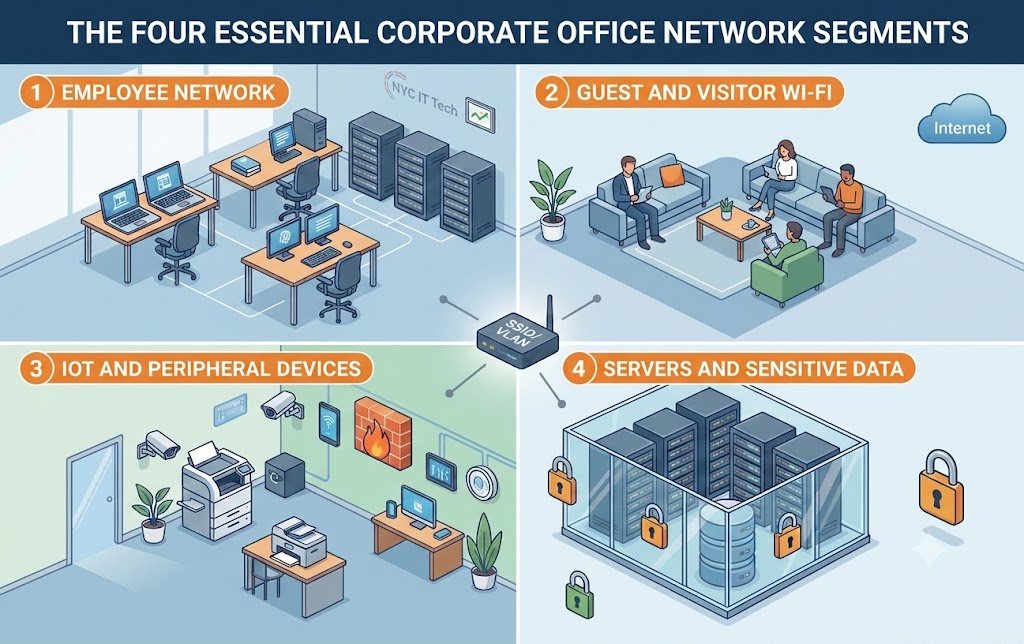
Running all devices on a single flat network creates a real security exposure. Employee laptops, guest phones, smart thermostats, and IP cameras carry different risk profiles and should not share the same subnet. Network segmentation separates them using VLANs, so a problem on one segment does not spread to others.

A corporate office typically needs at least three segments: employees, guests, and IoT or facilities systems. Conference room AV may occupy its own segment as well. Building this structure in during initial construction is much cleaner than retrofitting it later, and it simplifies compliance documentation for regulated industries.

Wi-Fi Design Checklist for New Office Construction

Planning AreaWhat to Address
Predictive site surveyCompleted from floor plans before framing
Structured cablingCat6/6A to every AP, workstation, and endpoint
Access point placementSurvey-driven, coordinated with the contractor
Channel planningReviewed against actual building RF conditions
High-density zonesConference rooms and open floors sized for peak load
Network segmentationVLANs for employees, guests, and IoT
SecurityFirewall and access policies at each segment boundary
Building interferenceNeighboring networks and materials factored into the design
Hybrid workforceBandwidth and latency for video conferencing and cloud tools
ScalabilityInfrastructure sized beyond current headcount

What Hybrid Work Requires From the Network

Employees expect consistent wireless performance across the building, from a corner office to a shared workspace or a large conference room. Hybrid work has raised the stakes. A dropped video call or degraded audio during a remote meeting has real business consequences, and those problems typically trace back to decisions made during the network design phase.

Planning for a hybrid workforce means accounting for simultaneous video conferencing across rooms, consistent low-latency access to cloud tools, and per-user bandwidth that holds up at peak hours. Those requirements feed into access point specifications, cabling design, and internet circuit sizing. All of those decisions need to be made before construction locks in the layout.

Monitoring and Multi-Trade Coordination After Go-Live

A well-planned network still needs ongoing visibility. Enterprise wireless platforms provide real-time data on client counts, signal strength, throughput, and channel utilization. Automated alerts surface hardware issues or unusual traffic before users notice the effect, which matters most in the months after move-in as usage patterns become clear.

On the construction side, a corporate wireless deployment involves multiple trades working in sequence. The cabling crew coordinates with electricians, HVAC contractors, and the general contractor to pull wire through the correct pathways before walls close. The most predictable outcomes come from projects where the wireless engineer stays involved from design through post-occupancy testing, rather than being handed off between vendors at each stage.

Your Building Isn’t Smart. It’s Alive. Here’s the Infrastructure That Makes It Possible

The most valuable commercial buildings of the next decade won’t be defined by steel and glass alone. They’ll be defined by data. Every system, from climate control to access management, will generate and consume information at a pace that older infrastructure simply cannot handle.

Think of IoT as a building’s nervous system, constantly sensing and reacting to conditions in real time. AI functions as the brain, interpreting that data and making decisions faster than any human operator could. But for this brain and nervous system to work together, they need a high-performance backbone. That backbone is a modern structured cabling system built to handle the demands of intelligent operations.

So What Makes a Building “Smart” in the First Place?

A smart building is not a collection of connected gadgets. It’s a unified ecosystem where multiple systems communicate with each other to improve efficiency, security, and the experience of everyone inside. The HVAC adjusts based on real-time occupancy data. Lighting syncs with natural daylight levels. Security systems use AI to identify potential threats before they escalate, and many facility managers across NYC are now integrating intelligent security platforms that tie directly into their building automation networks.

For commercial property owners in New York, this matters more than ever. Local Law 97 now requires significant reductions in building emissions, and smart building technology is one of the most effective ways to meet those targets. In competitive markets like Hudson Yards and the Financial District, buildings with modern automation attract higher-value tenants who expect operational transparency and energy-efficient systems.

Why Legacy Wiring Can’t Handle Today’s Data Demands

An intelligent building is a data-generating machine. Dozens of device categories, each with distinct bandwidth and power requirements, must share the same network. The table below shows the scope of what a modern commercial facility needs to support.

IoT Device CategoryExamplesCabling Requirement
Security and Life Safety4K AI-powered cameras, access control readers, smart locks, smoke and CO2 sensorsHigh-bandwidth Cat6A or Fiber for cameras; PoE for most devices
HVAC and Energy ManagementSmart thermostats, occupancy sensors, automated shades, smart lightingLow-voltage wiring, often PoE-powered, connected to a central controller
Occupant ExperienceSmart displays, room booking systems, Wi-Fi access pointsHigh-performance Cat6A for Wi-Fi 6/7; dedicated bandwidth for media
Operational TechWater leak detectors, predictive maintenance sensors on elevators and HVACLower bandwidth but requires reliable and secure network pathways

The sheer volume and diversity of this traffic will overwhelm older, unorganized cabling systems. The result is bottlenecks, dropped connections, and system failures that cost time and money. A Cisco study found that 80 percent of IoT project failures stem from infrastructure limitations rather than device or software issues.

“The intelligence of your building is limited by the quality of its backbone.”

How AI and Automation Depend on Continuous Data Flow

AI-enabled building management systems depend on continuous data flow between connected devices, sensors, and processing hubs. Predictive maintenance algorithms monitor elevator performance and HVAC units around the clock, flagging potential failures before they cause disruptions. Intelligent lighting adjusts output based on occupancy patterns learned over weeks and months. Access control systems cross-reference credentials against behavioral baselines in milliseconds.

All of this requires fast, uninterrupted communication. Bottlenecks in cabling infrastructure mean AI systems receive delayed or incomplete data. Decisions get made on outdated information, reducing accuracy and increasing operational costs. The network infrastructure for IoT devices needs redundancy and segmentation built in from the start. Dual-path cabling and centralized patch panels maintain uptime for mission-critical systems if one connection fails.

Designing Infrastructure That’s Ready for AI

Building an AI ready commercial building requires more than upgrading a few cables. It demands a strategic approach to structured cabling for building automation that accounts for current needs and future growth.

Bandwidth and Low Latency

AI-driven applications, especially in security and analytics, require both high bandwidth to carry high-resolution video and low latency for real-time analysis. A hybrid approach combining Fiber optic lines for backbone connections and Cat6A for horizontal runs delivers the speed and responsiveness these systems demand. Without it, your AI tools are working with outdated information.

Power over Ethernet is Non-Negotiable

PoE technology simplifies infrastructure by delivering both data and electrical power over a single Ethernet cable. This reduces installation costs, simplifies maintenance, and allows for centralized power backup during outages. PoE lighting and controls can reduce energy consumption by up to 45 percent, supporting sustainability initiatives and NYC’s Local Law 97 compliance. Plan for PoE+ or PoE++ capacity to support emerging devices that require higher wattage.

Scalability Through Zoned Architecture

A zoned cabling architecture divides the building into sections, each served by its own intermediate distribution frame or network switch. This approach makes the network easier to manage, troubleshoot, and expand as new technologies come online. For projects involving pre-construction infrastructure planning, zoned design is one of the most effective smart building cabling best practices for long-term flexibility.

Meeting NYC’s Energy and Sustainability Requirements

Modern commercial buildings face mounting pressure to reduce energy consumption. Structured cabling supports centralized monitoring systems that track usage across departments, floors, and individual zones in real time. Building operators can identify waste patterns and adjust systems remotely without dispatching technicians.

PoE-connected sensors and controls give facilities teams granular visibility into where energy goes and when. This data feeds directly into compliance reporting for NYC’s Local Law 97 and similar regulations. For property owners seeking LEED certification or marketing their buildings as sustainable, this level of operational transparency has become a competitive advantage.

Preparing for 5G, Edge Computing, and Emerging Tech

The future of connected buildings depends on integrating wired and wireless systems. Structured cabling supports 5G, Wi-Fi 7, and edge computing, all of which demand low latency and high bandwidth.

Edge processing moves data analysis closer to the source for faster response times. Digital twins create virtual models of buildings that rely on accurate, real-time data from connected devices. Private 5G networks offer secure, high-speed communication in sensitive environments. None of these technologies can function without IoT building infrastructure requirements being met at the physical layer first.

Network Security and Reliability Start With the Cables

A well-designed cabling system contributes directly to network security and operational resilience. It supports segmentation that isolates critical systems from general traffic, reducing vulnerability to cyberattacks. Clear labeling and documentation of cabling pathways simplify maintenance and support compliance with industry standards like TIA/EIA and ISO/IEC.

Common Questions Answered

What is structured cabling in a smart building?

Structured cabling is a standardized infrastructure of Cat6A copper and fiber optics that interconnects building systems like BMS, security, lighting, and IoT devices. It delivers reliable, scalable bandwidth with low latency for AI and automation applications.

How does cabling affect AI-driven building management?

AI systems require continuous, high-speed data flow to analyze information and make real-time decisions. A robust structured cabling system provides the low-latency backbone that allows predictive maintenance, intelligent HVAC control, and automated security responses to function without delays or data loss.

Why upgrade to Cat6A and fiber?

Cat6A supports 10 Gbps speeds at distances up to 100 meters, handling the bandwidth demands of 4K cameras, Wi-Fi 6/7 access points, and data-intensive IoT devices. Fiber optic lines offer even higher capacity for backbone connections between floors or buildings, future-proofing your investment.

How does PoE support energy efficiency?

Power over Ethernet delivers data and electrical power through a single cable, eliminating the need for separate power runs to each device. This simplifies installation, enables centralized power management, and allows building operators to monitor and control energy consumption at the device level.

What improves reliability and cybersecurity in cabling design?

Implement zoned architecture with dedicated distribution frames for each building section. Maintain accurate documentation and standardized labeling for all cable runs. Use network segmentation to isolate critical systems from general traffic, and build redundancy into pathways serving mission-critical equipment.

Building Intelligence Starts With the Right Foundation

The path to an AI-ready building doesn’t start with software. It starts with the physical layer infrastructure that carries every signal, powers every sensor, and connects every system. A strategic consultation can help you design a cabling infrastructure that supports your operational goals and prepares your facility for the next generation of building technology.

How Smart Home Technology Drives ROI for NYC Developers

In the hyper-competitive NYC real estate market, the rooftop pool and state-of-the-art gym have become standard. The new frontier for differentiation is in-unit technology. Smart home features are no longer a luxury add-on reserved for penthouses. They have become a core component of modern living that today’s buyers actively seek out.

For developers focused on maximizing asset value and accelerating sales cycles, the question is no longer “should we include smart technology?” It’s “how do we implement it strategically?” This post breaks down the financial returns of investing in smart home infrastructure for new residential developments in New York City.

What NYC Buyers Expect From Luxury Living in 2026

The definition of luxury has evolved. Marble countertops and hardwood floors remain important, but affluent buyers now prioritize convenience, security, and a seamless living experience. The post-pandemic hybrid work model has made a robust home environment critical for professionals who split time between the office and their apartment.

“Today’s luxury buyer in SoHo or the Upper East Side doesn’t want a beautiful apartment. They want an intelligent one. They expect the technology to work as flawlessly as the Sub-Zero refrigerator.”

According to industry data, 78% of homebuyers will pay more for a property with smart devices. Among millennial renters, that number climbs to 86%, with an average willingness to pay a 20% rent premium for apartments equipped with smart technology.

The Numbers Behind Smart Home ROI for Real Estate

Smart home ROI for real estate is quantifiable. Studies from the Consumer Technology Association and National Association of Realtors show that smart home features can increase a property’s value by 3% to 5%. On a $2 million Manhattan apartment, that translates to $60,000 to $100,000 in additional value.

Investment AreaImpact on ROIKey Data Points
Increased Property ValueDirect impact on sale priceSmart home features that increase property value by 3-5%. On a $2M unit, that’s $60K-$100K.
Faster Sales CycleReduced carrying costsTech-enabled properties have up to 40% greater chance of selling at a higher price point.
Higher Perceived ValueJustifies premium pricingAutomated shades, integrated lighting, and unified security create a powerful first impression.
Future-Proofing the AssetLong-term value retentionA building pre-wired for technology adapts to future upgrades, protecting its asset value for decades.

For multifamily properties, the returns are even more compelling. Smart home technology creates a 3-5% rise in building valuation with an average ROI of 30%.

Three Smart Home Investments That Deliver the Highest Returns

Not every smart feature delivers equal value. Based on market data, three categories consistently provide the highest return for developers building in Manhattan, Brooklyn, and Queens.

Intelligent Lighting and Motorized Shades

Circadian rhythm lighting creates an atmosphere of wellness and luxury that resonates with health-conscious buyers. Motorized shades offer effortless privacy in a city where neighboring buildings sit feet away. Smart lighting systems can also reduce electricity use by up to 50%, a selling point that appeals to environmentally minded residents and translates to real monthly savings.

Keyless Entry and Unified Security Systems

Video intercoms that route directly to a smartphone, keyless entry, and unified security systems rank among the most requested features in NYC buildings. Smart security systems can add up to 5% to a property’s value. For residents in a city where personal safety and package security are daily concerns, these features are expected rather than optional.

Building-Wide Network Infrastructure

High-speed Wi-Fi and wired connectivity have become the “fourth utility” after water, gas, and electricity. Offering guaranteed, building-wide network infrastructure is a massive differentiator for professionals who work from home. A robust network backbone supports every other smart feature in the building and belongs on any developer’s requirements checklist for new construction.

Why Pre-Wiring During Construction is the Only Cost-Effective Option

The only cost-effective way to implement these features is through pre-wiring during the construction phase. Running cable through open walls costs a fraction of what it takes to retrofit a finished luxury apartment. Attempting to add comprehensive smart systems after completion means tearing into walls, ceilings, and floors.

When developers pre-wire for home automation, they create a foundation that supports integrated platforms like Savant, Control4, or Crestron without limitation. The upfront investment is minimal compared to the long-term asset value it protects.

Smart Home Market Growth Through 2027

The global smart home market reached $127.67 billion in 2024 and is projected to hit $1.4 trillion by 2034. In the United States, over two-thirds of homes will have smart devices by 2027.

YearUS Smart Homes in MillionsPercentage of US Homes
202577.05~52%
202684.92~57%
202793.59~68%

Buildings without integrated technology will struggle to compete for buyers and tenants in the very near future.

Why Tech-Forward Markets Like NYC Command Higher Premiums

Location affects ROI significantly. In tech-forward markets like New York, San Francisco, and Austin, the premium for AI-integrated smart features can reach 7% to 10%. More traditional markets typically yield 2% to 5%. For developers building in NYC, the numbers strongly favor smart home investment. Buyers here expect cutting-edge technology and will pay accordingly.

Why Professional Installation Commands a Premium

DIY solutions work for a single smart thermostat. Comprehensive building-wide systems require professional installation, and buyers recognize the difference. A professionally installed and integrated system commands a higher premium because prospective owners trust it will function on move-in day. They do not want to inherit someone’s weekend project or troubleshoot a patchwork of disconnected devices. Systems that integrate through platforms like Control4 or Savant signal quality and reliability to discerning buyers.

Smart Technology as a Competitive Advantage

In a crowded market, smart home technology is a powerful tool for differentiation, value creation, and faster ROI. The most successful smart buildings result from collaboration between developer, architect, and technology integrator from day one.

Integrating professional home automation systems starts with a strategic plan rather than a last-minute addition. Early collaboration in the design phase maximizes returns and creates a standout property that commands premium pricing.

The Complete Pre-Wire Checklist for Your New Home Build in 2026

Building a new home means making hundreds of decisions before the drywall goes up. Your low-voltage wiring plan is one of the most important choices you will make during this process. Getting it right now saves you from expensive retrofits later.

This smart home wiring checklist will help you have a productive conversation with your builder and technology integrator. Print it out, bring it to your next meeting, and go through each section together. The goal is simple. Make sure no critical infrastructure gets overlooked while the walls are still open.

Why Pre-Wiring During Construction Matters

Running cables after drywall is installed can cost three to five times more than doing it during the framing stage. In some multi-story homes with fire breaks between studs, adding wire later is impossible. The labor to pull Cat6A cable through open framing takes a fraction of the time compared to fishing wire through finished walls.

Even if you do not plan to use every cable right away, having them in place means you are ready for whatever technology comes next. The wires will sit there waiting until you need them.

Setting Up Your Central Wiring Location

Every connected home needs a single spot where all systems come together. Some builders call it a distribution center or media closet. This is where your network equipment, patch panels, and amplifiers will live.

Look for a location that stays at a moderate temperature and has good airflow. It should sit close to where your internet service enters the home and have easy access from the main floor. A spot above the basement or crawlspace makes cable runs much simpler. Plan for plenty of electrical outlets and enough wall space for at least one equipment rack.

Infrastructure Basics

  • Dedicated closet or cabinet space for network equipment with ventilation
  • At least two 1.5-inch conduits running from the closet to the attic and basement
  • A clear path from where your internet provider enters the home to the equipment location
  • Whole-home surge protection at the electrical panel
  • Space and power for a battery backup unit

Understanding the Cables You Will Need

Knowing what each cable type does helps you communicate with your contractor and avoid confusion on site.

  • Cat6A is the standard for network wiring in new construction. It handles high-speed data, supports Power Over Ethernet for cameras and access points, and will meet your needs for years to come. The installation labor is identical to older cable types and the cost difference per foot is minimal.
  • RG6 Coaxial is still useful for over-the-air TV antennas and certain cable services. Run it alongside Cat6A at media locations.
  • Speaker Wire in 16-gauge runs back to your distribution center for connection to amplifiers. You will need it for any in-wall or in-ceiling audio.
  • Low-Voltage Wire handles motorized shades, contact sensors, and other smart home components that do not require network connectivity.

Living Spaces and Entertainment Areas

Your living room and family room will likely have the most technology. Plan for multiple network drops at TV locations to support streaming devices, gaming consoles, and future equipment you have not thought of yet.

  • 2-4 Cat6A drops at the primary TV location
  • 1 RG6 Coaxial drop at the TV location
  • 1 speaker wire run for a soundbar
  • 5-7 speaker wire runs for surround sound
  • 1 Cat6A drop in the ceiling for a Wi-Fi access point

Home Office Wiring for Remote Work

A home office benefits from hardwired connections more than any other room. Wi-Fi works fine for casual browsing, but video calls and large file transfers perform better over Ethernet.

  • 2-4 Cat6A drops at the desk location
  • 1 RG6 Coaxial drop
  • 1 Cat6A drop for a network printer
  • Additional drops behind desk areas for future devices

Bedroom and Hallway Runs

Each bedroom needs basic media connectivity. A central hallway location works well for a Wi-Fi access point that covers multiple rooms.

  • 2 Cat6A drops at the TV or media location in each bedroom
  • 1 RG6 Coaxial drop in each bedroom
  • 2 speaker wire runs for in-ceiling audio in the primary bedroom
  • 1 Cat6A run in a central hallway ceiling for Wi-Fi coverage

Kitchen and Laundry Room Considerations

Smart displays, small TVs, and in-ceiling speakers are common in kitchens. Running network cable behind appliance locations is speculative but forward-thinking. Future refrigerators and ovens may connect directly to your network instead of relying on Wi-Fi.

  • 1 Cat6A drop for a smart display or small TV
  • 2 speaker wire runs for in-ceiling music
  • 1 Cat6A behind the refrigerator location
  • 1 Cat6A behind the oven location
  • 1 Cat6A behind the washer in the laundry room
  • 1 Cat6A behind the dryer location

Bathroom Audio Integration

Speaker wire to bathrooms lets you extend your whole-home audio system into spaces where you might want music during morning routines.

  • 2 speaker wire runs for in-ceiling speakers in the primary bathroom
  • 1 speaker wire run for guest bathrooms
  • 1 Cat6A drop if you plan to install a smart mirror

Garage Connectivity and Access

The garage often gets overlooked during wiring planning. Security cameras, Wi-Fi coverage, and smart garage door integration all require network connectivity.

  • 1 Cat6A drop for a security camera at the garage entrance
  • 1 Cat6A drop for a Wi-Fi access point
  • 1 Cat6A drop near the garage door opener
  • 1 RG6 Coaxial drop if you plan to mount a TV

Outdoor and Landscape Wiring in NYC Homes

Outdoor spaces need network and audio infrastructure too. Running conduit from the attic to outer foundation walls gives you flexibility to add irrigation controls, landscape lighting, or additional speakers later. For homes across NYC, Brooklyn, and Queens, rooftop and patio entertainment systems are increasingly popular.

  • 1 Cat6A drop for an outdoor Wi-Fi access point
  • 2-4 outdoor-rated speaker wire runs for landscape audio
  • 1 Cat6A and power for an outdoor TV location
  • Conduit to the yard for future irrigation or lighting controls

Climate Control and Thermostat Wiring

Smart thermostats perform better with network connectivity than Wi-Fi alone. If your HVAC system supports zoned climate control, plan for multiple thermostat locations.

  • Cat6A drop at each thermostat location
  • Verify HVAC compatibility with smart home platforms
  • Consider wiring for zoned control if your system supports it

Smoke and Carbon Monoxide Detection

Hardwired smoke and CO detectors that interconnect throughout the house provide better safety than battery-powered units. An alarm in the basement will trigger alerts on every floor.

  • Hardwired power to all smoke detector locations
  • Hardwired power to CO detector locations near bedrooms and fuel-burning appliances
  • Cat6A drops near detectors for smart monitoring integration

Irrigation and Landscape Automation

Smart sprinkler controllers need either network or low-voltage wire at the installation location. Running conduit to the yard now means you can add soil moisture sensors or expand the system later.

  • Cat6A or low-voltage wire to the irrigation controller location
  • Conduit from the house to the yard for future expansion

Security Camera and Sensor Placement

Plan camera locations at every corner of the house, front door, back door, and garage. Running two cables to each location instead of one gives you room to add coverage later without pulling new wire. Power Over Ethernet cameras receive both data and power through a single Cat6A cable, which simplifies installation significantly. If you are planning integrated security systems with access control and monitoring, discuss additional wiring needs with your integrator.

  • Cat6A to all potential camera locations
  • Wire runs to windows and doors for contact sensors
  • Wire run for the main security panel and keypads
  • Consider doubling camera drops for future expansion

Smart Lighting and Motorized Shade Wiring

Smart switches require a neutral wire at each switch location. Confirm this with your electrician during the rough-in phase. Motorized interior shades can run on battery power, low-voltage wire, or Power Over Ethernet depending on the manufacturer.

  • Confirm neutral wire availability at all switch locations
  • Low-voltage wire to each window for motorized shades
  • Direct electrical wiring for exterior motorized shades

Home Automation Touchscreens and Control Systems

In-wall touchscreens from manufacturers like Savant and Control4 need network connectivity. If you are planning for whole-home audio and video distribution, discuss the specific wiring requirements with your integrator early in the design process.

  • Cat6A to each planned in-wall touchscreen location
  • Additional drops for future control panel expansion

Planning for Technology That Does Not Exist Yet

The cables you install today need to support devices that have not been invented. Run more cable than you think you need. Drop two network cables to camera locations instead of one. Pull speaker wire to every room where you might want music someday, even if you do not plan to install speakers right away.

Conduit is your best tool for future flexibility. PVC pipe between the attic and equipment rack lets you pull new cable types as technology evolves. The cost of extra materials during construction is minimal compared to the expense of opening walls later.

Using This Checklist With Your Builder

Print this list and bring it to your next meeting with your contractor and technology integrator. Go through each section room by room. Mark what applies to your home and note any questions that come up.

Every home is different. This checklist covers the most common needs for a new home pre-wire in 2026, but your specific situation may require additional planning. Use it as a starting point to create a professional new construction cabling plan that fits your family and how you live.

Your Home in 2030 and How to Pre-Wire Today for Tomorrow’s Technology

Remember when 4K TVs felt like science fiction? Conversations have already shifted to 8K displays, virtual reality setups, and AI assistants spread throughout every room. Technology moves fast, and homes built without the right infrastructure start feeling outdated within a few years.

The solution is a flexible, high-bandwidth structured cabling system. This goes beyond running wires through walls. It creates a platform for innovation that supports devices and systems we haven’t even imagined yet. Homeowners in NYC undertaking major renovations or new builds will find that planning cabling during new construction ranks among the most important infrastructure decisions of the entire project.

How the Connected Home Has Changed From 2000 to 2030

  • The 2000s brought most homes a single DSL modem and one coaxial cable running to the living room TV. Internet was something you logged onto rather than lived with constantly.
  • The 2020s look completely different. The average household now runs 17 connected devices. Streaming boxes, smart speakers, security cameras, home office setups, and Wi-Fi thermostats all compete for bandwidth. The network has become as critical as plumbing or electricity.
  • The 2030s will push things further. Expect immersive experiences like holographic displays and dedicated VR rooms requiring massive, low-latency bandwidth. AI assistants will move beyond countertop speakers to become integrated home automation systems woven into walls and ceilings. Dozens of IoT sensors will monitor health metrics, manage energy consumption, and coordinate security systems all at once.

Building a Home Network Foundation That Lasts for Decades

Building network infrastructure for emerging technology requires more than running cables. It demands thinking about what comes next.

High-Bandwidth Cabling with Fiber and Cat6A

Cat6A delivers excellent performance for current applications, supporting 10 Gbps speeds across standard distances. But a truly future-proof structured cabling design runs fiber optic lines alongside copper.

The cost of running fiber optic cable alongside Ethernet during construction is minimal. The cost of adding it after the walls close is enormous.

This hybrid approach gives you reliable copper for today’s devices while positioning your home for multi-gigabit speeds that will become standard within the decade.

Installing Conduit for Easy Future Upgrades

Conduit, sometimes called smurf tube, is flexible plastic tubing that runs from a central wiring closet to key locations throughout the home. With conduit in place, you can pull new cable types through walls years from now without demolition or drywall repair.

This matters especially in high-end NYC apartments where renovations are disruptive and expensive. The upfront cost is modest, but the long-term value for anyone thinking about how to future proof their home network is substantial.

Centralizing Network Equipment in a Dedicated Closet

Scattered equipment creates maintenance headaches. A dedicated, well-ventilated closet or rack houses the modem, router, switches, and patch panels in one accessible location.

This approach simplifies troubleshooting, makes upgrades easier, and keeps unsightly equipment out of living spaces.

Smart Home Standards Worth Understanding

Open standards matter more than brand names when selecting smart home components. The Matter protocol enables devices from Apple, Google, Amazon, and other manufacturers to communicate seamlessly. Thread wireless connectivity provides low-latency performance for sensors and controls.

Technology StandardBenefit
Matter ProtocolCross-brand compatibility without ecosystem lock-in
Thread ConnectivityReliable low-power communication for IoT devices
Wi-Fi 7Multi-gigabit wireless speeds with reduced latency
PoE++Powers devices up to 90W through Ethernet cables

Choosing systems built on these open protocols protects your investment as the smart home landscape continues to shift.

Wiring for Technologies on the Horizon

Wi-Fi 7 and Beyond

Next-generation wireless networks will deliver multi-gigabit speeds, but only when access points have wired backhauls capable of handling that throughput. This means running Ethernet to ceiling locations throughout the home, not to a single router location.

Power over Ethernet

New high-wattage PoE standards can power security cameras, VoIP phones, small displays, and even some lighting fixtures through a single Ethernet cable. This simplifies installation and reduces the number of electrical outlets needed in walls and ceilings.

Low-Voltage Lighting Systems

Tunable LED systems operate on low-voltage wiring rather than traditional electrical circuits. These systems adjust color temperature throughout the day to support circadian rhythms and can integrate directly with home automation platforms.

Designing Rooms That Adapt as Life Changes

A nursery becomes a home office. A guest bedroom transforms into a media room. Life shifts, and rooms need to shift with it.

Smart wiring anticipates these changes. Running multiple cable types to each room during construction costs little but pays off when that spare bedroom needs to support video conferencing equipment or a home gym with connected fitness mirrors. Placing junction boxes in locations that support wall-mounted displays makes sense even if you have no immediate plans to install one.

Connecting Sustainability and Health Systems to Your Network

Energy monitoring systems, solar panel integration, and EV charging stations all rely on data connectivity to function at their best. Smart breaker panels communicate usage patterns to the home network. Battery backup systems report charge levels through connected interfaces.

Wellness technology has similar requirements. Whole-house air quality monitors need network connections to log data and trigger HVAC adjustments. Water filtration systems with smart sensors alert homeowners to filter changes. These systems work independently, but when connected through a structured cabling backbone, they coordinate to create healthier living environments.

What Homeowners Ask About Pre-Wiring for Smart Technology

How much does future-proof cabling add to a new construction budget?

Pre-wiring during construction typically adds 1-3% to overall project costs. Retrofitting the same infrastructure after walls close can cost five to ten times more due to labor, drywall repair, and painting.

Can cabling be upgraded in an existing NYC apartment?

Yes, though options depend on building type. Pre-war buildings with plaster walls present challenges, but conduit pathways and surface-mounted solutions can work. Co-op and condo boards may require approval for any work affecting shared infrastructure.

What is the minimum to install if budget is tight?

At minimum, run Cat6A to every room where a TV or computer might go, plus ceiling locations for wireless access points. Add conduit runs from the central closet to the attic or basement for future expansion.

How long will Cat6A cabling remain relevant?

Cat6A supports 10 Gbps speeds and should remain viable for residential applications through the 2030s. Running fiber alongside copper provides additional insurance for bandwidth demands beyond that timeframe.

Creating Infrastructure That Grows With Technology

Future-proofing is not about predicting exactly what technology will emerge. It is about creating a flexible foundation that adapts to whatever comes next. Fiber alongside copper, conduit pathways for future cables, and centralized equipment placement give a home the infrastructure to grow.

The smartest homes of 2030 will be the ones planned with foresight today. A conversation with a technology integrator can help design an infrastructure ready for whatever innovations arrive over the coming decades.

7 Low-Voltage Wiring Mistakes That Can Ruin Your New NYC Apartment

The drywall is up. The paint looks perfect. But the Wi-Fi keeps dropping and your smart TV buffers constantly. If you’ve wondered why your ethernet is slow in your new house, the answer is usually hiding behind those freshly painted walls.

A simple, avoidable mistake made months earlier during the wiring phase is often to blame. These low voltage wiring errors aren’t always obvious during construction, but they show up the moment you move in. Here’s what goes wrong and how to prevent it.

The Most Expensive Wiring Mistakes at a Glance

Running Data Cables Too Close to Power Lines

Think of it like trying to have a quiet conversation next to a roaring subway train. Data cables running parallel to high-voltage electrical lines pick up electromagnetic interference that disrupts the signal.

What You’ll Notice

Unreliable Wi-Fi connections. Ethernet speeds that never reach their rated potential. Crackling in audio systems. Random data errors that seem impossible to diagnose.

How to Prevent It

Low-voltage data cables should maintain at least 12 inches of separation from electrical cables when running parallel. If they must cross, they should intersect at a 90-degree angle.

In tight Manhattan apartments and Brooklyn brownstone renovations, every trade competes for limited space inside walls and ceilings. A coordinated new construction cabling plan before anyone starts pulling wire makes all the difference.

Cheap Cabling That Fails When You Need It Most

Not all ethernet cable performs the same. Copper Clad Aluminum cables cost less than solid copper, but they’re brittle, less conductive, and don’t comply with TIA industry standards.

What You’ll Notice

Connections that fail over time. Network ports that suddenly stop working. An inability to deliver Power over Ethernet to security cameras or Wi-Fi access points.

How to Prevent It

Always specify and verify that your installer uses 100% solid copper Category 6A or better cabling from a reputable manufacturer.

Pro-Tip: Ask to see the box the cable came in. It should be clearly marked as solid copper and rated for the category you specified. If the installer can’t show you the packaging, that’s worth questioning.

Not Installing Enough Network Drops

A minimalist approach to wiring rarely pays off. Homeowners and builders sometimes try to save a few hundred dollars by installing only one or two ethernet ports in the entire home. This is one of the most common pre-wire mistakes in new construction projects.

What You’ll Notice

A home office that depends entirely on spotty Wi-Fi. A media center buried under switches and tangled cables. No wired option for the bedroom smart TV.

How to Prevent It

Plan for a minimum of two data drops in every key room. Living room, home office, bedrooms. Running an extra cable during construction costs almost nothing compared to opening finished walls later.

A cabling subcontractor involved during the rough-in phase can help you plan for both current needs and future expansion.

Bending Cables Too Sharply or Cinching Bundles Too Tight

Data cables aren’t as forgiving as standard electrical wire. Exceeding the bend radius or using plastic zip ties to cinch bundles too tightly damages the internal copper pairs and degrades performance over time.

What You’ll Notice

A network port that tests fine during the walkthrough but fails under heavy load. A gigabit connection that only registers at 100Mbps. Intermittent dropouts during video calls. These are classic network cable installation mistakes.

How to Prevent It

Installers should follow the manufacturer’s specified bend radius for each cable type. Loose-fitting Velcro straps work better than plastic zip ties for bundling cables.

Pro-Tip: The rule of thumb for bend radius is no tighter than the diameter of a coffee mug. If it looks kinked, it probably is.

Forgetting to Document Before the Drywall Goes Up

This isn’t a technical mistake. It’s a process mistake with major consequences. Once the walls close, you lose all visibility into where cables actually run.

What You’ll Notice

You hang a picture and drive a nail through a critical data line. You want to add a new outlet and have no idea what’s already in the wall. A future technician spends hours troubleshooting because there’s no documentation.

How to Prevent It

During the pre-wire walkthrough, take detailed photos and videos of every wall and ceiling cavity before insulation and drywall go up. Label these images by room and store them digitally.

This documentation becomes invaluable for future service calls. It’s also a selling point when your apartment hits the market, giving the next owner a clear map for their technicians.

Using Cable Not Rated for the Installation Environment

This is different from cable quality. Even solid copper Cat6A will fail if it’s not rated for where you install it. Indoor-rated cable used outdoors degrades from UV exposure. Standard cable in air handling spaces violates fire codes. Unshielded cable near motors or fluorescent lighting picks up interference.

What You’ll Notice

Insulation that cracks or becomes brittle within a year. Failed inspections that delay your certificate of occupancy. Intermittent signal problems that only appear under certain conditions.

How to Prevent It

Match the cable rating to the installation environment. Use plenum-rated cable in air handling spaces and drop ceilings. Choose UV-resistant, outdoor-rated cable for any exterior runs. Install shielded cable near sources of electrical noise.

Ignoring Voltage Drop on Long Cable Runs

Voltage drop happens when electrical resistance in the cable reduces the power available at the far end. This matters most for low-voltage lighting, powered devices, and PoE equipment. A 3-volt drop that’s negligible in a 120V circuit can completely disable a 12V system.

What You’ll Notice

LED landscape lights that dim noticeably at the far end of a run. Security cameras that randomly reboot or won’t power on. Access control panels that behave erratically.

How to Prevent It

Calculate voltage drop for any cable run longer than 25 feet. Keep total drop under 5% for general use and under 3% for sensitive equipment. For longer runs, use a larger gauge wire or add a power source closer to the load.

Common Questions Answered

Which mistake costs the most to fix after construction?

Not installing enough network drops. Opening finished walls to run new cables costs significantly more than adding extra runs during the rough-in phase. The cable itself is inexpensive compared to the labor of cutting, patching, and repainting drywall.

How can I tell if my installer used quality cable?

Ask to see the original packaging. Quality cable is clearly marked with the manufacturer name, cable category, and “solid copper” designation. Avoid any cable marked CCA or cable without clear labeling.

Do I need permits for low-voltage wiring in NYC?

Low-voltage work typically doesn’t require the same permits as high-voltage electrical, but it depends on the scope of your project. Work involving fire alarm systems, building-wide infrastructure, or modifications to common areas in co-ops and condos often requires permits and inspections.

How far should data cables be from electrical wires?

Maintain at least 12 inches of separation when running parallel to electrical cables. If data and power cables must cross, they should do so at a 90-degree angle to minimize electromagnetic interference.

Planning Your Low-Voltage Wiring Early Prevents Expensive Fixes

A successful smart home starts with thoughtful wiring. These mistakes are easy to make but equally easy to avoid with some planning upfront.

The most reliable way to sidestep these issues is working with experienced installers during the new construction cabling phase. A solid structured cabling foundation is one of the smartest investments in any home’s technological future.

Cat6A or Fiber Optic Cabling for Your New NYC Office Build

You’ve signed the lease on a new commercial space in Manhattan. The walls are bare, the floor plan is wide open, and every decision you make now will shape how your business operates for the next decade. The infrastructure hidden inside your walls will have a far greater impact on daily productivity than most people realize.

If you’re wondering whether to use Cat6A or fiber for your office network, you’re already thinking about this the right way. This guide breaks down both options so you can make an informed choice for your new construction cabling project.

How Cat6A and Fiber Optic Cables Transmit Data

Before diving into comparisons, it helps to understand what each cable type does and how it transmits data.

Cat6A Copper Cabling

Cat6A, or Category 6 Augmented, represents the current standard in copper Ethernet cabling. It supports speeds up to 10 Gbps across distances of 100 meters. Think of Cat6A as a newly expanded 10-lane highway for your data. It handles everyday office tasks like email, cloud applications, VoIP calls, and video conferencing without breaking a sweat.

The “A” stands for Augmented, meaning it offers better shielding against crosstalk compared to standard Cat6. This makes it more reliable in environments where multiple cables run close together.

Fiber Optic Cabling

Fiber optic cables transmit data using pulses of light rather than electrical signals. This allows them to achieve speeds of 40 Gbps, 100 Gbps, and beyond. If Cat6A is a highway, fiber optics is a dedicated bullet train with no speed limit.

One major advantage is distance. Light signals can travel for miles without degradation, while copper cables max out at about 328 feet. Fiber is also completely immune to electromagnetic interference, which becomes important in buildings with heavy electrical equipment or elevator shafts.

Comparing Cat6A and Fiber Optic for Commercial Buildings

When evaluating Cat6A vs fiber optic for a commercial building project, five key factors typically drive the decision.

FeatureCat6AFiber OpticBusiness Consideration
Speed and BandwidthUp to 10 Gbps40 Gbps to 100+ GbpsCat6A handles most office workloads. Fiber suits data-heavy industries like video production or financial trading.
Distance100 meters maxMiles without signal lossLarge floor plates or multi-floor buildouts may exceed Cat6A limits. Fiber connects separate floors or buildings easily.
InterferenceSusceptible to EMIImmune to EMIDense buildings with heavy electrical systems benefit from fiber’s immunity to interference.
Installation CostLower upfront, easier terminationHigher upfront, requires more trainingBudget-conscious startups often choose Cat6A. Long-term flagship offices may justify fiber’s cost.
DurabilityRugged and flexibleMore fragile, needs careful handlingCopper withstands rough construction environments better, though both require quality installation.

For businesses wondering which cable is better for 10Gb network speeds, Cat6A delivers that capability at a lower cost. Fiber becomes necessary when you need speeds beyond 10 Gbps or cable runs longer than 100 meters.

Why Fiber Offers Better Network Security

For businesses handling sensitive data, fiber optic cabling offers a security advantage that copper cannot match. Electrical signals traveling through copper cables emit small amounts of electromagnetic radiation that can potentially be intercepted with the right equipment. Fiber transmits light pulses contained entirely within the glass strand, making it virtually impossible to tap without physically cutting the cable and disrupting service.

Law firms, financial institutions, healthcare providers, and government contractors often specify fiber for this reason alone. If your business handles client financials, medical records, or proprietary information, the added security layer may factor into your decision beyond raw performance metrics.

Combining Cat6A and Fiber Optic for a Smarter Office Network Design

The Cat6A vs fiber debate doesn’t have to be an either/or decision. Many businesses use both technologies strategically, and this hybrid approach often makes the most sense for structured cabling in Manhattan offices.

A common setup runs fiber as the building’s backbone, connecting the main server room to different floors or zones. From there, Cat6A handles the horizontal runs to individual workstations, phones, and devices. This approach gives you the long-distance, high-bandwidth advantages of fiber where it matters most, while keeping costs manageable for individual connections.

The True Long-Term Cost of Cat6A vs Fiber Optic Cabling

The comparison table above addresses upfront installation costs, but the full financial picture extends further. Cat6A cables have a typical lifespan of 10 to 15 years before degradation affects performance. Fiber optic infrastructure can last 25 years or more with minimal maintenance, and the glass strands themselves don’t corrode or degrade like copper over time.

Fiber also requires less power to transmit signals over long distances, reducing energy costs in larger installations. And when bandwidth demands increase, fiber networks can often be upgraded by changing the equipment at each end rather than replacing the cables themselves. Cat6A running at its 10 Gbps maximum today has less headroom for future upgrades without recabling.

Matching Your Business Needs to the Right Cabling Infrastructure

Your specific situation will determine which cabling makes the most sense.

Cat6A Works Well For

Businesses operating primarily from a single floor under 10,000 square feet. Standard office applications like email, cloud software, and video calls don’t require fiber’s extreme bandwidth. Cat6A installation costs run significantly lower than fiber, making it attractive for startups watching their buildout budget.

Fiber Optic Works Well For

Data-intensive industries such as video editing, software development, or financial trading. Fiber also makes sense when connecting multiple floors or buildings. If you’re planning for substantial growth over the next 10 to 20 years, fiber’s virtually unlimited bandwidth protects your investment.

A Hybrid Setup Works Well For

Offices with a large footprint that need high-speed connectivity everywhere without overspending. A fiber backbone combined with Cat6A to the desktop gives you future-proof infrastructure where it counts.

Getting Your Cat6A vs Fiber Decision Right the First Time

Both Cat6A and fiber optic cabling are excellent choices for commercial networks. The right answer depends on your industry, office layout, budget, and anticipated growth. Taking time to analyze these factors now prevents costly retrofits later.

The network foundation you install during your buildout phase will affect operations for years to come. A professional structured cabling installation means whichever path you choose gets implemented correctly for maximum performance and reliability.

What Every NYC Homeowner Should Know About Pre-Wiring During Renovation

You’ve closed on a stunning new apartment in Manhattan. The finishes are gorgeous and the views are incredible. But within the first week, the Wi-Fi drops out in the bedroom. Your smart TV buffers constantly. Running cables for that home office means ugly wires along the baseboards or expensive demolition later.

This scenario plays out often in New York City. The fix is simple, but it needs to happen before those walls close up. Pre-wiring is the hidden infrastructure that separates a modern, connected home from one that fights against itself. This guide covers what cables to run in new apartment construction and how to plan for the technology you’ll use today and years from now.

Why Wired Connections Still Matter in NYC High-Rises

Living in a New York apartment means dealing with challenging wireless conditions. Your neighbors’ networks compete with yours. Concrete walls and steel framing block signals. A pre-war building conversion or modern high-rise with reinforced construction can turn a fast internet connection into frustration.

Hardwired Ethernet delivers consistent speeds, lower latency for video calls and gaming, and better security than broadcasting data through the air. For critical devices like your work computer or main TV, relying on Wi-Fi alone leaves performance on the table. The network infrastructure you install during construction becomes the backbone for every connected device in your home.

Room-by-Room Wiring for a Connected Apartment

Smart home wiring during construction requires thinking through how you’ll actually use each space. Going room by room helps identify exactly where you need connectivity.

Your Entertainment Hub

This room typically needs the most attention. Plan for multiple Ethernet ports behind the TV location for streaming devices, gaming consoles, and the television itself. Speaker wire runs for surround sound should be mapped out now. If you use cable TV, include a coaxial drop as well.

Your Home Office Setup

Remote work has made the home office essential. Run at least two Ethernet drops to your desk area for your computer and a backup device. If this room sits far from your main router, consider adding a ceiling mount for a dedicated wireless access point.

Bedroom Connectivity

Each bedroom benefits from Ethernet behind the TV mounting location. If you’re planning motorized window shades, low-voltage wiring needs to reach each window. Speaker wire turns any bedroom into part of a whole-home music system, and pairs well with a broader home automation setup.

Kitchen Wiring Needs

Even kitchens need connectivity. An Ethernet drop supports smart displays, small TVs for recipe videos, or future smart appliances. In-ceiling speakers keep music flowing while you cook without taking up counter space.

Comparing Cable Types for Residential Pre-Wires

Different cable types serve different purposes. Here’s what you need to know about each.

Cable TypePrimary UseWhy You Need It
Cat6A EthernetInternet and NetworkingDelivers the fastest, most reliable connection for computers, TVs, and Wi-Fi access points. Supports 10-Gigabit speeds over standard distances.
Fiber OpticFuture-ProofingOffers nearly unlimited bandwidth. Ideal for connecting your apartment to the building’s main fiber line or for demanding applications.
RG6 CoaxialCable TV and InternetStill required by most cable TV and internet providers throughout NYC.
Speaker Wire 16/2 or 14/2AudioConnects in-wall, in-ceiling, or traditional speakers for distributed audio throughout the home.

A structured cabling approach treats all these cable types as part of one unified system, with everything terminating at a central location for easy management.

Evaluating Your Existing Electrical Infrastructure

Before any cables get pulled, a contractor needs to evaluate the existing infrastructure. In older NYC apartments, this starts with the electrical panel. How many circuits exist? Is there capacity for additional loads? Experienced professionals can look at the panel and determine what the current system can handle versus what needs upgrading.

Pre-war apartments that haven’t been updated in decades often need significant work. Many buildings constructed through the early twentieth century have outdated wiring systems with only 60 to 100 amps of service. Modern homes typically require 200 amps to support today’s electrical demands. Some older systems lack code-approved grounding conductors or use materials that increase the risk of electrical issues.

What Low-Voltage and Electrical Work Costs in NYC

Understanding potential costs helps avoid surprises mid-project. Rough-in work, where cables are run to outlets and switches before walls close, is typically charged by the junction box or outlet at $250 to $400 each. The total depends on how many locations you need wired.

Electrical panel upgrades range from $2,000 to $5,000 or more for a new box. If your existing panel has room for new circuits but you’re adding energy-hungry devices, each new circuit breaker runs between $300 and $800. Additional outlets typically cost $100 to $300 each.

Full electrical overhauls that include demolition, permits, labor, materials, and refinishing can start at $15,000 and climb based on apartment size. For gut renovations, electrical work often represents around 5% of the total budget. If you’re only renovating one room, a full electrical upgrade for that space might match or exceed the rest of the project cost.

NYC Permits and Inspection Requirements

Anything beyond a simple fixture swap requires an electrician licensed by the Department of Buildings. The electrician must file an electrical application and pay permit fees before work begins. Once completed, an inspection takes place and a certificate is issued confirming the work meets code.

Each room must have a light fixture according to NYC electrical code. Smoke and carbon monoxide detectors must be hardwired since battery-powered models are not permitted. Your contractor should walk through these requirements during the initial assessment.

Challenges Unique to New York Apartment Buildings

New York City presents unique obstacles. Co-op and condo boards often require detailed approval before work begins, including documentation of exactly what’s being installed. Building codes are strict, and high-rise construction typically requires plenum-rated cables that meet fire safety standards.

Pre-war buildings add another layer of complexity. Working around original plaster, brick, and decades of previous renovations takes experience. These challenges aren’t reasons to skip pre-wiring. They’re reasons to plan carefully with professionals who understand how NYC buildings are constructed.

How the Pre-Wiring Process Works During Construction

The pre-wiring timeline aligns with specific construction phases.

  • Consultation and Design happens before demolition wraps up. This is when you map out every cable run based on how you’ll use each room.
  • Rough-In occurs after framing but before drywall installation. Cables are pulled through walls and ceilings to their designated locations, with extra length left at each end for termination.
  • Termination and Testing comes after the walls are finished. Wall plates get installed, cables are connected to a central patch panel, and every run is tested to verify performance.

Missing the rough-in window means either surface-mounted cables or expensive wall demolition later.

The Long-Term Value of Pre-Wiring Your NYC Apartment

Pre-wiring represents a small fraction of a renovation budget but delivers outsized returns in usability, home value, and future flexibility. A well-executed low-voltage system eliminates frustrations that come from retrofitting technology into a finished space.

The key is starting early. By thinking about technology needs from the beginning, you build an apartment ready for whatever comes next. For a deeper look at how this process works during construction, new construction cabling covers the full scope of planning and installation.