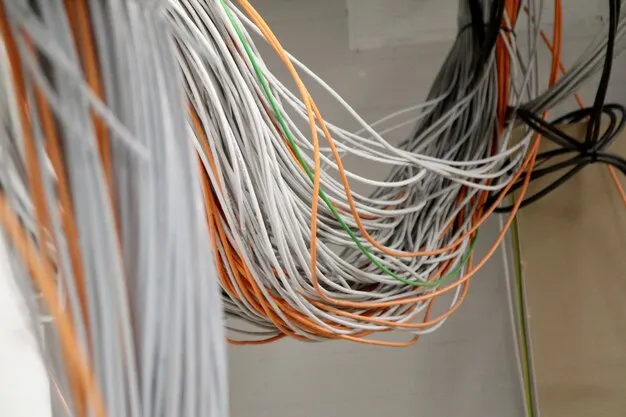
Before removing old office cables, confirm what they serve, who owns them, and whether they are reserved for future use. Your removal scope should separate verified abandoned runs from live, shared, future-use, and unidentified cables. Where the applicable NYC code requires removal, include accessible abandoned cable and associated equipment in the approved work.
If you are planning office cabling work during a renovation or tenant turnover, the challenge is knowing what can safely come out. Cables left by previous tenants may share a ceiling route with your internet connection, security devices, or building services. A clear inventory helps you price the work and protect the connections that need to stay.
Is That Cable Abandoned, Inactive, or Still Needed?
A disconnected end, faded label, or missing link light does not prove a cable is abandoned. It may be temporarily inactive, still suitable for reuse, serve another space, or be properly identified for future use. Have its status verified before adding it to the removal scope.
Use a cable status register: a list of the runs being assessed, the evidence available, and the approved action. For each entry, record the cable or service ID, route, owner, and anything still unresolved.
The categories below are planning examples, not findings from a completed project.
Cable Status
Evidence to Record
Owner or Approval to Confirm
Planned Action
Live
Traced endpoints, service records, and appropriate testing
Tenant IT team or service owner
Retain and protect during work
Shared or serving another tenant
Route to another suite, shared equipment, or building service
Building management and relevant service owner
Retain unless separately authorized for removal
Reserved for future use
Required durable tags and documented intended use
Party responsible for the retained cable
Retain subject to applicable identification requirements
Verified abandoned
Assessment against the applicable definition, traced route, and documented status
Responsible project party
Remove accessible portions within the approved scope
Unknown or unresolved
Incomplete trace, unclear ownership, or inaccessible section
Party responsible for resolving the uncertainty
Hold pending verification
Can Unused Cable Stay Above an Office Ceiling in NYC?
Unused-looking cable needs assessment. Where Section 800.25 applies, the accessible portions of abandoned cables, power sources, and associated equipment must be removed. Cables retained for future use require durable identification tags; tagged future-use power sources and special equipment must be de-energized under that provision.
The 2025 NYC Electrical Code took full effect on December 21, 2025, and incorporates the 2020 National Electrical Code with local amendments.
Have the qualified project reviewer confirm the applicable edition and provisions. Some earlier-filed projects may remain under the previous code through DOB’s transition rules, and fiber or other circuits may fall under separate articles.
A retained cable still needs to meet the applicable requirements for its ceiling environment. Its jacket rating does not establish whether it is abandoned.
Which Services Need Protection Before Cable Removal?
Identify live services and their owners before removal starts. Your team should know which connections must remain available, who can approve changes, and where the removal contractor’s authority ends.
Pay particular attention to:
Wi-Fi access points, phones, printers, cameras, and access-control connections.
Shared risers and cables serving neighboring suites.
Building systems, alarm circuits, and other infrastructure outside the tenant’s control.
Unidentified runs that need further tracing or an owner response.
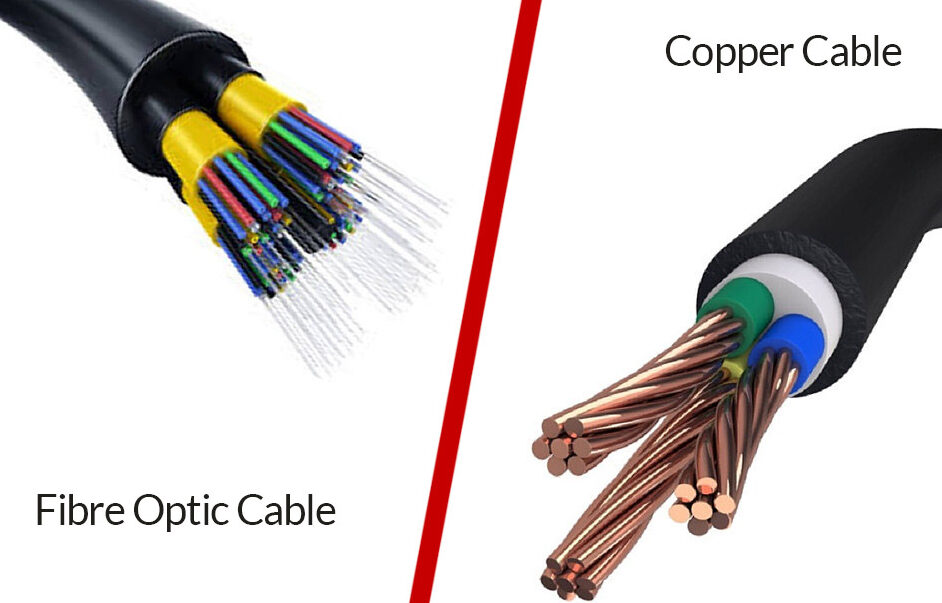
An older office may contain several generations of copper, fiber, and coax in the same pathway. Cable type, jacket color, and appearance can help with identification, but they do not establish service status or permission to remove it. If the work also involves rearranging active rack connections, agree on a separate scope, service checks, and approvals for those changes.
Confirm carrier ownership and maintenance boundaries from the service agreement and building records. Keep unresolved runs on hold. Any changes to electrical or life-safety systems need the appropriate authorization and specialist scope.
Who Pays for Cable Removal When a Tenant Renovates or Leaves?
Payment and surrender duties depend on your lease, building rules, and project agreement. A code requirement tells you what work may be required; those documents determine how responsibility and cost are allocated.
Before accepting a quote, confirm:
Tenant obligations: Which tenant-installed cables must come out, and which may remain with approval?
Existing infrastructure: Who handles cable left by earlier occupants?
Building approval: Who authorizes access to shared ceilings, risers, and communications rooms?
Contractor responsibilities: Who traces, removes, restores, and signs off on the work?
If the landlord agrees to retain cable for a future tenant, document that agreement and confirm the applicable identification requirements. Lease permission does not replace code compliance.
What Should an Abandoned Cable Removal Quote Include?
A useful quote identifies the removal inventory, access limits, retained services, restoration responsibilities, and completion records. A line item that says “remove old cable” leaves too much open to interpretation.
Ask for the following boundaries in writing before comparing prices.
Scope Item
What the Quote Should Define
Retained Items or Exclusions
Approval and Completion Evidence
Survey and tracing
Work area, accessible routes, record review, and tracing allowance
Unresolved runs and areas requiring separate access
Status register and list of unresolved items
Cable removal
Verified runs or defined quantities, pathways, and associated equipment within scope
Live, shared, future-use, and inaccessible items requiring separate review
Approved inventory and photos of completed areas
Live-service protection
Retained connections, identification, and any agreed outage windows
Service changes outside the removal agreement
Owner approval and agreed post-work service checks
Access and work hours
Ceiling access, occupied areas, after-hours work, and freight arrangements
Unapproved rooms, risers, or additional visits
Building access approval and recorded access limits
Restoration and cleanup
Responsibility for disturbed firestopping, ceiling damage, debris, and removed material
Unrelated repairs and work assigned to another trade
Restoration records and cleanup confirmation
Final records
Removed, retained, and unresolved inventory; photos; and required sign-off
Documents assigned to the GC, building, or tenant IT team
Named recipient and agreed handover package
The quote should explain its quantity assumptions and how additional discoveries will be priced. Square footage alone cannot show how many abandoned runs are above the ceiling or how difficult they are to access. If the bid also includes new cabling, separate removal from the installation allowance: a per-drop rate does not establish the price of tracing and removing existing cable.
How Should Cable Removal Fit Into the Renovation Schedule?
Plan cable removal before renovation work closes access to the affected routes. Confirm retained services first, agree on the removal areas, and assign responsibilities in the low-voltage scope of work. Identify who protects retained cables between visits and who resolves access or restoration issues while other trades use the same ceilings and pathways.
Schedule new cable installation around the handover of cleared pathways. Retained connections may still need protection while ceiling, HVAC, and other renovation work continues.
In NYC office buildings, confirm the managing agent’s work hours, freight-elevator bookings, insurance requirements, and any building-specific labor rules before fixing the schedule. These requirements can affect the number and length of visits.
What Records Should You Keep After Network Cable Decommissioning?
Keep a record of what was removed, what stayed, and what remains unresolved in the project’s closeout documentation. Tie those records to the approved work area so your facilities team, IT team, or next contractor can understand the result.
Your removal handover should include:
Cable or service IDs and the final status register.
Photos showing the agreed removal areas and retained infrastructure.
Future-use identification and relevant owner approvals.
Inaccessible sections, access restrictions, and unresolved items.
Records of disturbed firestopping or ceiling restoration.
Required completion sign-off and removed-material disposition.
Name the party responsible for each outstanding item so the handover does not leave unanswered questions.
What to Share for an Abandoned Cable Removal Assessment
To scope abandoned cable removal in your NYC office, share the work area, known retained services, available route records, and building or lease instructions. These inputs help establish what needs verification before quantities and pricing are finalized.
Useful starting information includes:
Floor plans, suite size, and accessible ceiling areas.
Photos of cable routes and any existing labels.
Known service owners and connections that must stay active.
Available as-built drawings or previous cabling records.
Renovation dates, tenant surrender deadlines, and access restrictions.
With those details ready, request a cable removal assessment to establish the removal inventory, retained services, and access limits before approving the work.
A demarc extension connects your internet provider’s agreed handoff point to the equipment location inside your office. You may need one if the provider delivers service to a shared building room while your firewall or router sits elsewhere. The route, cable type and responsibilities should be confirmed before installation is priced.
Ordering business internet does not always include this connection. Before you book the work, check where the carrier will deliver service, what cabling already exists, and who handles the remaining distance to your rack.
What Is a Demarc Extension, and Does Your Office Need One?
Your office needs a demarc extension when the carrier’s handoff and your equipment location are separate, and no suitable connection already links them.
For example, imagine your provider delivers a circuit to a basement telecommunications room while your office is on the fourteenth floor. The extension carries that connection through an approved building route to your equipment rack. This is an illustrative example; your carrier may deliver service to a different location.
You may not need a new run if:
The carrier’s order includes delivery directly to your equipment location.
Your suite already has a suitable, available connection from the handoff.
A shared telecommunications room on your floor has an existing connection that can be approved for reuse.
Start with the delivery location written into your order. If an extension is needed, include it alongside your other office cabling work, with clear endpoints, access requirements and testing deliverables.
MPOE vs. Demarc: Where Does the Carrier’s Work End?
The building entry point, carrier handoff and office equipment location serve different purposes. They can share a room, but you should not assume they do.
Term
What It Means
What to Confirm
MPOE
The point where the carrier’s line enters the building. You may see it called the main or minimum point of entry.
Its exact location and whether your service will terminate there.
Demarcation point, or demarc
The agreed service handoff between the carrier’s facilities and the customer’s connection.
The room, floor and equipment or port identified in your order.
Tenant equipment location
The rack, cabinet or room where your office router, firewall or other equipment receives the service.
Where the extension must end and what connection the equipment requires.
Verizon’s readiness definitions distinguish the building entry from the demarcation point and note that they can coincide. That is a provider-specific example; your own carrier’s order determines the handoff for your project.
Ask the carrier a precise question: “Where will you hand over our service, and does this order include the connection from that point to our office rack?”
A written answer gives the contractor a defined starting point and helps prevent gaps between the carrier’s scope and yours.
Who Installs, Pays for and Maintains a Demarc Extension?
The carrier order, building rules and approved installation scope determine those responsibilities. Do not assume the party installing the extension will also pay for it, own it or maintain it.
Before work begins, use a responsibility table like this to assign each task. The roles below are coordination points, not universal contractual duties.
Work or Decision
Parties to Involve
What Needs to Be Agreed
Written Confirmation
Carrier handoff
Carrier, tenant and IT lead
Delivery location, interface and included work
Service order and handoff details
Route and access
Building manager or riser operator, tenant and contractor
Permitted route, room access and any approved-vendor requirement
Access approval and building instructions
Physical installation
Tenant, contractor and carrier if its order includes extension work
Who supplies, installs and terminates the cable
Itemized installation scope
Payment
Tenant, carrier and building representative
Included work, separately billed work and building charges
Quote, service order and relevant building terms
Equipment connection
IT lead and contractor
Who patches the connection and configures the router or firewall
Equipment setup scope
Testing and records
Contractor, IT lead and carrier
Physical-link tests, carrier service checks and required records
Acceptance requirements and test reports
Future maintenance
Tenant, carrier, building operator and contractor
Ownership, support boundaries and workmanship coverage
Support and warranty terms
Who Pays for a Demarc Extension?
You may need to budget for the extension separately from the internet circuit. Whether the carrier, tenant or another party covers any portion depends on the agreements for that installation.
Resolve three questions before accepting a quote:
Carrier: Is any handoff-to-suite cabling included in the service order?
Building: Are there access charges, riser fees or required vendors?
Contractor: Does the price include materials, installation, terminations, testing and any required restoration?
Keep unresolved charges visible. A contractor’s installation price may exclude fees billed directly by the building or its riser operator.
How Will the Connection Reach Your Office?
The route depends on the actual handoff location and the pathways available in your building. A connection from a basement room to an upper floor involves different coordination from a short run across the same floor.
These are possible arrangements, rather than a standard layout for every NYC office.
Handoff Location
Possible Extension Route
Main Questions
Basement or building-entry room
Up a shared riser, then across the tenant floor to the rack
Who controls riser access? Is the route available? Are separate approvals needed?
Shared telecommunications room on your floor
Through an approved horizontal pathway into the suite
Who provides room access? What ceiling or wall work is included?
Existing termination inside your suite
From the termination point to the current equipment location
Can the existing connection be used, and does it match the new service?
A riser is a vertical pathway between floors. For NYC riser cabling, ask the building manager whether the contractor can use the proposed route and whether any part of the work must go through a designated operator.
Whether the route uses fiber or copper, the cable needs to match the carrier handoff and your equipment requirements. A fiber demarc extension should specify the required fiber and connectors rather than leave them as “fiber cable” in the quote. Do not choose the media from the floor count alone.
What Should Your Demarc Extension Quote Include?
A useful quote identifies both endpoints, the approved route and the work needed to deliver a tested connection. If those details are still unknown, ask which parts of the price are provisional.
Give your demarc extension contractor the following inputs before requesting a final price.
Quote Input
Why It Matters
Who Can Confirm It
Carrier handoff location
Establishes where the extension begins
Carrier order manager
Handoff interface
Determines the required cable, connectors and any interface equipment
Carrier and IT lead
Destination rack or cabinet
Establishes where the extension ends
Tenant and IT lead
Approved route
Determines access, installation work and route length
Building manager or riser operator
Building requirements
Identifies required vendors, documentation, escorts or separate charges
Building representative
Permitted work hours
Establishes whether daytime or after-hours labor is needed
Building representative
Termination and finishing work
Defines connectors, panels, labels and any required firestopping or restoration
Contractor and building representative
Testing and acceptance records
Defines the evidence required before accepting the physical connection
IT lead and contractor
For any unresolved input, the quote should state the assumption and what would trigger an additional charge. “Route subject to approval” is useful only if you also know who will obtain that approval.
Separate Cabling From Router and Firewall Setup
Installing and testing the extension does not automatically include configuring your office network.
The cabling scope may cover the cable run, termination, labeling and physical-link tests. Router and firewall setup belong to a separate scope unless they are explicitly included.
Confirm who will connect the carrier handoff to your router or firewall, who supplies any required interface equipment, and who checks the service through your office network. Those tasks can involve different teams even when they happen during the same visit.
If the extension is part of a construction project, record these responsibilities in the low-voltage scope of work so the contractor, IT team and project manager share the same definition of completion.
Can You Reuse an Existing Demarc Extension?
An existing extension may be reusable if you have permission to use it, its route remains available, and its cable and connectors meet the new service requirements. Its condition also needs to be checked.
A cable left by a previous tenant is a possible starting point, not proof that the connection is ready.
Before approving reuse, confirm:
Permission and ownership: Who owns the cable, and can your tenancy use it?
Route availability: Does it still connect the required rooms without an inaccessible or disconnected section?
Compatibility: Does the installed media match the new carrier handoff and your equipment?
Condition and performance: What testing is needed to establish that the connection is suitable?
Identification: Can both ends be traced, labeled and recorded?
Keep the assessment specific to the extension. Reusing this connection does not establish that every inherited cable elsewhere in the office is suitable.
If reuse needs new terminations, repairs or additional testing, have those items priced separately so you can compare them with a replacement run.
How Much Does a Demarc Extension Cost in NYC?
Demarc extension cost depends on the route, cable and connector requirements, building access, installation hours and testing scope. A project-specific quote is more useful than a generic per-foot or per-floor estimate.
A short connection through an available pathway involves different work from a multi-floor installation requiring shared-room access and building coordination. Even two offices with similar floor plans may have different handoff locations and access terms.
Ask the quote to separate:
Route inspection and preparation: Confirming endpoints and checking the available pathway.
Cable and connection materials: The specified media, connectors and termination hardware.
Installation labor: The pull, termination and any approved finishing work.
Access-related work: Required escorts, work windows or coordination with a riser operator.
Testing and documentation: The agreed tests, labels and handover records.
Additional charges and exclusions: Building fees, pathway repairs or work supplied by another party.
When comparing bids, check that both contractors are pricing the same endpoints, media, access conditions and acceptance requirements.
A general office data-drop rate does not describe the price of a one-off carrier extension. Ask what the extension includes rather than comparing it with an unrelated per-drop figure.
What Must Be Ready Before Carrier Activation?
Before the carrier visit, the extension should be installed and tested to the agreed requirements, the handoff interface confirmed, and the people responsible for equipment connection available. Include those dependencies in your internet activation schedule, following the readiness instructions attached to your order.
Verizon’s local-contact checklist, for example, calls for the exact demarc location to be identified and any required internal extension to be ready before dispatch. Follow the requirements attached to your own order.
Confirm the following with the carrier, contractor and IT lead:
The handoff room, floor and port or equipment location are documented.
Access to every required room has been arranged.
The extension is terminated, labeled and tested.
The required connector or interface equipment is available.
The person responsible for router or firewall setup is scheduled.
Each team knows who to contact if a problem appears.
Physical cabling tests and carrier activation prove different things. A completed extension does not establish that the internet circuit is active or that the office equipment is configured correctly.
Request an Assessment With the Right Handoff Details
To define the extension scope, provide the carrier’s delivery details, your equipment destination and a building contact who can confirm access.
Include:
The carrier order or installation notice showing the handoff location and interface.
The destination rack, cabinet or equipment-room location.
The building manager or riser operator’s contact details.
Available drawings, cable labels or photos of the existing route.
Any known access restrictions and the planned carrier installation date.
For a new office build-out, include the current floor plan if the route is still being designed.
Send these details with your assessment request. Before approving installation, ask for a written scope identifying the route, materials, included work, testing deliverables and responsibilities.
You can reorganize a working network closet, but start by identifying what each connection supports. A network closet cleanup needs a reliable port map, a clear list of changes and an agreed window for anything that could interrupt service. Photos and record checks can often happen during office hours; disconnecting active cables requires a separate plan.
If your rack has years of unclear labels, tangled patch cords or connections nobody recognizes, the first step is finding out what must stay connected. From there, you can agree on what needs attention, when it can happen and how the work will be checked before the office relies on those connections again.
Can You Clean Up a Network Closet During Office Hours?
Some work can happen while your team is working. Reviewing records, photographing the rack and checking labels usually do not require a disconnection. Moving or replacing active patch cords can interrupt service, so those tasks need approval and a planned work window.
Before scheduling anything, identify the services your office depends on: internet access, phones, Wi-Fi, payment terminals, meeting-room equipment and any other connected systems. Name the person who can approve changes to each one and confirm when interruptions are acceptable.
An unknown cable stays in place until someone identifies it. A connection with no obvious activity could support a backup link or a device used only occasionally. Neither its appearance nor the absence of a link light proves it is safe to remove.
Build the Port Map Before Moving Cables
A port map should show how each connection runs from the patch panel to the network equipment and the device or service at the other end. It gives your IT team and contractor a shared reference for deciding what can change and which existing cable runs can stay in use.
For each connection, record:
Patch panel name and port number.
Cable ID and outlet or endpoint location.
Connected switch and switch port, where applicable.
Device or service supported, including its network assignment if relevant.
Service owner and status: confirmed active, reserved, approved for removal or still unknown.
Photos help capture the starting arrangement, but they cannot replace the map. A photo may show where a cord is plugged in without explaining what depends on it.
Make Office Cable Labeling Match the Records
Use the same naming scheme on the cables, panel ports and records. If a port is labeled “A14” but the spreadsheet calls it “01-A-14,” resolve the mismatch before moving that connection. Check existing labels against the actual endpoints rather than copying them without verification.
What Does Network Closet Cleanup Include?
Within a structured cabling project, closet cleanup should distinguish organizing patch cords from changing installed cabling. A patch cord is the removable cable between equipment and a panel or outlet. The permanent link is the fixed cabling and its terminations, typically between the patch panel and the outlet.
Patch panel cleanup may involve choosing suitable cord lengths, routing cables through managers and improving access to ports. Repairing a panel termination or wall jack changes the permanent link, so its labor, service impact and test requirements should be listed separately.
Use this planning table to agree on the work before scheduling it. Service impact depends on the connections involved; no row is a downtime guarantee.
Work Item
Information Needed
Possible Service Impact
Approval or Work Window
Check After Work
Photos, records and labels
Current connections and verified cable IDs
Usually no interruption if connections stay untouched
IT approval for access and labeling
Labels agree with the port map
Patch-cord routing
Confirmed endpoints, cable lengths and available managers
Handling active cords can disturb connections
IT agrees what may move during office hours
Connections remain seated; affected services work
Patch-cord replacement
Exact ports and the service using each cord
An active connection is interrupted during replacement
Approved window and service owner available
Link returns and the affected service works
Panel or outlet retermination
Cable ID, installed category and agreed test requirements
The affected link is unavailable during work
Approved window and repair scope
Changed permanent link passes the agreed test
Removal of a confirmed unused cable
Traced endpoints and authorization to remove it
Misidentification could disconnect a service
Owner approval; window based on nearby live connections
Retained services work and records reflect removal
Plan the Work Window, Service Checks and Recovery
Agree on the affected connections, the expected interruption and the checks required before each stage is complete. Also decide when to stop and how to restore the previous arrangement if a change fails. This recovery plan is often called a rollback plan.
For an MDF or IDF cleanup—the main distribution room or a secondary distribution room—group work by the services that depend on those connections. Avoid treating the whole rack as one task when different teams need to approve different changes.
The register below is an illustrative planning template. Replace the port groups, approvals and stopping conditions with those agreed for your office.
Stage
Affected Service or Port Group
Approval Owner
Check Before Continuing
Stop or Recover If
Confirm the map
Ports in the agreed cleanup scope
IT lead
Endpoints and service owners are identified
Labels conflict or ownership remains unknown
Organize approved cords
Identified spare or active connections
IT lead; service owner for active links
Routing preserves connections and access
A connection is disturbed or service changes unexpectedly
Replace scoped patch cords
Named active links in the work plan
IT lead and affected service owner
Link and service return within the agreed recovery period
Service does not return; use the agreed recovery plan
Repair scoped terminations
Named permanent links
IT lead and relevant service owner
Each changed link passes its agreed test
Testing fails or the service check fails
Remove approved unused cables
Identified removal list
Cable or service owner
Retained services work and the map is updated
Identification is uncertain or an unexpected fault appears
Coordinate Building Access With the IT Window
For a network closet cleanup in NYC, confirm building access before fixing the work date. Depending on the property, you may need a certificate of insurance, a freight elevator reservation or access outside normal office hours. A time approved by IT may still be unavailable to the contractor.
If the closet is shared with other tenants or building systems, establish who owns each connection and who can authorize changes. Put those access and ownership details in the work plan so they do not become a last-minute delay.
Which Cables Can Be Removed From a Live Closet?
Remove only cables whose purpose and endpoints have been identified and whose owner has approved removal. A loose cord, an empty switch port or a disconnected run may still be reserved for future use.
Use clear status labels during discovery:
Keep: Active connections and confirmed spare links needed by the office.
Remove: Identified cables with explicit removal approval.
Verify: Unknown endpoints, conflicting labels or unclear ownership.
This keeps uncertain connections out of the removal list. It also gives your team a record of unresolved items rather than leaving the next technician to guess.
Removing unused runs from ceilings or risers expands the job beyond closet organization. List that work separately, with its own access arrangements, ownership checks and review of applicable requirements.
What Should Be Checked After Network Closet Cleanup?
Check the connections and services affected by the work, then update the records to match the finished arrangement. The verification scope should follow the changes made; a tidy rack photo does not show that every link or service works.
If a permanent link was reterminated, agree on the required cable testing level before work begins. The scope should name the applicable category or standard, the result required and how failed tests will be handled.
Service checks need the right owner involved. A cable can pass its test while a device remains offline because of switch-port settings or network configuration, or an upstream issue. Assign any configuration changes to the IT owner and coordinate them with the cable work.
Your handover records should include the updated port map, changed-link test results, before-and-after photos and a list of unresolved items.
What Does Better Rack Cable Management Change?
Good network rack cable management makes ports easier to reach and connections easier to trace. Your team can follow a predictable route when replacing a cord or investigating a fault, with fewer cables obstructing nearby equipment.
Server closet cable organization can also keep cords clear of equipment vents and maintenance access. It does not automatically increase speed on healthy links or replace equipment-room planning for power and cooling. The practical value is clearer connections, easier maintenance and less risk of disturbing neighboring cables during future work.
What Should a Network Closet Cleanup Quote Include?
A useful quote separates discovery, physical changes, testing and documentation. It should also state which tasks can happen during office hours and which need a planned interruption.
When comparing cabling quotes, check the inclusions below. A lower total is hard to assess when quantities, materials or testing requirements differ.
Quote Item
What Should Be Specified
Why It Affects Cost
Racks, panels and ports
Quantities and the exact areas included
More connections take longer to trace and document
Existing records
Whether a reliable map exists or must be built
Missing or conflicting records add discovery work
Patch-cord work
Routing, replacement quantities and materials
Organizing existing cords differs from replacing active connections
Permanent-link repairs
Named runs, terminations and test requirements
Repairs add labor, testing and service coordination
Cable removal
Identified cables approved for removal
Tracing unknown runs is separate from removing confirmed ones
Work windows and access
Office restrictions and confirmed building requirements
Restricted hours and access arrangements affect scheduling and labor
Handover
Updated map, photos, test results and unresolved items
Documentation needs time allocated in the scope
Keep unknown connections visible as investigation items. If the contractor cannot identify them during the initial assessment, the quote should explain how further tracing or scope changes will be approved.
Plan Your Closet Assessment
To arrange a closet assessment, share recent rack photos, any existing port records and a list of services that must stay available. Include known faults, unclear labels and building access restrictions so the assessment can focus on the connections that need attention.
The assessment should establish what needs mapping, which changes are proposed and what approvals or work windows are needed before physical work begins.
A failed office connection does not automatically mean you need a new cable run. A damaged patch cord, loose connection or faulty wall jack may be enough to interrupt service. Network cabling repair starts with finding the fault, fixing the affected component and testing the connection again. Replacement becomes necessary when the installed cable or its route cannot meet the agreed requirements.
Before approving a replacement, ask three questions: Where is the fault? What work will correct it? How will the technician verify the result? Those answers help you choose a repair that addresses the problem without replacing usable cabling.
Ethernet Wall Port Not Working? Start by Finding the Fault
If one wall port stops working, the cause could be the patch cord, wall jack, installed cable, switch port or connected device. If several desks lose connection together, check shared equipment and upstream connections before assuming every cable has failed.
Start by noting what is affected. Is it one workstation, one meeting room or several devices connected to the same switch? Did the problem begin after furniture moved, a new device was installed or someone changed connections in the network closet?
Your IT team can compare the affected connection with a working one. With their approval, a known-good patch cord or device can help narrow down the fault:
The problem follows the patch cord: the cord may need replacing.
The problem follows the device: investigate the device or its network adapter.
The problem stays with the wall port: investigate the jack, installed run, closet patch cord and switch port.
Several connections fail together: check the network equipment or upstream connection they share.
These observations point the investigation in the right direction; they do not prove a diagnosis on their own. Equipment or configuration faults need a separate scope from the physical cable repair.
A browser speed test can show that an application or internet connection is slow. It cannot tell you whether the installed cable meets Cat6 requirements.
Why Can a Cable Pass a Basic Test but Fail Cat6 Certification?
A basic wiring test checks whether the conductors connect to the correct pins. Cat6 certification measures whether the link meets the category’s electrical performance requirements. A cable can pass the first check and fail the second.
That distinction matters when someone tells you the cable was “tested.” Ask which test was performed and request the result, so you know what was checked and what remains unverified.
If Cat6 certification failed, possible causes include a poor termination, damage along the run, unsuitable components or excessive length. Incorrect tester settings can also produce a misleading result. The technician should confirm the setup, review the failed measurements and inspect the relevant parts of the connection before recommending replacement.
Also check what was tested. A permanent-link test covers the fixed cabling between the panel and outlet, excluding the user patch cords. A channel test includes the patch cords in the tested connection. A result for one is not automatically a result for the other.
Office Ethernet Troubleshooting: Match the Symptom to the Evidence
The symptom tells you where to begin. The test results and inspection determine which repair is justified.
Use the table below to understand what a technician should investigate before changing the installed cabling. Possible repairs apply only when the relevant fault is confirmed.
Symptom
What Still Needs Checking
Evidence to Gather
Possible Corrective Work
Verification After Work
One Ethernet wall port has no connection
Patch cord, jack, installed cable, switch port or device
Known-good comparisons, wiring test and inspection of both ends
Replace a faulty cord or repair the affected termination
Retest to the agreed requirement and reconnect the endpoint
Connection drops intermittently
Cable fault, equipment issue or another cause
Record when it drops; review link tests, terminations and equipment logs
Correct the confirmed termination or cable fault; investigate equipment separately
Repeat the relevant link test and confirm operation with IT
Wiring test passes, but Cat6 certification fails
Failed parameter, test setup and fault location
Full test report, correct settings, component checks and length results
Reterminate, replace an unsuitable component or replace the run if needed
Repeat certification using the correct category and configuration
Wall jack is visibly damaged
Whether damage extends into the cable behind it
Inspect the jack and nearby cable
Replace the jack and reterminate if the cable remains usable
Retest the repaired fixed link at the agreed level
Several ports fail after patch-panel work
Incorrect patching, damaged terminations or equipment changes
Compare labels and records; trace affected connections and test links
Correct patching or repair confirmed panel faults
Retest changed links and verify endpoint assignments
A PoE phone or access point disconnects
Cable condition, device fault or insufficient power
Repair a confirmed cable fault or address the equipment/power issue
Retest the link and check the device in operation
PoE, or Power over Ethernet, supplies power through the network cable. A powered device can disconnect because of a cable fault or a power problem, so both need checking before choosing a repair.
When Is Cable Retermination Enough?
Cable retermination can resolve a fault at the wall jack or patch panel when the cable itself remains usable. It means reconnecting the cable pairs correctly at the affected end. It cannot fix a crushed, cut or otherwise unsuitable section elsewhere in the run.
The proposed work should match the fault the technician found. Most repairs fall into four categories.
Replace a Faulty Patch Cord
A patch cord is the short, removable cable connecting a device to the wall outlet or the patch panel to the switch. If the fault follows that cord and the fixed link meets the required test, replacing the installed run is unnecessary.
Record which cord was changed and whether the endpoint worked afterward. That gives IT a useful starting point if the issue returns.
Reterminate the Wall Jack or Panel Connection
A damaged module or poorly terminated pair may need a fresh connection, sometimes with a replacement jack. The technician should check that enough undamaged cable remains to complete the work correctly, then retest the link.
A successful repair needs a test result as well as a connection light. If the same failure remains, investigate further before repeating the work or approving a new run.
Repair the Patch Panel
Patch panel repair may involve replacing a damaged module or correcting affected terminations. Incorrect labels and disorganized patching can make faults harder to trace, so identify the affected connection before changing anything.
Restore and verify the failed connection first. If the wider closet also needs organizing or relabeling, agree on that follow-up work separately so a focused repair does not turn into an open-ended cleanup.
Replace an Unsuitable Cable Run
A new cable run may be needed when the installed cable is damaged along its route, cannot support the required performance or needs a different pathway to meet the specification. Ask the contractor to show why repairing the ends would not resolve the failure.
A replacement quote should identify the route, endpoints, materials, access requirements and final testing. Without those details, a price for an unspecified “new cable” gives you little basis for comparing the proposed work.
Repair or Replace the Ethernet Cable? Compare the Findings
Choose the work based on a verified condition. An unexplained failure needs more investigation before it becomes a replacement recommendation.
Verified Condition
Appropriate Next Step
When a New Run May Be Needed
Fault is isolated to a jack or panel connection; cable remains usable
Repair or replace the affected termination, then retest
Further testing identifies a fault that cannot be corrected at the ends
Patch cord is faulty; fixed cabling meets requirements
Replace the patch cord
The patch-cord fault alone does not justify a new run
Cable is damaged along its route
Assess the damage and scope replacement
Damage prevents the installed link from meeting requirements
Tested length exceeds the specified limit
Review the route and confirm the correct test configuration
A shorter or revised compliant route is required
A jack or patch cord is unsuitable for the required category
Replace the unsuitable component and retest
The fixed cable itself also cannot meet the requirement
Required repair point cannot be accessed
Inspect available access and alternative routes
An alternative run is the practical way to restore the connection
When several older runs show problems, assess the existing cabling together to separate usable runs from those needing correction or replacement. One failed connection is not evidence that the whole office needs rewiring.
Planning Network Cabling Repair in a Working NYC Office
Agree on the affected connections, access arrangements and work window before intrusive repair begins. A wall port may serve a desk phone, wireless access point or meeting-room system that other people rely on.
For NYC offices, building access can influence the schedule as much as the repair itself. Depending on the property, ceiling work may require management approval, a certificate of insurance, freight-elevator coordination or an after-hours window. Confirm the rules for your building before booking the work.
Your IT team and office manager should agree on:
Which endpoints may lose service and who needs notice.
When the technician can disconnect or test those links.
How the technician will reach the panel, outlet and cable route.
Who approves changes if inspection reveals a different fault.
What happens if the repair cannot be completed within the window.
If inspection reveals more work than expected, ask for the additional scope and any changes to the interruption window before approving it.
What Should Be Retested After a Cable Repair?
Retest the corrected link against the agreed requirement and keep the result under the same link ID. If Cat6 certification was required, a basic continuity check is not an equivalent replacement.
For older cabling with no original records, agree on the test requirement before work starts. The handover should state what was tested and what remains outside the repair scope.
Keep the following details in the repair and handover records:
Link ID: the wall outlet and corresponding panel port.
Original problem: the reported symptom and any failed measurements.
Confirmed cause: where the fault was found.
Corrective work: components replaced or connections repaired.
Retest details: category or application requirement, configuration and result.
Remaining issues: equipment, configuration or service problems needing separate attention.
Keep the physical test and the operational check distinct. A passing cable result does not confirm every switch setting, internet service or application works. IT should also check the affected endpoint after reconnection.
If the repair is part of a larger installation project, include its results with the other project records so the corrected link remains traceable after completion.
What to Send When Requesting a Cabling Repair Assessment
You do not need to diagnose the fault before contacting a contractor. Describe what is happening, where it happens and what has changed. That information helps scope the investigation.
Include:
The affected rooms, desks or devices, with jack labels if available.
Whether the connection is dead, intermittent or failing a specified test.
When the issue began and any recent moves, installations or patching changes.
Any existing test reports, photos or IT troubleshooting results.
Device models for affected PoE phones, cameras or access points.
Building access rules and acceptable interruption windows.
When you arrange an assessment, ask for the fault location, proposed correction and retest requirement to be documented. That gives you a clear basis for approving a focused repair—or a replacement run when the evidence supports it.
Yes, you can reuse existing office cabling when the cables are in suitable condition, reach the right locations, and pass the checks needed for your devices. A Cat6 label or a working connection alone does not settle the decision. Some cables may stay, others may need new end connections, and a few may need replacement.
If you have leased an office with network cabling already installed, start by finding out what is usable. Replacing everything could mean paying for work you do not need. Keeping everything without checking could leave you with missing connections or links that cannot support the new setup.
An assessment helps you separate those situations before you commit to a cabling budget or close up ceilings during a renovation.
Can You Reuse Cabling Left by a Previous Office Tenant?
Often, yes. Previous tenant network cabling can be useful if it serves your new layout and meets your equipment requirements. Its age, appearance, and cable category are starting points for inspection, rather than a reason to keep or replace every run. A cable run is the installed cable between two connection points.
For example, an older cable with intact insulation and sound connections may still suit a desk port. A newer cable damaged during a renovation may need replacing. Assess each run according to its condition and intended use.
Before changing anything, ask the landlord or building manager who owns the cabling and which services are still active. Some cables may belong to the previous tenant, while others serve the building, an internet provider, or another occupied space. Your lease and building records may also set out what can remain and any requirements for removing unused cables.
This is especially useful in a prebuilt office, where the visible sockets may have been installed across several fit-outs. A neat wall plate does not tell you where its cable ends or whether it is still connected.
Map the Existing Office Cabling Before Deciding What Stays
Start with an inventory that connects each outlet to its panel port, location, and intended device. The aim is to find out whether the existing network serves your office plan, including desks, meeting rooms, wireless access points, printers, and security equipment.
During the walk-through, your IT team or cabling assessor should record:
Outlets in each room, including any labels and unused sockets.
Patch panels in the equipment room and the ports that match those outlets.
Cable categories, visible damage, and the condition of jacks and panel connections.
Accessible cable routes and any sections that cannot be inspected.
Known live services, shared building connections, and internet-provider handoffs.
Existing drawings, test reports, and records of changes made by earlier tenants.
Compare that inventory with your furniture and equipment plan. A cable can be in excellent condition but end at a wall where you no longer need a connection. Another may reach the correct location but fall short of the speed or power your new device needs.
What Looks Promising During an Inspection?
Matching labels, secure jacks, consistent panel connections, and accessible routes are useful signs. Enough spare cable at an endpoint may also allow the connection to be repaired without pulling a new run. These findings help identify reuse candidates, but they still need the appropriate testing.
What Needs Closer Investigation?
Cut ends, missing labels, crushed sections, sharp bends, loose sockets, and signs of water damage all need attention. Record where each issue appears. The assessor can then determine whether it affects one connection, an entire run, or a route shared by several cables.
Keep, Reterminate, Replace, or Verify Before Removal?
Choose an action for each run based on its condition, test evidence, and role in the new office. Retermination means repairing the connection at a jack or patch panel. It can be suitable when the cable itself is sound and the fault is confined to an end connection. Retest the corrected link before approving it for reuse.
Use the following criteria to discuss the assessment findings. Unused sockets and disconnected panel ports alone do not establish that a cable is abandoned. These are decision guidelines, not results from a completed project.
Evidence or Condition
Proposed Action
What to Verify
Effect on Your Plan
Identified run reaches a needed endpoint and passes the specified application tests.
Keep.
Condition, route suitability, required speed, and power delivery where applicable.
Reuse that connection without a new cable pull.
Evidence points to a faulty jack or panel connection on an otherwise suitable cable.
Reterminate and retest.
Fault location, cable condition, compatible components, and test results after correction.
Allow for connection work and retesting.
Cable is damaged or cannot meet the required performance after appropriate investigation.
Replace.
Reason for failure and an approved route for the replacement.
Include a new run and the required acceptance tests.
Cable is usable but does not reach a location required by the new layout.
Assess relocation or a new run.
Available length, route access, and whether relocation preserves suitable installation conditions.
Price the affected endpoint separately.
Cable appears unused, with no confirmed endpoint or owner.
Verify before removal.
Ownership, active services, and permission to remove it.
Keep removal outside the approved work until confirmed.
One end is inaccessible or testing has not been completed.
Leave pending.
Required access, identification, and outstanding tests.
Show the run as unverified in the budget and inventory.
Can You Reuse Cat5e or Cat6 Cabling for Your New Devices?
You may be able to reuse Cat5e cabling for existing desk connections, phones, or other devices if testing confirms it supports the required application. Existing Cat6 cable testing should follow the same principle: check the installed link against the speed, power, and acceptance requirements you plan to use.
The cable category is only part of the picture. Length, jacks, patch panels, patch cords, and installation condition can affect the result. An assessment should identify which parts were tested and which parts will form the final connection.
Check Device Requirements Before Approving Reuse
A desk phone and a new Wi-Fi access point can place different demands on the same cable. Give the assessor the model numbers of planned devices and the operating speed you expect.
For desk ports, confirm the required wired speed and the outlet location.
For access points, check the wired uplink speed, mounting position, and power requirements.
For cameras and phones, check both the network connection and any power delivered through the cable.
For links that need higher performance, specify the test criteria before accepting the existing run.
For example, Cisco’s CW9178I Wi-Fi 7 access point has two 10 Gigabit Ethernet ports. Its deployment documentation allows Cat5e with performance limitations and recommends Cat6 or Cat6A for better performance. These requirements apply to this model; they do not mean every cable in an office needs replacing.
Check PoE as Well as Network Speed
Power over Ethernet, or PoE, supplies power to compatible devices through their network cables. A reused run may support data traffic while the complete connection still needs checking for the device’s power requirements. Include the cable, connections, intended device, and available switch power in that assessment. The switch also needs enough power for the other connected devices.
A Working Port Does Not Replace a Cable Test
A connection light or a successful internet connection does not establish that the cable meets every planned requirement. Application qualification checks whether a link supports a specified network speed. Category certification checks compliance with the applicable cabling standard. Basic continuity testing does not establish either result. If your project requires certification reports, a qualification result should not be presented as a substitute.
What If the Office Has No Cable Labels or Test Records?
Missing records create work to investigate; they do not automatically mean you need a full recable. Inherited office network cabling can often be traced, relabeled, and tested so you know which connections remain useful.
The assessor should match outlets to panel ports, assign consistent cable IDs, and label both ends. Test results should use those same IDs. That allows your IT team to connect a result to the correct desk, room, or ceiling location later.
Old reports can provide a starting point if they clearly identify the links and test method. They do not establish the current condition of a run that has since been moved, altered, or damaged. Record any uncertainty and agree on the checks needed for your planned use.
A Simple Inventory for an Existing Cabling Assessment
The example below uses illustrative IDs and situations. It shows how to record a decision without treating an untested run as passed or failed.
Cable ID
Endpoint
Evidence Status
Required Application
Decision
Unresolved Issue
A-01
Reception desk
Visual inspection only
1 Gigabit desk connection
Pending identification and testing
Panel label does not match
A-02
Reception phone
Both ends identified; untested
Phone data and PoE
Pending data and power checks
Phone model not confirmed
B-14
Ceiling access point
Cat6 marking; no current result
Planned access-point uplink
Pending device requirements and testing
New mounting position not finalized
C-07
Meeting-room floor box
Older report available
1 Gigabit display connection
Candidate for reuse after current checks
Changes since the report are unknown
D-22
Unknown
Unidentified cable above corridor
Not assigned
Verify before any removal
Owner and far end unknown
Where one end is inaccessible, the inventory should say what remains unverified and who needs to arrange access. An unknown result should stay visible until there is enough evidence to decide.
When Does Partial Replacement Make More Sense Than a Full Recable?
Partial replacement is worth considering when some existing runs suit the new office and others do not. It lets you retain verified connections while addressing damaged cables, relocated endpoints, or higher equipment requirements.
Consider this illustrative layout change: your desks stay along one side of the floor, the meeting room moves, and the access points need new ceiling positions. The desk cables may remain if they pass the agreed checks. The meeting room and access points may need new runs because their destinations have changed. Unidentified cables remain pending until traced.
Ask for the proposed work to distinguish assessment and testing, connection repairs, new runs, and verified removal. That gives you a useful basis for comparing the cost of partial replacement with a full recable. Include work needed to make retained cables usable, rather than counting every existing socket as a saving.
If you are renovating, plan new cable routes while the relevant pathways are accessible. The assessment should identify where reused and new cables meet the revised layout before ceilings or partitions are finished.
What Should an Office Cabling Assessment Deliver?
You should receive a usable inventory showing which cables can stay, which need correction or replacement, and which remain unverified. Each recommendation should have a reason you can connect to the new office plan.
Ask for:
A cable and port map linking identified outlets to panel connections.
A decision for each assessed run, with the supporting inspection or test evidence.
The testing scope, including the method, acceptance criteria, and links covered.
A list of repairs, new runs, and potential removal work.
Access limitations, ownership questions, and services requiring building or provider confirmation.
Priority actions that affect the renovation or move-in schedule.
If the proposed structured cabling audit covers only selected runs, the report should identify them. Testing a sample or repairing a few ports does not establish that the entire office has been certified.
What to Prepare Before Requesting the Assessment
Share your furniture plan and mark the devices that need wired connections. Include access points, printers, meeting-room equipment, cameras, and phones where relevant. Exact device models help the assessor check speed and power requirements.
Send any existing drawings, panel photos, and test records, even if they are incomplete. Also provide the dates for your renovation or office move, along with a building contact who can arrange equipment-room and ceiling access. These inputs help define the assessment scope and identify questions that need resolving before the visit.
What Affects an Office Cabling Assessment in NYC?
Building access can affect what the assessor can confirm and when the work can happen. For an office cabling assessment in NYC, ask building management about equipment-room access, shared cable routes, permitted work hours, and any approvals needed to inspect concealed sections.
In a Manhattan office, an inherited cable may pass through a shared riser or locked room outside your suite. Those sections need their own access and ownership checks. The same questions can apply elsewhere in the city; the building’s setup matters more than its borough.
Before the visit, you can collect accessible outlet labels, panel photos, existing records, and your proposed layout. Have the assessor identify any additional access needed. Work involving concealed routes or shared infrastructure should be coordinated with the people responsible for those areas.
Assess Existing Cabling Before Paying to Replace It
The decision to replace or reuse Ethernet cable should follow the evidence for each run. A written assessment gives you a clearer basis for approving the work, setting a budget, and handing the network over to your IT team.
When you request an assessment, share your new layout, device requirements, available records, and known building-access restrictions. Ask for a written keep, reterminate, replace, and pending list before committing to a full recable.
Choose verification to check cable connections, qualification to assess support for a required Ethernet speed, and certification to document compliance with a cabling standard such as Cat6 or Cat6A. For an existing office network, the right test depends on what you need to confirm. For new office cabling, it must also meet the project’s acceptance requirements.
\A cable can pass a basic connection test without meeting the performance requirements your project specifies. Before approving the work, agree on the test level, the connection being tested and the results you’ll receive.
What Is The Difference Between Cable Testing And Certification?
Certification is one of the three levels of cable testing. Verification checks connections, qualification assesses a particular application or speed, and certification checks the installed link against the selected category or class standard. The practical question is what a passing result establishes.
What each cable testing level tells you:
Test level
Question answered
Useful situation
Main limitation
Result to request
Verification
Are the wires connected to the correct pins?
Checking terminations and finding basic wiring faults.
Does not establish Ethernet speed support or category compliance.
Wiremap and connection results identified by cable link.
Qualification
Can the link support the required application or Ethernet speed?
Checking existing cabling before an equipment upgrade.
Does not certify compliance with a category standard.
Results showing the target application or speed and each link’s outcome.
Certification
Does the link meet the specified category or class requirements?
Accepting a specified installation or meeting confirmed warranty requirements.
Does not validate the configuration of the active network.
Detailed results for each link, including the selected test limit, measurements, margins and pass/fail outcome.
When you compare proposals, compare the evidence each one includes. A basic pass indicator and a category certification report answer different questions, even if both quotes call the work “testing.”
Is A Continuity Or Wiremap Test Enough For Office Ethernet?
A continuity or wiremap check is useful for finding basic connection faults, but it does not show whether a link supports the Ethernet speed you need. Continuity checks for an electrical path; wiremap checks how the conductors connect at each end. More capable verification tools can also detect split pairs.
For example, an existing run might pass a wiremap check while a newly connected access point still has performance problems. That result leaves the cause unresolved. It does not establish that the cabling supports the required speed, or that the problem is definitely in the cable.
Qualification or certification can provide more evidence before you decide whether to repair or replace a run. If a physical fault is found, the corrective work should address that fault and account for the condition of the link.
Cable Qualification Vs Certification: Which Should You Specify?
Specify qualification when your main question is whether existing cabling supports a particular application. Specify certification when the contract, project specification or confirmed manufacturer requirements call for evidence of category or class compliance.
For a switch refresh or Wi-Fi upgrade, testing existing runs at the required speed may answer the immediate question. If you plan to keep the existing cabling, also consider its condition, route and suitability for the equipment you’re planning. A passing speed result alone does not settle the whole reuse decision.
For new work specified as Cat6A, request Cat6A certification using the agreed test configuration. A report showing support for 10 Gigabit Ethernet does not replace that category compliance evidence.
If a manufacturer warranty is included, ask which test limits, report files and installation conditions apply. Certification may be one requirement; passing a test does not automatically register or grant the warranty.
Permanent Link Vs Channel Testing: What Is Included?
A permanent link test covers the fixed cabling, typically from the patch panel to the wall outlet, without the equipment patch cords. A channel test includes the patch cords used at both ends. The choice changes the connection being assessed and the test limits used.
Permanent link and channel test boundaries for a typical copper office connection:
Configuration
What is included
What your scope should specify
Permanent link
Fixed cabling and its installed connections, typically between the patch panel and outlet; equipment patch cords are excluded.
The required category or class, permanent link limits and suitable test adapters.
Channel
The installed cabling plus the patch cords forming the connection at the time of testing.
The included cord set, channel configuration and applicable category or application requirements.
Permanent link measurements are commonly used to assess installed infrastructure because equipment cords can change later. A channel result applies to the tested combination, so replacing a cord changes that combination.
If your specification says “Cat6A permanent link certification,” the proposal should use those words and identify the matching test setup. Channel testing is not a substitute simply because it also produces a passing result. Agreeing on the boundary now can prevent a second visit to obtain the evidence you originally needed.
Cable Tester vs Certifier: Does the Equipment Matter?
Yes. A basic tester, an application qualifier and a category certifier have different capabilities. The equipment listed in a proposal should be capable of performing the test you’ve requested and retaining the agreed results.
What to confirm about the testing equipment:
Instrument type
What it checks
What to confirm in the proposal
Verification tester
Continuity, wiremap and basic wiring faults, depending on the tool.
The included checks and how results will be recorded for each link.
Application qualifier
Whether the link supports the specified Ethernet application or speed.
The target application or speed, the tool’s supported tests and the results you’ll receive.
Category certifier
Whether the link meets the selected category or class requirements.
The test standard and limits, correct adapters, calibration status and detailed results for each link.
Can a Speed Qualification Result Replace Cat6A Certification?
No. Qualification assesses support for a particular application or Ethernet speed. Cat6A certification checks the installed link against the specified category performance requirements. A passing speed qualification result does not replace that certification evidence.
If your project requires Cat6A certification, the proposal should specify a capable certifier, the agreed connection boundary and the appropriate test limits. Ask what will be measured and which results you’ll receive, so the testing matches the acceptance requirements.
What Should A Cable Testing Proposal Include?
Your proposal should identify the links being tested, the required test, the connection boundary and the results you’ll receive. It should also explain what happens if a link fails.
Ask for these items in writing:
Links and quantities: Cable IDs, locations and the number of links included. If sampling is proposed, define the sample and obtain explicit agreement; it does not document every link.
Test level: Verification, qualification or certification, with the application or speed identified where relevant.
Performance basis: The cable category or class, selected test limit and revision of the applicable cabling standard.
Connection boundary: Permanent link or channel, including which patch cords are part of a channel test.
Equipment: Instrument capability, suitable adapters and current calibration where certification requires it.
Results: The report format and saved result files to include in the cabling handover, with cable IDs that match the labels onsite.
Failed links: Whether investigation, new terminations, repairs and retesting are included or priced separately.
Access and timing: Closet and outlet access, affected connections and any agreed work windows.
If certification is required, ask to see a sample report format before accepting the quote. The delivered record should let you identify the link, the configured test limit and the outcome without guessing. Agree whether you need a readable report, saved instrument files or both, especially if your IT team or another contractor will review the results later.
A cable report does not establish that your switches and VLANs, firewalls or internet services are configured correctly. Include any required active-network testing and configuration as separate items in the quote.
Why Does Cable Certification Cost Vary?
Cable certification cost depends on how much work is needed to identify, access, test and document the links. The number of drops matters, but it is only one factor in a cabling quote.
Two offices with the same cable count can require very different amounts of preparation. Clearly labelled outlets and accessible patch panels reduce tracing work. Missing labels, locked closets or hard-to-reach endpoints add time before testing can begin.
Link quantity and identification: How many runs are included and how much tracing or relabelling is needed.
Access: Whether both ends are reachable during the agreed visit.
Corrective work: Allowances for failed links, new terminations and repeat testing.
Cable types: Whether the scope includes copper, fiber or both; fiber needs its own specified test methods and equipment.
Documentation: The report organisation, saved files and delivery requirements.
In an occupied NYC office, building access and tenant schedules can also affect the work. Your quote may need to account for permission to enter a shared closet, reserved access periods or work outside normal office hours. These are project conditions to confirm, rather than assumptions to apply to every building.
Give each contractor the same testing requirements when comparing prices. Otherwise, a lower price may include a different test, fewer links or no allowance for retesting.
Which Cable Test Fits Your Office Project?
Start with the decision you need to make, then specify the evidence needed to support it. These common situations give you a practical starting point:
Accepting a new Cat6A installation: Request Cat6A certification in the configuration required by the project, results for every specified link and an agreed process for correcting failures.
Upgrading switches or wireless access points: Qualification at the required Ethernet speed may answer the existing-link question. Add certification if the contract or acceptance requirements call for it.
Investigating unreliable connections: Define which links need assessment and what further testing follows if the initial checks leave the cause unresolved.
Changing patch panels or cable terminations: If closet work involves reterminating cables, include testing of the altered links so the results reflect their current condition.
For access points, cameras or other powered devices, assess the switch’s PoE capacity alongside the cabling requirements. A passing cable certification report does not establish that the switch has enough total power for all connected devices.
Request Cable Testing With Clear Deliverables
When you request cable testing for your NYC office, include your required speed or category, approximate link count and any project specification. Add what you know about the existing cabling, access arrangements and the reports your IT or project team needs.
The quote should name the test level, connection boundary, retained results and handling of failed links. You’ll have a clearer basis for comparing proposals and deciding whether the completed testing meets your requirements.
Structured cabling cost in NYC depends on the cable runs, materials, testing and building access included in your quote. A per-drop price is useful only when you know what it covers. To compare proposals fairly, match those details first, then check the total with any separate charges added.
If you are comparing two bids, start with one question: are both contractors pricing the same work? A lower rate might exclude patch panels, certification or evening access. A higher rate might already include them.
How Much Does Structured Cabling Cost Per Drop In NYC?
Published prices offer a starting point. Your network cabling cost per drop depends on the layout, cable specification and installation conditions.
Before approving an office cabling installation, ask for a written drop definition, the included quantities and the assumptions behind the price. A floor plan may support an initial estimate. Unclear ceiling routes, restricted access or undocumented existing wiring may need a walkthrough before the contractor can confirm the scope.
Keep cable-material prices separate from installed-drop prices. A price per foot for cable does not cover the work needed to route, terminate, label and test it.
What Should One Data Drop Include?
A data drop is one cable run between the network closet and an outlet or device location. Your quote should identify both ends and state which materials and installation tasks are included.
Check for:
Cable: the category, jacket rating and route allowance.
Outlet hardware: the jack, faceplate or other specified connection at the device end.
Closet termination: the connection at the patch panel, with panel hardware included or priced separately.
Installation labor: pulling, terminating and organizing the cable along the agreed route.
Labels: matching identifiers at both ends.
Testing: the required test level and the results you will receive.
Patch cords, racks, new cable supports and wall repairs may be separate items. The proposal should show who supplies them and what they cost.
How Many Data Drops Does Each Workstation Need?
Count the connections your layout requires rather than assuming one desk equals one drop. A computer and phone may share a connection through a compatible phone, or your IT design may specify separate outlets. Spare connections also need to be counted if you want them installed now.
Include access points, printers, cameras and conference-room devices in the plan. An outlet with two network jacks generally represents two cable runs. Compare run counts across bids.
Why Do Office Cabling Quotes Differ For The Same Drop Count?
The same number of drops can involve different materials, routes, work hours and testing. Fixed project charges also affect the total, especially on a small job.
Look for these differences before deciding that one bid is expensive:
Route length and access: an accessible ceiling route and a finished wall require different installation work.
Cable and connection hardware: Cat6 and Cat6A proposals need matching specifications before their prices are comparable.
Existing pathways: one contractor may assume usable supports; another may include new supports or conduit.
Occupied-space work: protecting desks, working in phases and arranging shutdowns can add tasks to the scope.
Work hours: a daytime price may need revision if building management permits work only at night.
Fixed charges: crew setup, equipment rental and minimum job charges may sit outside the per-drop figure.
Also distinguish an allowance from an exclusion. An allowance budgets for a stated amount of work, such as a defined route length. An exclusion leaves a task outside the price. If the actual conditions exceed an allowance or require excluded work, ask how the contractor will price and approve the change.
A low unit price with several additions can cost more than a higher rate that includes those tasks.
How To Compare NYC Office Cabling Quotes Line By Line
Compare what each quote includes before comparing the per-drop price. Cable category, testing, hardware and access requirements should match across the bids.
The references below come from public NYC pricing pages checked on October 5, 2026.
Matching Cat6A components, required jacket rating and the testing included
Certification and reports
One menu lists $20/drop for certification; another lists certification and documentation within a $300+ per-cable starting price
Whether certification is included, the test standard and boundary, and the saved results you receive
Plenum-rated cable
One menu lists a $40/drop upgrade
Which runs require that rating and whether it is already included in the base price
Patch-panel hardware
A 24-port panel is listed at $75 on one menu
Whether the price covers the panel, installation and terminations, or only part of that scope
New pathway supports
Cable tray/J-hook work listed at $8/ft on one menu
The measured route, support type and any existing supports that can be reused
Carrier extension
Demarc extension advertised from $350/run
Handoff location, route, materials, terminations and responsibility for the work
Minimum job charge
One published minimum is $500
Whether the minimum sets the invoice total or is an additional charge
After-hours installation
Published policies vary: one provider states the same unit rate when scheduling allows; another identifies after-hours work as a cost factor
The approved work window and any labor or building-access charges
The testing row shows why the lowest starting price may not produce the lowest complete quote. A bid that includes certification and records covers a different scope from one that prices those tasks separately.
For your project, have each bidder identify included work, separate charges and exclusions. Wall repairs, required firestopping, old-cable removal and building fees also need a clear owner and price wherever they apply.
Once the quantities and scope match, compare the totals, including applicable taxes. Confirm the quote’s validity period and how additional work will be approved and priced.
How Do Cat6, Cat6a And Fiber Affect Your Cabling Estimate?
The cable type you choose affects the materials, termination work and testing included in the quote. Agree on the required specification before comparing prices.
Cat6 Installation Cost
Cat6 can be suitable for office connections designed around gigabit speeds. When comparing Cat6 installation costs in NYC, keep the jacket rating, outlet hardware, route and testing consistent. Two proposals labeled “Cat6” may still cover different work.
Cat6A Cabling Cost
Cat6A supports 10-gigabit Ethernet over a standards-compliant channel up to 100 meters. It generally carries a higher installed price than an equivalent Cat6 scope, but the difference depends on the selected products and installation conditions.
Specify the cable and matching connection hardware before comparing Cat6A cabling costs. Your IT team should confirm the performance required for planned access points and other devices, rather than choosing a category from the device’s marketing label alone.
Fiber Backbone Cost
Fiber may appear as a separate connection between floors or network closets. Its price depends on the route, fiber type, strand count, termination and testing. Keep that backbone line separate from workstation drops so its cost is visible in the total.
Is Cable Certification Included In The Installation Cost?
Not necessarily. “Tested” does not tell you which checks were performed or what evidence you will receive. The quote should state the required test level and the records you will receive.
There are three testing levels:
Verification: basic continuity and wiring checks; it does not establish the link’s bandwidth capability.
Qualification: assesses whether a link can support specified network speeds or applications.
Certification: checks the link against the performance limits of a named cabling standard and records a pass or fail result.
For certification, specify whether the test covers the permanent link—the fixed installed cabling—or the channel, which includes the relevant patch cords. The report should match the agreed test boundary and identify each tested run.
Your IT requirements and any applicable manufacturer warranty conditions should guide this choice. Confirm the required evidence before installation, then check whether testing, reports and correction of failed runs are included in the price.
Which NYC Building Conditions Can Change The Price?
Your network cabling installation cost also depends on building access and coordination. Confirm the requirements with building management before treating an initial estimate as a final price.
For a Manhattan office, useful questions include:
Does the building require a certificate of insurance in a particular format?
Must deliveries use a reserved freight elevator?
Are ceiling or riser areas restricted?
Which work hours are permitted, and who approves them?
Are there fees, escorts or other access requirements to include?
These are project questions, rather than rules that apply to every NYC building. A proposal should reflect the answers for your property.
The physical space matters too. A finished ceiling may require access openings and repairs. An open ceiling may allow a more direct route but still need equipment to reach it safely.
For a converted office in Brooklyn or Queens, include inherited wiring in the assessment. Its condition and suitability should be checked before it is credited as a saving.
Small Addition, Occupied Retrofit Or Full Office Fit-Out?
Project size affects how setup and access costs are spread across the work. A few new connections and a full-office installation should not be compared by their per-drop rates alone.
Adding A Few Connections
A small addition still requires access coordination, crew setup, installation and testing. Those tasks are spread across fewer drops, which can raise the effective cost per drop.
Ask how a minimum job charge applies. It may set the minimum invoice total rather than being added on top of the drop price. If several additions are already planned, ask whether completing them together changes the quote.
Updating An Occupied Office
An occupied retrofit may need protective coverings, phased work and agreed shutdown windows. Ask which connections must stay available and whether evening work is included. The lowest bid is harder to assess if it assumes access your staff cannot provide.
If some existing runs may be retained, price their assessment separately from installing replacements. Compare the same combination of retained, corrected and new runs across proposals.
Wiring A Full Fit-Out
During a fit-out, coordinate cabling with ceiling and wall work. Installing along accessible routes before finishes are complete may reduce later access and repair work.
The quote still needs to separate workstation drops, backbone connections and closet hardware. Switches, wireless equipment, AV and security systems need to be counted in the overall technology budget, so confirm where the cabling proposal ends.
Which Extra Charges Should You Check Before Approving a Quote?
Look for work the office needs that sits outside the base drop price. An exclusion is easier to manage when it is identified before the job begins.
Carrier connection to your suite: if the provider hands off service elsewhere in the building, confirm whether a demarc extension is needed and who supplies it.
Old-cable removal: identify any removal work separately, with the cable status and removal boundary confirmed before work starts.
Rack and equipment items: check whether panels, racks, patch cords, switches and power equipment are included, supplied by you or purchased separately.
Ask each bidder to separate included work, optional additions and exclusions, including tasks assigned to other contractors. Necessary work should not remain unpriced.
What Should You Send For An Accurate Office Cabling Estimate in NYC?
Send a marked floor plan, an endpoint list and the building access information you have. Together, these give the estimator a clearer basis for pricing the cost to wire your office.
Include:
Floor plan: mark outlet locations, the network closet and any floor-to-floor connections.
Endpoint list: count cable runs for workstations, access points, printers and other devices.
Performance requirements: provide the agreed cable category or ask your IT team to confirm it.
Testing requirements: state the test level, test boundary and records needed.
Access details: share permitted work hours, freight arrangements and building documentation requirements.
Existing infrastructure: include photos and any records for cabling, pathways or panels you hope to retain.
Separate work: identify carrier extensions, removal, wall repairs and equipment supplied by others.
Timing: give the intended installation window and any dependencies on construction or occupancy.
Share the floor plan, endpoint list and known access conditions when you request an estimate, and flag any unknown details. Ask which assumptions can support an initial structured cabling estimate and which need a site assessment.
The proposal should itemize the included work, separate charges and exclusions, so you can compare it fairly with the other bids.
To calculate a PoE power budget, add the manufacturer-rated maximum power for every powered device, group devices by the switch that supplies them, check each endpoint against its port limit, then compare the total with the switch’s usable PoE capacity. Add reserve for growth, simultaneous restarts, and the failure state the office needs to survive. Use live draw for monitoring, not as your only sizing number.
For NYC offices, this matters because WiFi access points, phones, cameras, conference room devices, and access control often share the same network closets and UPS systems. A budget that looks fine across the building can still overload one switch, stack, or floor.
What Is a PoE Power Budget?
A PoE power budget tells you how much power a switch or other Power Sourcing Equipment can provide to all connected PoE devices. It is different from both the maximum power available on one port and the electrical power the switch itself draws.
Keep these four numbers separate:
Device power requirement is the maximum power an access point, phone, camera, controller, or other endpoint may need.
Per-port power limit is the maximum power a specific switch port can supply.
Total PoE budget is the amount of power all PoE ports can share.
Switch electrical input includes the switch itself, PoE output, conversion losses, and the load placed on the UPS or building circuit.
The switch or injector supplying power is the Power Sourcing Equipment, or PSE. The access point, phone, camera, reader, or other endpoint receiving that power is the Powered Device, or PD.
Advertised PoE Capacity Is Not Always Usable Capacity
Do not size an office network from the largest wattage printed on a product page.
Available PoE capacity can depend on the exact switch model, installed power supplies, operating mode, stack or chassis design, and platform-specific limits. Use the manufacturer documentation for the equipment being installed rather than assuming the headline power figure is fully available.
How to Calculate a PoE Power Budget Step by Step
The easiest way to avoid mistakes is to treat the calculation like a worksheet you can update whenever devices are added or replaced.
Required PoE capacity = total device design load + reserve, tested against per-port limits and failure-state capacity.
A spreadsheet can work as a simple PoE power budget calculator as long as the assumptions behind each number are documented.
Step 1. List Every Device That Will Use PoE
Start with everything drawing power from a network port, including:
WiFi access points
VoIP phones
Security cameras
Conference room controllers and schedulers
Access control readers and controllers
Digital signage
Sensors and other networked office devices
For a WiFi refresh, do not estimate the access point count simply to complete the power calculation. Start with the AP count established during the wireless site survey, then calculate the power those devices will require.
Step 2. Record the Maximum Requirement for Each Device
Use manufacturer data for the exact model.
For each endpoint, record its required IEEE PoE standard, maximum power input, and any connected components that can increase the load.
A camera with PTZ or heating can require more power than a basic indoor camera. An access control device may also feed other hardware downstream.
Step 3. Group Devices by the Switch That Powers Them
Do not calculate only one total for the entire office.
PoE capacity has to work at the individual switch, stack, chassis, or network closet level. A multi-floor office may have plenty of power overall while one IDF is close to its limit.
Group the device inventory by its actual power source before adding anything together.
Step 4. Add the Design Load for Each Switch
Multiply the quantity of each device by its maximum design wattage, then add the subtotals.
For example:
20 access points × 30W = 600W
60 phones × 6W = 360W
Continue until every powered device connected to that switch is accounted for.
Step 5. Check the Per-Port Limits
A switch can have plenty of total PoE capacity and still be unable to power a particular endpoint.
Each device must fit the power standard and limit of the individual port it uses. Check the port configuration and any platform-specific limits before relying on the total switch budget.
Step 6. Add Reserve for Growth and Startup Demand
Do not design the network so the connected devices consume every available watt on day one.
Reserve should reflect the office’s expected growth, higher-draw replacement devices, simultaneous restarts, future moves and additions, and uncertainty in the design assumptions.
There is no percentage that works for every office. The reserve should match the way that particular network is expected to change.
Step 7. Test Normal Operation and Failure Conditions
Run the calculation with all power supplies operating, then run it again for the failure state the network is expected to survive.
What happens if one PSU fails? Can the remaining supply carry every critical endpoint? Which devices lose power first if it cannot?
If the design does not pass, you may need to redistribute devices, change the power configuration, add capacity, or define which loads can be shed. These decisions should feed directly into switch selection and the broader office network design before equipment is ordered.
Office PoE Power Budget Example
Here is a hypothetical office device schedule showing how the calculation works. The wattages are examples only. Replace them with manufacturer data for the devices in your project.
Device group
Example calculation
Subtotal
What to check
WiFi access points
20 × 30W
600W
Port class and total switch capacity
Desk phones
60 × 6W
360W
Simultaneous restart load
Room controllers
4 × 15W
60W
Conference room device requirements
Indoor cameras
12 × 12W
144W
Camera model and operating features
PTZ cameras
4 × 25W
100W
Higher peak power requirements
Door readers
8 × 5W
40W
Any downstream powered components
Connected design load
–
1,304W
Before reserve
Example 20% reserve
1,304W × 0.20
260.8W
Illustrative reserve only
Design total
1,564.8W
Compare with usable capacity
If a target platform advertises 1,440W of PoE capacity but the installed power configuration provides only 1,100W of usable output, this example does not fit even in normal operation. The design has to change before equipment is purchased.
Different Office Systems Affect the Budget Differently
An office rarely powers only access points and phones.
Adding conference room AV can bring schedulers, controllers, touch panels, and other room devices onto the same PoE switches.
The same applies when access control shares the network infrastructure. Readers, controllers, and connected door hardware can change how much power each connection needs.
Security cameras also vary significantly by model and function. PTZ, heating, infrared, and onboard processing can all affect demand, which is why camera-specific PoE requirements should be calculated from the equipment being installed rather than from a generic camera wattage.
PoE vs PoE+ vs PoE++ for Office Devices
The PoE standard determines how much power a connection can provide, but the switch and endpoint still have to support compatible standards and power classes.
IEEE 802.3af provides up to 15.4W at the source, with about 12.95W available to the powered device.
IEEE 802.3at increases source power to about 30W.
IEEE 802.3bt Type 3 supports up to 60W at the source.
IEEE 802.3bt Type 4 supports up to 90W at the source.
Terms such as PoE, PoE+, and PoE++ are useful shorthand, but do not rely on the plus signs alone. Confirm the exact IEEE support, class, and model requirements at both ends of the connection.
A higher-power device connected to a lower-capacity port may negotiate to a lower power level or refuse power, depending on the equipment.
Why You Should Not Use 100 Percent of a PoE Switch Budget
A switch with no remaining headroom has little room for future devices, replacement hardware, simultaneous restarts, or changes in how the office uses the network.
Reserve capacity is not a universal percentage. It should reflect the office’s real growth plans and the failure conditions the network needs to handle.
WiFi upgrades can change the calculation quickly. If an office is moving from WiFi 6E toward WiFi 7, higher access point requirements may affect both PoE capacity and the wired access layer supporting them.
How Much PoE Reserve Should an Office Network Have?
Use enough reserve to cover realistic growth and stress conditions rather than choosing a percentage by habit.
Consider:
Planned devices for the next 12 to 24 months
Simultaneous device restarts
Higher-draw replacement models
One power supply being unavailable
Spare ports likely to be used
Changes to WiFi, cameras, AV, or access control
The right number becomes clearer once those conditions are modeled.
Per-Port Limits Can Fail Before the Total PoE Budget
Every powered device has to pass two separate tests.
First, the individual port must support the power the device needs. Second, the combined load must fit within the switch’s usable total PoE budget.
A switch can therefore have hundreds of watts available overall and still deny power to one endpoint if that port, line card, or configuration does not support the required class.
Switch logs and monitoring tools can help identify denied-power events, limited-power warnings, or devices that negotiated below their expected level.
How Redundancy Changes Your Real PoE Capacity
Two power supplies do not automatically mean every PoE device stays online when one supply fails.
Some platforms use both supplies to create a larger combined power pool. Others can be configured so one supply is reserved for redundancy. The usable PoE capacity after a failure can therefore be very different from the normal operating capacity.
A useful enterprise network power assessment should model both conditions:
Normal state with all required power supplies available
Failure state with one supply, cord, stack member, or other planned component unavailable
If the failure-state capacity is lower than the connected load, decide which devices remain powered or change the design before deployment.
PoE Power Supply Redundancy vs Full Failover Capacity
Redundancy means the switch can continue operating after a power-supply failure.
Full PoE failover means the remaining power configuration can also support the entire connected PoE load without dropping endpoints.
Those are different requirements. If full failover matters, size and test the power supplies, switch architecture, and device distribution around that condition.
Include PoE in UPS, Heat, and Electrical Planning
PoE moves more electrical demand into the network closet. That affects the UPS, circuits, available power, cooling, and recovery plan.
A switch powering a large number of endpoints draws more from the wall than the same switch carrying data only. UPS sizing therefore needs to include the switch’s own load plus its PoE output and conversion losses.
This can become especially important in NYC offices with small telecom rooms, shared electrical infrastructure, multiple IDFs, limited ventilation, and building restrictions around electrical or after-hours work.
UPS Runtime Planning for a PoE Office Network
Start with the services that need to remain available during an outage and how long they need to run.
A short graceful-shutdown window requires a very different battery design from several hours of continued camera, access control, phone, or network operation.
Include PoE load when calculating runtime instead of sizing the UPS from the switch’s base consumption alone.
How Cabling Affects PoE Power and Distance
Power and data travel over the same Ethernet cabling, so cable length and installation conditions still matter.
Higher PoE levels can increase voltage drop and heat, particularly in large bundles. The structured cabling supporting those devices has to suit the required data rate, PoE level, cable length, conductor size, connection quality, and installation environment.
A power calculation cannot compensate for a physical cabling run that falls outside the design requirements.
Will PoE Work Over 100 Meters?
Standard Ethernet channel limits still apply.
Extenders, additional switches, or midspans can change the design, but they introduce new equipment, power requirements, and failure points. Treat them as separate design decisions rather than a default fix for an over-length cable run.
Monitor PoE Capacity After the Office Goes Live
A good PoE design should remain visible after installation.
Switch telemetry can show:
Current and peak power use
Denied-power events
Devices drawing more than expected
Capacity pressure
Changes after firmware or configuration updates
Set alerts before the switch reaches its usable limit so there is time to investigate instead of waiting for ports to lose power.
Live consumption is useful, but it does not replace the design worksheet. A quiet Tuesday afternoon cannot tell you what happens when every access point, phone, camera, and room device restarts at the same time.
And once cameras, access systems, phones, AV, and business devices are sharing the same switches, power is only part of the design. Separating those systems through appropriate network segmentation can reduce the operational impact when one device group has a problem.
When PoE Network Design Services in NYC Are Worth It
A simple office with a few low-power devices may not need a separate Power over Ethernet consulting engagement. A review becomes more useful when the network has multiple closets, higher-power devices, significant growth, or services that need to remain online during a failure.
Consider a professional capacity review when:
A WiFi upgrade is adding or replacing many access points
Cameras, AV, phones, and access control share the same switches
Several floors or network closets divide the PoE load
Dual power supplies or full failover are required
UPS runtime is important for critical services
Devices have started losing or being denied power after an expansion
A switch replacement or larger office network upgrade is already planned
For a new office build, PoE is easier to solve before pathways, closets, cabling, WiFi, AV, and security are locked in. Coordinating those systems during new construction cabling and infrastructure planning gives the network team a much clearer picture of the load each closet will eventually carry.
Some switches reserve power based on the device’s negotiated class or maximum requirement, so allocated power can be higher than the live draw shown in monitoring.
It depends on the switch. Some models can maintain PoE during certain software reloads, while others interrupt power during a reboot or firmware update.
Yes, if the change adds or relocates phones, access points, cameras, AV, or other powered devices. PoE capacity should be included in office IT moves and changes.
Designing the core network for a multi-floor office usually starts with one question that shapes the entire budget. Should the backbone running between floors be fiber, copper, or some combination of the two? Get this wrong early and you either overspend on hardware you do not need or hit dead spots once the office fills up. The answer rarely lands on one material alone.
For most multi-floor offices, fiber optic carries the vertical backbone between floors while copper handles the short runs to desks, cameras, access points, and phones. Copper signals degrade past 100 meters, and the path from a main distribution frame on one floor to an intermediate frame several floors up almost always exceeds that range. A hybrid layout keeps cost reasonable without sacrificing performance.
How to Decide Between Fiber and Copper for an Office Network
The decision comes down to distance, bandwidth, and what each cable physically connects. Copper is the right call for the last stretch to user devices because every laptop, IP phone, and wireless access point already accepts an RJ45 connection and can draw power over the same line. Fiber earns its place on the backbone, the high-traffic spine that moves aggregated data between floors and into the server room.
Mixing the two is not a compromise. It is the standard pattern in commercial buildings, and it reflects how each medium behaves under real conditions.
Where Copper Still Wins
Copper stays unbeatable on cost and convenience inside a single floor. Cat6 and Cat6a terminate in the field with basic tooling, tolerate tight bends behind walls, and deliver Power over Ethernet to devices that would otherwise need a separate electrician. For runs under 100 meters, it is hard to justify anything else.
Where Fiber Becomes Necessary
Fiber takes over once distance or bandwidth climbs. It shrugs off electromagnetic noise from elevator motors and mechanical rooms, moves 10G and beyond without strain, and stays thin enough to fit crowded risers. The tradeoff is that fiber cannot power a device and needs transceivers to talk to standard switches. On a busy backbone carrying traffic from dozens of floors, that immunity and bandwidth headroom matter more than the higher upfront cost.
The Cable Models That Matter for a Backbone
A handful of cable grades cover almost every multi-floor office, and the grade you pick sets your performance ceiling for years. Each medium has its own naming system, and mixing them up at the design stage leads to expensive corrections later. The grade also locks in your switch and transceiver choices, so it is worth settling before any cable order goes out.
Copper Grades to Know
Cat6a is the modern baseline for office cabling because it carries 10G across a full 100-meter run. Older Cat6 still works but caps 10G near 55 meters, and Cat8 reaches 40G only across very short distances, which keeps it inside data-center racks rather than office walls.
Fiber Grades to Know
OM3 and OM4 multimode fiber handle 10G to 40G across building-height distances and suit the typical office backbone. Single-mode OS2 stretches into kilometers and is the choice for campus links between separate buildings. Transceivers must match the fiber type, since a multimode module will not pass light correctly on single-mode glass.
Fiber Optic vs Cat6a Copper at a Glance
Side by side, the differences in reach, speed, and cost explain why the two coexist rather than compete.
Factor
Cat6a Copper
OM4 Multimode Fiber
Max distance
100 m
400 m at 10G, 150 m at 40G
Typical speed
10 Gbps
10G to 40G, scalable to 100G
Powers devices
Yes, via PoE
No
EM noise immunity
Limited
Excellent
Relative cost
Low
Roughly 4 to 6 times higher per segment
Best role
Floor distribution to users
Vertical backbone between floors
Why 328 Feet Is the Line You Cannot Cross with Copper
Ethernet over copper is rated for 100 meters, about 328 feet, and that limit includes the patch cords on both ends, not only the cable in the wall. Past that point the signal weakens and error rates climb, which shows up as slow transfers and dropped connections rather than a clean failure. Engineers who ignore the rating often spend weeks chasing intermittent faults that trace back to an overlong run.
In a multi-floor layout the math is unforgiving. A vertical drop of four or five floors, plus horizontal routing to the closet and patching at each end, eats through 328 feet fast. That is the core reason fiber is mandatory for connecting frames on different floors.
Running a Backbone Through Manhattan Telecom Risers
In older Manhattan towers, the backbone path is dictated by the existing telecom riser, a vertical shaft that carries cabling between floors. These risers are often narrow, partly occupied by legacy wiring, and shared with other tenants, so space for new fiber is tight and access usually requires building management coordination.
Picture a main distribution frame on the 10th floor feeding an intermediate frame on the 15th. That five-floor climb is well beyond copper’s reach, so a fiber optic backbone cabling run becomes the only workable option through the riser. Planning the route early avoids surprises once the walls and ceilings are closed.
IDF Closet Design Constraints in NYC Buildings
IDF closet design constraints in NYC are mostly about square footage, power, and cooling in spaces that were never meant to hold modern gear. Pre-war and mid-century buildings often allotted closets sized for a phone block, not a rack of switches, patch panels, and fiber enclosures that throw off heat.
A workable IDF needs room for airflow, a dedicated circuit, and enough patching depth to terminate both the fiber backbone and the copper feeding that floor. Heat is the quiet failure point, since a sealed closet packed with active gear can climb past safe operating temperatures during a Manhattan summer. Surveying each closet before ordering equipment saves painful redesigns mid-project.
Building a Backbone That Survives the Jump to 10G
Sound network backbone cabling standards mean specifying for the speeds you will need in five to seven years, not only today’s traffic. Most offices that wire for 1G regret it within a lease term as video conferencing, cloud apps, and denser access points pile on. Pulling cable inside finished walls and risers is the costly part, so the practical move is buying distance and speed margin while the run is still open. Running OM4 fiber on the backbone and Cat6a to the floor leaves headroom for 10G and beyond without re-pulling cable.
Treating the backbone as the foundation of your enterprise network design pays off as the company grows. If you are weighing options for a new build or relocation, mapping the riser path and closet capacity first gives every later decision something solid to stand on.
Most NYC office build-outs run network cable through the same overhead space the building uses to move air. That space is called a plenum, and any cable inside it has to meet plenum-rated fire safety standards. The short answer on plenum cabling requirements for NYC commercial ceilings is simple. If the cable shares space with return air, it must be CMP rated, low-smoke, and listed for air-handling environments. Generic PVC cable does not qualify, and an inspector who finds it will fail the install.
This guide covers what counts as a plenum space, how the NYC DOB fire code plenum cable rules apply, how the cable grades compare, and what a tenant carries as liability if the wiring is wrong.
What Plenum-Rated Cable Is and Why NYC Requires It?
Plenum cable uses a fire-resistant jacket that releases very little smoke and stops flame spread under burn testing. It is built for ceiling cavities, raised floors, and other spaces where air circulates freely. In a fire, ordinary PVC-jacketed cable melts, drips, and releases dense toxic smoke. That smoke moves through the same return-air pathway employees breathe from, which is what makes the jacket type a life-safety issue rather than a wiring preference.
The reason NYC commercial buildings lean so heavily on plenum cable comes down to design. Most Midtown and FiDi office floors use the area above the drop ceiling as a return-air pathway, with no separate ducts pulling exhaust back to the HVAC unit. The ceiling cavity does that job, and any cable installed up there is treated as part of the air system.
How NYC DOB Fire Codes Treat Air-Handling Spaces
The New York City Department of Buildings classifies any ceiling or floor cavity used for environmental air as a plenum, and the cable inside it must carry a CMP rating from a recognized testing lab. The rules pull from the NYC Electrical Code, which adapts the National Electrical Code with city-specific amendments, alongside FDNY enforcement on fire alarm and life safety circuits.
An inspector looking at a Manhattan office build-out checks three things. The cable jacket markings, the route the cable takes through the ceiling, and the documentation showing the listing. Cable without a clear CMP stamp gets flagged. Cable run inside metal conduit has more flexibility, but most low-voltage runs in commercial offices are open-air pulls, so the jacket rating is doing the work.
Where the Plenum Rule Most Often Applies
The NYC spaces that almost always trigger plenum requirements include the area above suspended acoustic tile ceilings, raised computer-room floors, vertical riser shafts shared with HVAC return, and any pathway feeding rooftop units. If a building uses ducted returns instead of an open plenum, the rule may relax, but few NYC commercial buildings are designed that way.
Comparing CMP, CMR, and CM Cable for Office Wiring
The CMP vs CMR cable office building debate comes up on almost every commercial buildout. Each grade has a defined use case, and the wrong rating in the wrong location is what fails an inspection.
Cable Rating
Common Name
Allowed Location in NYC Offices
Burn Behavior
CMP
Plenum
Drop ceilings, return-air spaces, raised floors
Low smoke, low flame spread, fluorinated jacket
CMR
Riser
Vertical floor-to-floor shafts not used for return air
Stops flame from climbing between floors
CM / CMG
General Purpose
Single-floor wall runs with no air handling
Standard PVC, fails plenum smoke test
CMX
Limited Use
Residential or short patch runs
Not accepted in NYC commercial ceilings
A Frequent Substitution Mistake
A common shortcut on smaller jobs is using CMR riser cable in a drop ceiling because it runs cheaper per foot than CMP. Riser cable passes a vertical flame test but does not meet the smoke density limits required in a plenum, and that distinction is exactly what FDNY and DOB inspectors look for.
Cable Models You Will See on NYC Commercial Specs
Most reputable installers stick to a short list of cable models with documented CMP listings. Familiar Cat6 and Cat6a plenum options come from Belden, CommScope, Berk-Tek, Superior Essex, and Hitachi. Each one publishes UL listing data accepted by NYC inspectors. For fire alarm circuits, FPLP-rated lines such as Honeywell Genesis and Windy City Wire SmartWire FPLP appear on most submittal sheets.
The shorthand on a drawing usually reads CMP for copper, FPLP for fire alarm power-limited, and OFNP or OFCP for fiber. A contractor on a commercial structured cabling project should match the model number on the box to the line item on the spec, since substitutions are a frequent reason submittals get rejected by the building engineer.
The Tenant Liability of Non-Compliant Network Wiring
The tenant occupying the space at the time of inspection carries direct responsibility for non-compliant cable inside the leased premises, even if a previous tenant installed it. That is the part most business owners learn the hard way during a build-out or a lease renewal.
If a Midtown office is found with PVC cable above the drop ceiling during a routine FDNY inspection or a renovation permit review, the resulting violation lands on the current occupant. Costs include removal of the existing wiring, fines, re-inspection fees, and full reinstallation with code-compliant material. A floor of cabling that should have cost the original installer a few thousand dollars more can turn into a five-figure problem years later. This is also why integration with commercial fire alarm systems gets reviewed closely during any tenant improvement, since alarm circuits share the same ceiling cavity as data and voice runs.
How to Tell if Your Office Has a Plenum Ceiling
Look up. If you see acoustic ceiling tiles in a metal grid and there are no visible round or rectangular metal ducts running between the tiles and the structural slab above, the space is almost certainly being used as a return-air plenum. Buildings with fully ducted HVAC have insulated metal returns visible above the tile, but in NYC that setup is the exception rather than the rule.
A Fast On-Site Check
Two quick checks help confirm it. Pop a single ceiling tile and look for return-air grilles cut into the ceiling with no ductwork attached behind them. Then ask the building engineer for a copy of the floor mechanical drawings. If the drawings label the ceiling cavity as a return plenum, the cable rules follow automatically.
Does Fiber Optic Cable Need to Be Plenum Rated?
Yes. Fiber installed in a plenum space follows the same rule as copper and must be listed as OFNP or OFCP based on the cable construction. Optical fiber on its own does not produce smoke, but the outer jacket and strength members do. OFNP applies to non-conductive fiber, and OFCP applies to fiber that contains conductive components.
Many office network refreshes assume fiber gets a pass because it does not carry electrical current. The NYC code does not read that way. The plenum requirement targets the burn behavior of the entire cable assembly, not the signal it carries. Single-mode and multimode backbones running between MDF and IDF closets through ceiling space should always carry the plenum listing on the spec sheet, the box label, and the as-built drawings.
Plenum compliance is one area where the rule is well-defined but the financial fallout of getting it wrong lands entirely on the tenant. Knowing how to read a ceiling, how to read a cable jacket, and how to spot a substituted rating on a spec sheet protects the office, the lease, and the people working inside it.