
- Home
- IT Services
- AI Video Analytics & Intelligent Video Systems
- Savant Home Automation
- Help Desk & Maintenance
- Advanced Networking Security
- Audio Visual Installation
- Moves, Adds and Changes
- Structured Cabling & Networking
- VoIP Installation in NYC
- Smart Home Automation Systems in NYC
- Audio Video NYC
- Media Room & Home Theater Installation in NYC
- Audio Video Structured Cabling NYC
- Security & Surveillance
- New Construction
- Area
- Brooklyn, NY
- Queens, NY
- Home Security Services NYC
- Home Security Services New Jersey
- Manhattan, NY
- Audio Video Downtown Manhattan
- Audio Video Midtown Manhattan
- Audio Video Midtown
- Audio Video Upper East Side
- Audio Video Lower East Side
- Audio Video Uptown Manhattan
- Video Camera Installation in Murray Hill, Manhattan, NY
- Video Camera Installation in Chelsea NY
- IT Help Desk Support Queens, NY
- Home Automation Installation Queens, NY
- VoIP Phone Systems Installation Manhattan, NY
- CCTV Camera Installation Bronx, NY
- Access Control Systems Queens, NY
- Structured Cabling Installation Manhattan, NY
- Network Security Services Brooklyn, NY
- News
- Projects
- Contact
Fiber Optic vs Copper Backbone for Multi-Floor Offices
Designing the core network for a multi-floor office usually starts with one question that shapes the entire budget. Should the backbone running between floors be fiber, copper, or some combination of the two? Get this wrong early and you either overspend on hardware you do not need or hit dead spots once the office fills up. The answer rarely lands on one material alone.
For most multi-floor offices, fiber optic carries the vertical backbone between floors while copper handles the short runs to desks, cameras, access points, and phones. Copper signals degrade past 100 meters, and the path from a main distribution frame on one floor to an intermediate frame several floors up almost always exceeds that range. A hybrid layout keeps cost reasonable without sacrificing performance.
How to Decide Between Fiber and Copper for an Office Network
The decision comes down to distance, bandwidth, and what each cable physically connects. Copper is the right call for the last stretch to user devices because every laptop, IP phone, and wireless access point already accepts an RJ45 connection and can draw power over the same line. Fiber earns its place on the backbone, the high-traffic spine that moves aggregated data between floors and into the server room.
Mixing the two is not a compromise. It is the standard pattern in commercial buildings, and it reflects how each medium behaves under real conditions.
Where Copper Still Wins
Copper stays unbeatable on cost and convenience inside a single floor. Cat6 and Cat6a terminate in the field with basic tooling, tolerate tight bends behind walls, and deliver Power over Ethernet to devices that would otherwise need a separate electrician. For runs under 100 meters, it is hard to justify anything else.
Where Fiber Becomes Necessary
Fiber takes over once distance or bandwidth climbs. It shrugs off electromagnetic noise from elevator motors and mechanical rooms, moves 10G and beyond without strain, and stays thin enough to fit crowded risers. The tradeoff is that fiber cannot power a device and needs transceivers to talk to standard switches. On a busy backbone carrying traffic from dozens of floors, that immunity and bandwidth headroom matter more than the higher upfront cost.
The Cable Models That Matter for a Backbone
A handful of cable grades cover almost every multi-floor office, and the grade you pick sets your performance ceiling for years. Each medium has its own naming system, and mixing them up at the design stage leads to expensive corrections later. The grade also locks in your switch and transceiver choices, so it is worth settling before any cable order goes out.
Copper Grades to Know
Cat6a is the modern baseline for office cabling because it carries 10G across a full 100-meter run. Older Cat6 still works but caps 10G near 55 meters, and Cat8 reaches 40G only across very short distances, which keeps it inside data-center racks rather than office walls.
Fiber Grades to Know
OM3 and OM4 multimode fiber handle 10G to 40G across building-height distances and suit the typical office backbone. Single-mode OS2 stretches into kilometers and is the choice for campus links between separate buildings. Transceivers must match the fiber type, since a multimode module will not pass light correctly on single-mode glass.
Fiber Optic vs Cat6a Copper at a Glance
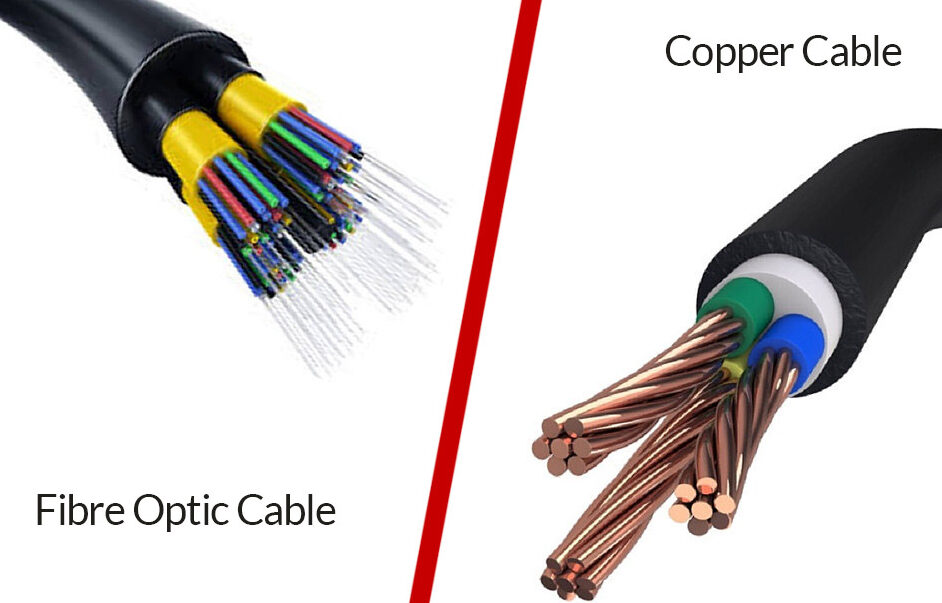
Side by side, the differences in reach, speed, and cost explain why the two coexist rather than compete.
| Factor | Cat6a Copper | OM4 Multimode Fiber |
| Max distance | 100 m | 400 m at 10G, 150 m at 40G |
| Typical speed | 10 Gbps | 10G to 40G, scalable to 100G |
| Powers devices | Yes, via PoE | No |
| EM noise immunity | Limited | Excellent |
| Relative cost | Low | Roughly 4 to 6 times higher per segment |
| Best role | Floor distribution to users | Vertical backbone between floors |
Why 328 Feet Is the Line You Cannot Cross with Copper
Ethernet over copper is rated for 100 meters, about 328 feet, and that limit includes the patch cords on both ends, not only the cable in the wall. Past that point the signal weakens and error rates climb, which shows up as slow transfers and dropped connections rather than a clean failure. Engineers who ignore the rating often spend weeks chasing intermittent faults that trace back to an overlong run.
In a multi-floor layout the math is unforgiving. A vertical drop of four or five floors, plus horizontal routing to the closet and patching at each end, eats through 328 feet fast. That is the core reason fiber is mandatory for connecting frames on different floors.
Running a Backbone Through Manhattan Telecom Risers
In older Manhattan towers, the backbone path is dictated by the existing telecom riser, a vertical shaft that carries cabling between floors. These risers are often narrow, partly occupied by legacy wiring, and shared with other tenants, so space for new fiber is tight and access usually requires building management coordination.
Picture a main distribution frame on the 10th floor feeding an intermediate frame on the 15th. That five-floor climb is well beyond copper’s reach, so a fiber optic backbone cabling run becomes the only workable option through the riser. Planning the route early avoids surprises once the walls and ceilings are closed.
IDF Closet Design Constraints in NYC Buildings
IDF closet design constraints in NYC are mostly about square footage, power, and cooling in spaces that were never meant to hold modern gear. Pre-war and mid-century buildings often allotted closets sized for a phone block, not a rack of switches, patch panels, and fiber enclosures that throw off heat.
A workable IDF needs room for airflow, a dedicated circuit, and enough patching depth to terminate both the fiber backbone and the copper feeding that floor. Heat is the quiet failure point, since a sealed closet packed with active gear can climb past safe operating temperatures during a Manhattan summer. Surveying each closet before ordering equipment saves painful redesigns mid-project.
Building a Backbone That Survives the Jump to 10G
Sound network backbone cabling standards mean specifying for the speeds you will need in five to seven years, not only today’s traffic. Most offices that wire for 1G regret it within a lease term as video conferencing, cloud apps, and denser access points pile on. Pulling cable inside finished walls and risers is the costly part, so the practical move is buying distance and speed margin while the run is still open. Running OM4 fiber on the backbone and Cat6a to the floor leaves headroom for 10G and beyond without re-pulling cable.
Treating the backbone as the foundation of your enterprise network design pays off as the company grows. If you are weighing options for a new build or relocation, mapping the riser path and closet capacity first gives every later decision something solid to stand on.