
- Home
- IT Services
- AI Video Analytics & Intelligent Video Systems
- Savant Home Automation
- Help Desk & Maintenance
- Advanced Networking Security
- Audio Visual Installation
- Moves, Adds and Changes
- Structured Cabling & Networking
- VoIP Installation in NYC
- Smart Home Automation Systems in NYC
- Audio Video NYC
- Media Room & Home Theater Installation in NYC
- Audio Video Structured Cabling NYC
- Security & Surveillance
- New Construction
- Area
- Brooklyn, NY
- Queens, NY
- Home Security Services NYC
- Home Security Services New Jersey
- Manhattan, NY
- Audio Video Downtown Manhattan
- Audio Video Midtown Manhattan
- Audio Video Midtown
- Audio Video Upper East Side
- Audio Video Lower East Side
- Audio Video Uptown Manhattan
- Video Camera Installation in Murray Hill, Manhattan, NY
- Video Camera Installation in Chelsea NY
- IT Help Desk Support Queens, NY
- Home Automation Installation Queens, NY
- VoIP Phone Systems Installation Manhattan, NY
- CCTV Camera Installation Bronx, NY
- Access Control Systems Queens, NY
- Structured Cabling Installation Manhattan, NY
- Network Security Services Brooklyn, NY
- News
- Projects
- Contact
Designing Corporate WiFi for Glass-Walled Conference Rooms
Glass conference rooms look sharp, but they create wireless problems that catch a lot of NYC offices off guard. Calls freeze mid-sentence, screen shares stall, and laptops cling to the wrong access point even though the signal bars read full. If that sounds like your boardroom, the cause usually has less to do with weak coverage and more to do with how radio waves behave around glass and dense building materials.
Does Glass Block WiFi Signals in an Office?
Plain interior glass barely blocks WiFi, while the coated glass used in modern towers can cut a signal down hard. That split is the root of most confusion around corporate WiFi design for glass walled conference rooms.
Standard glass partitions absorb very little radio energy, often around 1 to 2 dB, so the signal travels farther than expected and bleeds into neighboring rooms. Coated glass does the opposite and can wall off a room almost completely. Both cause trouble, and knowing which type surrounds your conference rooms changes the entire design.
Why Low-E Glass in Hudson Yards Towers Weakens Your Signal
Low-emissivity glass, common in newer Hudson Yards and Financial District builds, carries a thin metallic coating that reflects heat and reflects WiFi along with it. A boardroom wrapped in this glass can feel sealed off even with an access point a few feet away.
Developers favor Low-E glass because it keeps energy costs down across an all-glass tower. The same coating that bounces sunlight back outside also scatters 5 GHz and 6 GHz signals, the exact bands modern laptops lean on. Teams moving into a fresh build-out often assume the network is broken, while the glass itself is reshaping how WiFi signal through glass walls travels across the office.
How Different Office Materials Affect WiFi Signal Strength
Each wall material weakens a wireless signal by a different amount, and that number drives where access points belong. The figures below give rough attenuation for common NYC office surfaces at 5 GHz.
| Material | Approx. signal loss | Effect on coverage |
| Open air | Minimal | Signal carries far, wide overlap |
| Interior glass partition | 1 to 2 dB | Low loss, heavy spillover into nearby rooms |
| Drywall | 3 to 5 dB | Moderate, predictable falloff |
| Low-E coated glass | 8 to 20 dB | Strong loss, near-sealed rooms |
| Concrete or brick | 12 to 20 dB+ | Heavy loss, common in pre-war conversions |
Values shift with thickness and coating, so treat these as planning estimates rather than fixed numbers. A short site survey confirms the real behavior before any hardware goes up.
What Is Co-Channel Interference in Dense Office Buildings?
Co-channel interference happens when two or more access points share the same channel and end up taking turns instead of transmitting at the same time. In a packed Manhattan high-rise, this is one of the biggest hidden causes of slow WiFi.
Because plain glass lets signals carry so far, nearby access points hear each other and wait their turn, which drags throughput down for everyone on the floor. Stack that against the dozens of other tenant networks above and below you in a dense tower, and the airwaves fill up fast. Cutting co-channel interference in a high density WiFi setup comes down to smarter channel planning and lower power, not more hardware.
How Many Access Points Does a Glass Office Need?
Fewer access points running at lower power usually beat a room crowded with units at full strength. Piling on hardware in a glass space tends to multiply interference rather than clear dead spots.
A telltale sign of overbuilt WiFi is strong signal bars paired with choppy video and constant device hopping between access points. The answer is controlled coverage. Plan around how many people and devices use each zone, keep cells from overlapping through the glass, and use narrower channels so more access points can share the spectrum cleanly. A thoughtful approach to corporate WiFi network setup is what keeps a dense floor stable as headcount grows.
Where to Place Access Points in Glass Conference Rooms
Mount access points near room entrances and keep them at least three feet off any glass surface. Placement matters more than raw count once reflections enter the picture.
Keep units away from the glass
Glass reflects radio waves, so an access point pressed against a pane scatters its own signal and inflates readings without improving real performance. A meter of clearance, with ceiling mounting in open areas, keeps coverage clean and predictable.
Avoid mirrored placement
Putting matching access points on both sides of a glass wall guarantees overlap and interference. Stagger them instead, serve multiple rooms from a single well-placed unit where occupancy allows, and reserve a dedicated access point for rooms with eight or more regular users.
Choosing Access Point Models for Glass-Heavy Offices
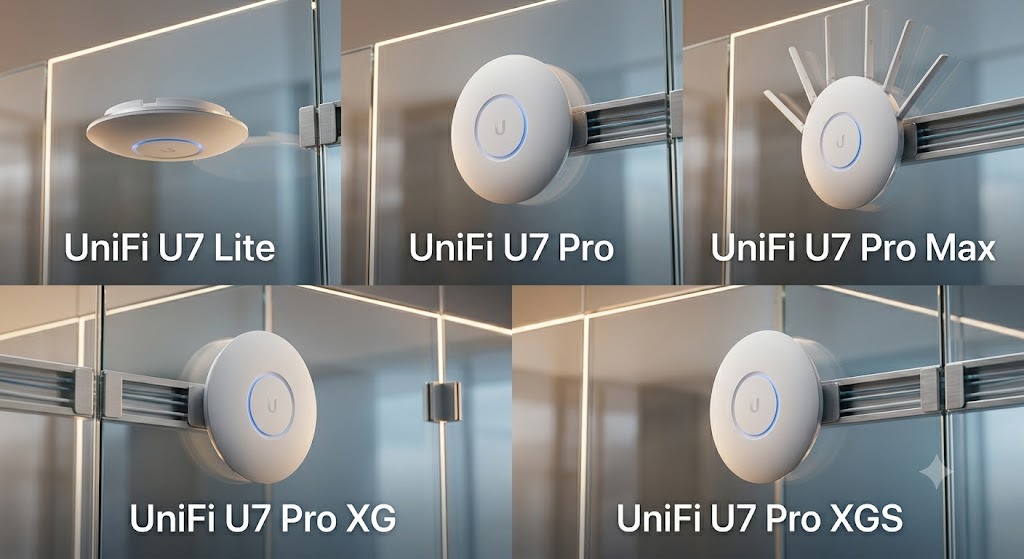
Match the access point model to the size and density of the space rather than buying the most powerful unit on the shelf. WiFi 6E and WiFi 7 hardware handles reflections and 6 GHz traffic far better than older gear.
These enterprise models from Ubiquiti’s UniFi line are widely deployed across NYC offices and map well to different floor sizes.
| Office size | Suggested model | Best fit |
| 5 to 25 users | UniFi U7 Lite | Small suites, moderate density |
| 25 to 75 users | UniFi U7 Pro | Mid-size floors with heavy video use |
| 75+ users | UniFi U7 Pro Max | Large open offices, high client counts |
| Conference centers, dense glass | UniFi U7 Pro XG | Multi-gigabit uplink, strong beamforming |
| Multi-gigabit backbone needs | UniFi U7 Pro XGS | Top capacity and uplink headroom |
Beamforming and multi-link operation on the newer models help cut through the reflections a glass boardroom throws back, which makes them a strong match for executive floors and high-traffic meeting spaces.
How to Fix Dropped WiFi in a Conference Room
Most dropped Zoom and Teams calls in a glass conference room trace back to interference and roaming, not weak signal. Working through a short checklist clears up the majority of cases.
Trim 2.4 GHz and lower power
Start by reducing 2.4 GHz, which travels farthest through glass and causes the most overlap, then lower transmit power on the 5 and 6 GHz radios so each room gets a tighter, cleaner cell. Steer devices toward the faster bands and set a minimum signal threshold so laptops let go of distant access points instead of hanging on.
Run a predictive survey
If calls still stutter after channel and power tuning, a predictive wireless survey usually pinpoints the one room where the glass layout needs its own access point. Getting the wireless layer right also pays off for the hardware bolted into the room, since stable connectivity is what keeps your conference room AV systems running without hiccups during a live meeting.
A glass-walled office does not have to mean unreliable WiFi. Once you account for how the glass scatters signal, plan coverage around real usage, and tune power and channels for the building you occupy, those conference rooms can hold a call as well as any other space on the floor.